mirror of
https://github.com/debauchee/barrier.git
synced 2026-10-23 08:07:53 -06:00
[GH-ISSUE #160] Put barriers.exe in firewall whitelist as name "Barrier Server" and change barrier.exe firewall whitelist name as "Barrier" #129
Labels
No labels
HiDPI
bounty
bsd/freebsd
bsd/openbsd
bug
bug
build-infra
cantfix
critical
doc
duplicate
enhancement
fix-available
from git
from release
good first issue
help wanted
installer/package
invalid
linux
macOS
meta
needs testing
pull-request
query
question
regression
regression
v2.4.0
windows
wontfix
work-in-progress
No milestone
No project
No assignees
1 participant

Notifications
Due date
No due date set.
Dependencies
No dependencies set
Reference
github-starred/barrier#129
Loading…
Reference in a new issue
No description provided.
Delete branch "%!s()"
Deleting a branch is permanent. Although the deleted branch may continue to exist for a short time before it actually gets removed, it CANNOT be undone in most cases. Continue?
Originally created by @coughingmouse on GitHub (Oct 20, 2018).
Original GitHub issue: https://github.com/debauchee/barrier/issues/160
Operating Systems
Server: Windows 10 (Microsoft Windows Version 1803 (OS Build 17134.345))
Client: macOS (macOS High Sierra version 10.13.6 (17G65))
Barrier Version
2.1.0-RELEASE
(You know, the one you can download pre-compiled.)
Steps to reproduce bug
Other info
Workaround: Yes
Does it prevent me from using barrier completely: It prevents using Windows as Server; yeah in that #case.
Be aware: Maybe this is already patched. IDK. But for a totally techno-phobic person like me who can't compile anything but a simple .c file, .exe file download's the only option.
I figured barrier for Windows 10 does not set privillage for barriers.exe but only for barrier.exe.
That is, I was trying to connect my MacBook Air to a Windows PC locally.
I could set my Mac as server and Windows as client quite automatically.
But I couldn't connect while setting Windows as server, even after tweaking with "Configure Server..."
Looking at the logs on both sides, it was apparent that Mac couldn't even reach, probably due to firewall settings on the Windows side. After registering barriers.exe to the firewall whitelist, voila! It works like a charm.
For what I see, barrier.exe is registered on the firewall whitelist as "barrier" which is already a bad name on which I would like to encourage changing the name to "Barrier" or "Barrier Client". But barriers.exe doesn't get added to the firewall. So, please make to do so, in name "Barrier Server" to be fair.
@AdrianKoshka commented on GitHub (Oct 20, 2018):
I think this will be fixed with barrier 2.2
@jdnewman85 commented on GitHub (Feb 10, 2019):
Hey, how about you make a note for this KNOWN ISSUE. I opened the firewall for barrier.exe, then gave up and tried an earlier version (2.0.0). This version prompted as it should have for 'barriers.exe'. After, I reinstalled the latest version.
Seriously, stick a note above the download or something.
@AdrianKoshka commented on GitHub (Feb 10, 2019):
Sorry, been busy with work and other things, slipped my mind.
@jdnewman85 commented on GitHub (Feb 11, 2019):
No worries, was just a bit irritated at trying to get it to work :p
@AdrianKoshka commented on GitHub (Feb 11, 2019):
I hope this is good enough.
@mrmohitj commented on GitHub (Aug 1, 2021):
Hi I am using barries 2.3.3 and unable to connect to server running in windows 10 from client in raspberry . I have tried with screen name and server Ip on the client side .
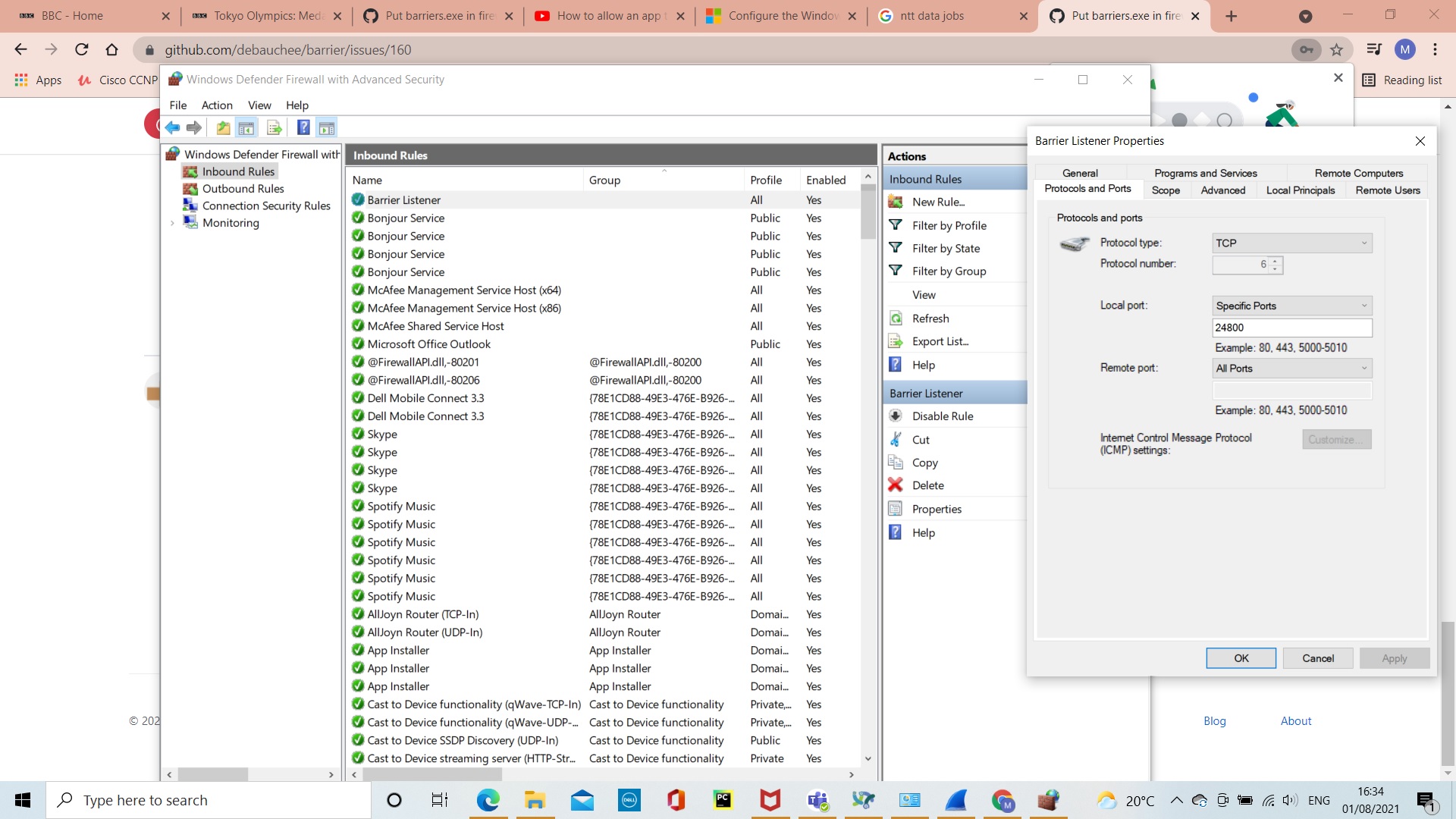
My suspicion is in the windows firewall but I can see the rule in firewall.
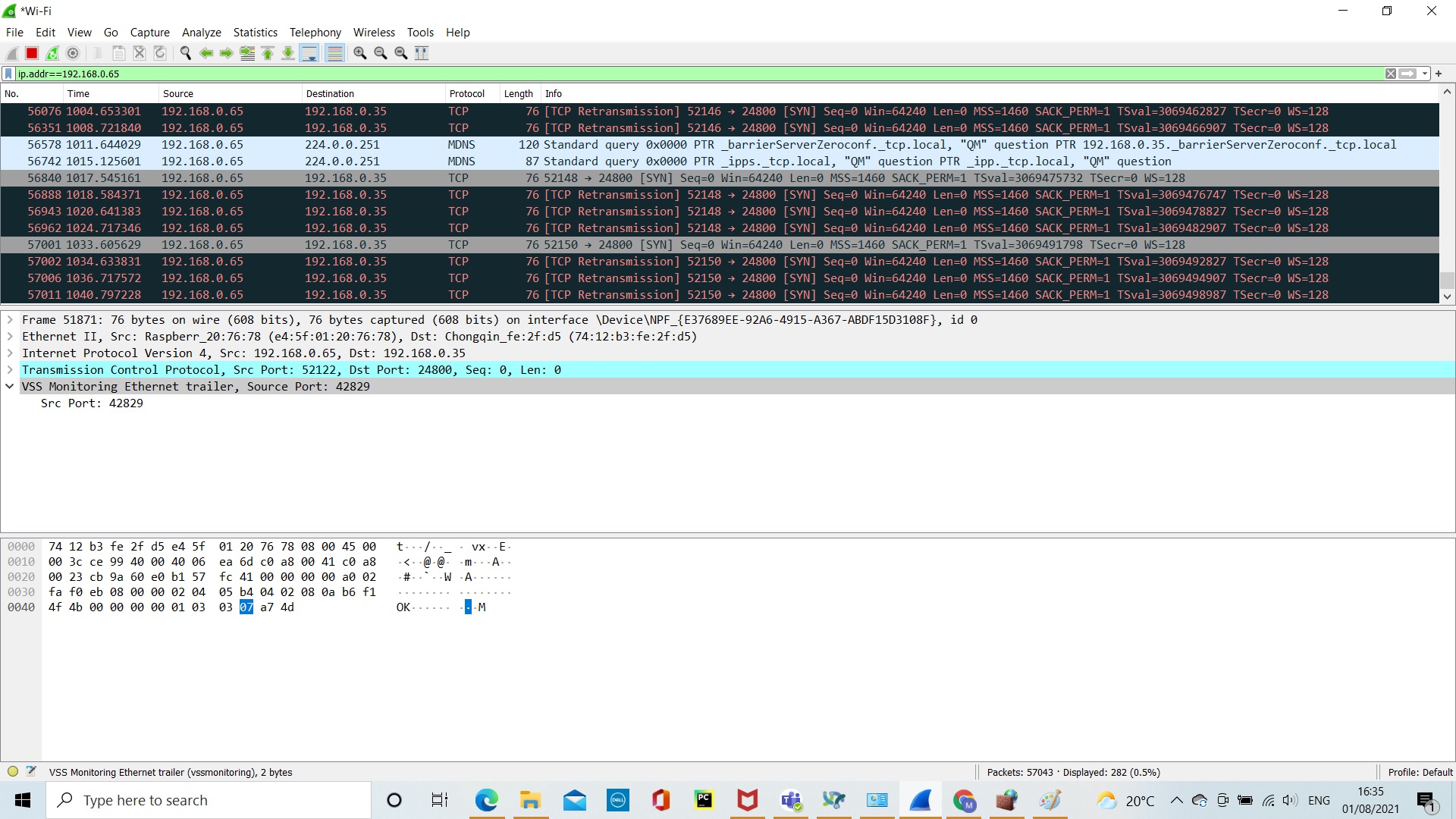
I don't see anything in server logs and can see on wireshark on server side that message from client is coming but nothing going back.
Enclosing screen shots.
Can someone help ?
Thanks,
mohit