mirror of
https://github.com/debauchee/barrier.git
synced 2026-10-23 08:07:53 -06:00
[GH-ISSUE #1690] Not detecting transition edge with uneven monitors #1247
Labels
No labels
HiDPI
bounty
bsd/freebsd
bsd/openbsd
bug
bug
build-infra
cantfix
critical
doc
duplicate
enhancement
fix-available
from git
from release
good first issue
help wanted
installer/package
invalid
linux
macOS
meta
needs testing
pull-request
query
question
regression
regression
v2.4.0
windows
wontfix
work-in-progress
No milestone
No project
No assignees
1 participant

Notifications
Due date
No due date set.
Dependencies
No dependencies set
Reference
github-starred/barrier#1247
Loading…
Reference in a new issue
No description provided.
Delete branch "%!s()"
Deleting a branch is permanent. Although the deleted branch may continue to exist for a short time before it actually gets removed, it CANNOT be undone in most cases. Continue?
Originally created by @billyJoePiano on GitHub (Jun 9, 2022).
Original GitHub issue: https://github.com/debauchee/barrier/issues/1690
What happened?
I have a slightly unusual monitor setup. My Ubuntu workstation is a laptop with 3 external monitors. It is the Barrier server, and its monitor setup looks like this:
(Note: Monitor 2 is a phantom "built-in" monitor which I can't figure out, so I just disable it... perhaps related to having both a GPU and the CPU having built-in graphics? Not sure???)
The Windows client (also a laptop with external monitors) is just to the left of it, with a setup like this:
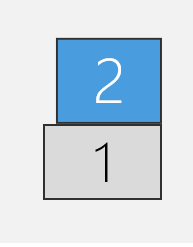
I was hoping that Barrier would transition cursors from Linux-3 to Windows-2, and from Linux-1 to Windows-1. However, when in Linux-3, my cursor just gets blocked at the boundary between Linux-3 and Windows-2 (it is only allowed to cross-over from the left-edge of Linux-1) and if I try to move from Windows-2 to Linux-3, then it ends up in Linux-1.
Unfortunately, If I re-arrange the monitor config, and move Linux-3 all the way to the left-most edge so it aligns with Linux-1's left edge, then the cross-over between Windows and Linux works, BUT I lose the ability to cross between Linux-3 and Linux-4 in that setup :-(
I've spent a few hours searching online and playing around with Gnome display settings, including trying to use compizconfig-settings-manager to bridge the gap between Linux-3/4 (in the latter arrangement), all to no avail. Is there any way to get Barrier to recognize the left-most-edge of the Linux-3 monitor as a transition boundary?
Version
v2.4.0
Git commit hash (if applicable)
N/A
If applicable, where did you install Barrier from?
Ubuntu Software
What OSes are you seeing the problem on? (Check all that apply)
Linux
What OS versions are you using?
Ubuntu Desktop, 20.04
Relevant log output
No response
Any other information
No response