[GH-ISSUE #1424] windows 11 server configuration not worked well #1099

Open
opened 2026-05-05 07:29:06 -06:00 by gitea-mirror · 1 comment
Owner

Originally created by @ailabktw on GitHub (Nov 12, 2021).
Original GitHub issue: https://github.com/debauchee/barrier/issues/1424

What happened?

I installed 2.3.4 on windows 11 for server.
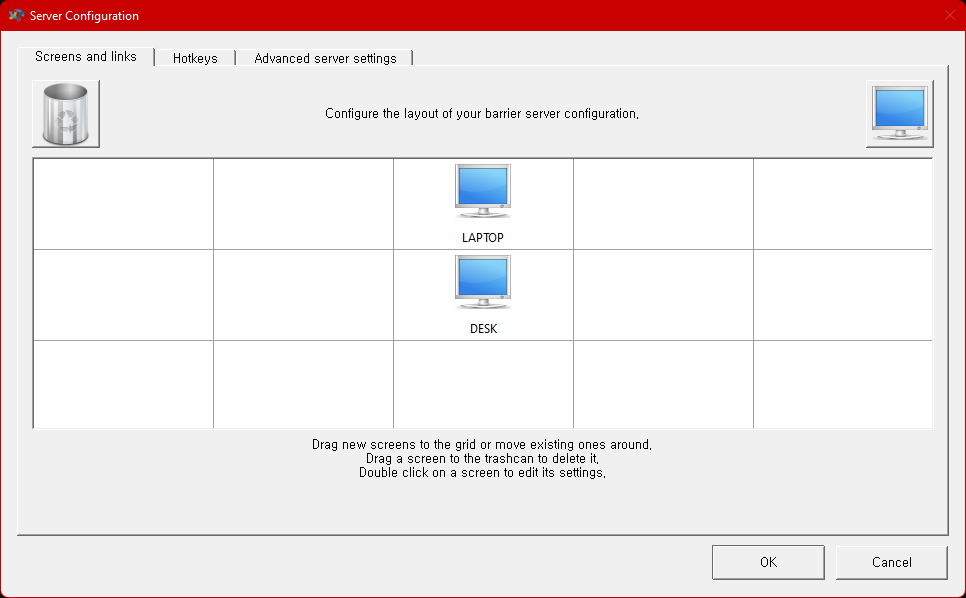
However, it doesn't worked for configure like below
image
(can't enter another screen)

but it worked for like this
image

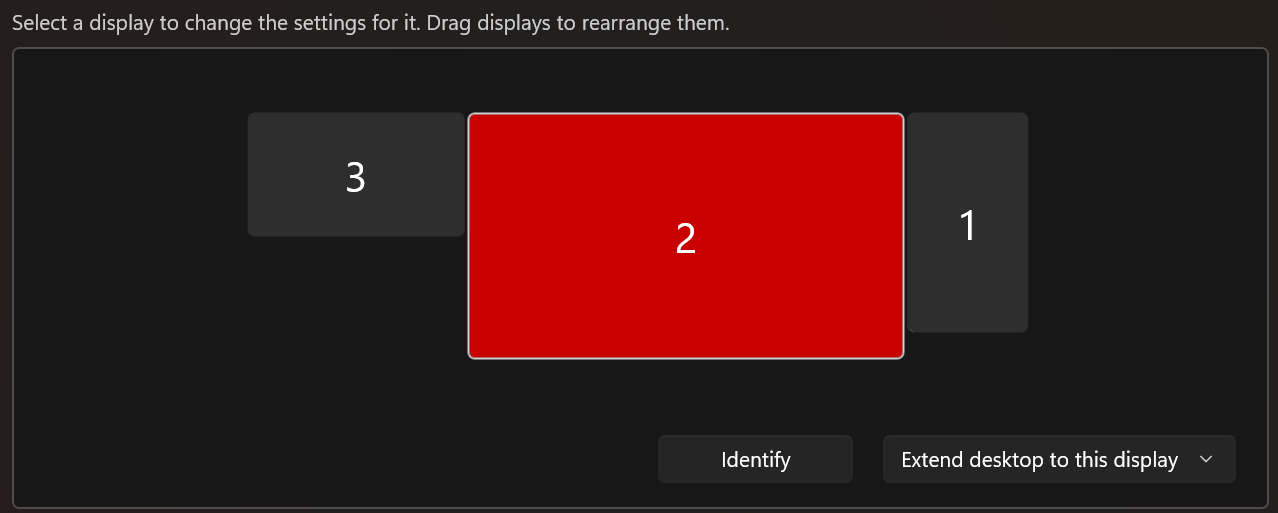
Server monitors are set like this
image

Thanks

Version

v2.3.4

Git commit hash (if applicable)

No response

If applicable, where did you install Barrier from?

Git release win 2.3.4

What OSes are you seeing the problem on? (Check all that apply)

Windows

What OS versions are you using?

windows 11 22000.318

Relevant log output

[2021-11-12T17:09:54] INFO: starting server
[2021-11-12T17:09:54] INFO: config file: C:/Users/****/AppData/Local/Temp/Barrier.sbUcob
[2021-11-12T17:09:54] INFO: log level: INFO
[2021-11-12T17:09:54] INFO: log file: C:/Program Files/Barrier/log/barrier.log
[2021-11-12T17:09:54] INFO: service command updated
[2021-11-12T17:09:54] INFO: service command updated
[2021-11-12T17:09:54] INFO: got ipc shutdown message
[2021-11-12T17:09:54] NOTE: disconnecting client "LAPTOP"
[2021-11-12T17:09:54] NOTE: client "LAPTOP" has disconnected
[2021-11-12T17:09:54] NOTE: stopped server
[2021-11-12T17:09:55] INFO: process 5416 was shutdown gracefully
[2021-11-12T17:09:55] INFO: starting new process as privileged user
[2021-11-12T17:09:55] INFO: drag and drop enabled
started server (IPv4/IPv6), waiting for clients
server status: active
[2021-11-12T17:09:55] NOTE: accepted client connection
[2021-11-12T17:09:55] NOTE: accepted client connection
[2021-11-12T17:09:56] NOTE: client "LAPTOP" has connected
[2021-11-12T17:09:56] NOTE: accepted client connection
[2021-11-12T17:09:56] NOTE: accepted client connection

Any other information

No response

Originally created by @ailabktw on GitHub (Nov 12, 2021). Original GitHub issue: https://github.com/debauchee/barrier/issues/1424 ### What happened? I installed 2.3.4 on windows 11 for server. However, it doesn't worked for configure like below ![image](https://user-images.githubusercontent.com/70126203/141433448-6c097a2e-1442-418d-bc94-58a90976fcfc.png) (can't enter another screen) but it worked for like this ![image](https://user-images.githubusercontent.com/70126203/141433581-522beb51-9730-4375-9918-22ef749f3721.png) Server monitors are set like this ![image](https://user-images.githubusercontent.com/70126203/141432642-ec1591b8-e537-4ab5-8995-60e7807550d2.png) Thanks ### Version v2.3.4 ### Git commit hash (if applicable) _No response_ ### If applicable, where did you install Barrier from? Git release win 2.3.4 ### What OSes are you seeing the problem on? (Check all that apply) Windows ### What OS versions are you using? windows 11 22000.318 ### Relevant log output ```shell [2021-11-12T17:09:54] INFO: starting server [2021-11-12T17:09:54] INFO: config file: C:/Users/****/AppData/Local/Temp/Barrier.sbUcob [2021-11-12T17:09:54] INFO: log level: INFO [2021-11-12T17:09:54] INFO: log file: C:/Program Files/Barrier/log/barrier.log [2021-11-12T17:09:54] INFO: service command updated [2021-11-12T17:09:54] INFO: service command updated [2021-11-12T17:09:54] INFO: got ipc shutdown message [2021-11-12T17:09:54] NOTE: disconnecting client "LAPTOP" [2021-11-12T17:09:54] NOTE: client "LAPTOP" has disconnected [2021-11-12T17:09:54] NOTE: stopped server [2021-11-12T17:09:55] INFO: process 5416 was shutdown gracefully [2021-11-12T17:09:55] INFO: starting new process as privileged user [2021-11-12T17:09:55] INFO: drag and drop enabled started server (IPv4/IPv6), waiting for clients server status: active [2021-11-12T17:09:55] NOTE: accepted client connection [2021-11-12T17:09:55] NOTE: accepted client connection [2021-11-12T17:09:56] NOTE: client "LAPTOP" has connected [2021-11-12T17:09:56] NOTE: accepted client connection [2021-11-12T17:09:56] NOTE: accepted client connection ``` ### Any other information _No response_
Author
Owner

@kazenshi commented on GitHub (Mar 29, 2022):

I was having the same issue but what I did is first: connect the Client to the Server. Then I modified the Barrier Layout to a different location than my desired layout, saved and reloaded Barrier, and then moved the Layout back to my preferred Barrier layout. Finally save and reload Barrier and the problem was fixed for me.

<!-- gh-comment-id:1081356191 --> @kazenshi commented on GitHub (Mar 29, 2022): I was having the same issue but what I did is first: connect the Client to the Server. Then I modified the Barrier Layout to a different location than my desired layout, saved and reloaded Barrier, and then moved the Layout back to my preferred Barrier layout. Finally save and reload Barrier and the problem was fixed for me.
Sign in to join this conversation.
No milestone
No project
No assignees
1 participant
Notifications
Due date
The due date is invalid or out of range. Please use the format "yyyy-mm-dd".

No due date set.

Dependencies

No dependencies set.

Reference: github-starred/barrier#1099
No description provided.