mirror of
https://github.com/debauchee/barrier.git
synced 2026-10-23 08:07:53 -06:00
[GH-ISSUE #1265] 'Barrier is starting' but doesn't start #1021
Labels
No labels
HiDPI
bounty
bsd/freebsd
bsd/openbsd
bug
bug
build-infra
cantfix
critical
doc
duplicate
enhancement
fix-available
from git
from release
good first issue
help wanted
installer/package
invalid
linux
macOS
meta
needs testing
pull-request
query
question
regression
regression
v2.4.0
windows
wontfix
work-in-progress
No milestone
No project
No assignees
1 participant

Notifications
Due date
No due date set.
Dependencies
No dependencies set
Reference
github-starred/barrier#1021
Loading…
Reference in a new issue
No description provided.
Delete branch "%!s()"
Deleting a branch is permanent. Although the deleted branch may continue to exist for a short time before it actually gets removed, it CANNOT be undone in most cases. Continue?
Originally created by @asharpham on GitHub (Sep 1, 2021).
Original GitHub issue: https://github.com/debauchee/barrier/issues/1265
I've installed Barrier on both my Ubuntu computer and my Windows 10 computer. I'm running Ubuntu 21.04 on a desktop and have made it the Server. Windows 10 is running on a laptop and is the Client.
The 'Screen Name' for the server is 'Server' and for the client is 'Client'. Both computers have static IP addresses and are on the same network.
I eventually got Barrier in Windows to run. It says 'Barrier is running'. In Ubuntu I get this error message:
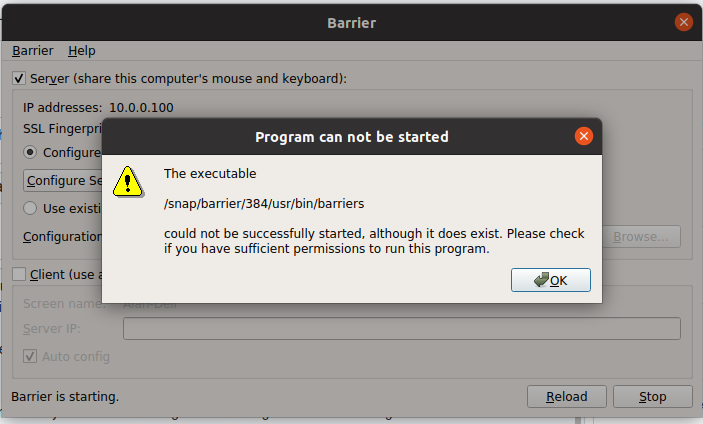
I have no idea what to do from here. All I get from Ubuntu is 'Barrier is starting' and I don't know how to fix the error that is in the message above. I don't know what permission is required or how to give permission. Can someone help?
Much obliged,
Alan
@AvgOrdinaryGuy commented on GitHub (Sep 3, 2021):
I've been dealing with the same issue for several weeks now. Barrier starts on other computers, both Windows and Linux, but not on the Kubuntu system that is my main rig and set up as Barrier server. See here: https://github.com/debauchee/barrier/issues/1246
There does not seem to be a solution, as a few have offered suggestions, but no one has been able to say exactly why Barrier fails to start on Ubuntu and Kubuntu machines.
At one time I had even tried installing Barrier using Snap just as you have, and received the same error message.
@dadaphl commented on GitHub (Oct 2, 2021):
same here "Barrier is starting" forever
@asharpham commented on GitHub (Oct 4, 2021):
I'm not sure how, but Barrier is now working on my machines. I've even got it to load automatically on reboot. I'm really sorry I can't explain why it is working normally now.
@presire commented on GitHub (Oct 4, 2021):
on Ubuntu, first install firewalld using,
then start and enable firewalld. (Auto-start and start firewalld)
then use this two commands. (Open TCP:24800 port in firewalld, and settings enabled)