mirror of
https://github.com/MonitorControl/MonitorControl.git
synced 2026-10-23 08:07:35 -06:00
[GH-ISSUE #1221] Ventura System Settings processes sometimes do not close if MonitorControl is running #710
Labels
No labels
Status: Abandoned
arm64
beta
beta
bug
done
duplicate
enhancement
feedback needed from reporter
in progress
information
invalid
investigating
known Issue
monitor Issue
pull-request
translation
unable to reproduce
unreleased
x86
No milestone
No project
No assignees
1 participant

Notifications
Due date
No due date set.
Dependencies
No dependencies set
Reference
github-starred/MonitorControl#710
Loading…
Reference in a new issue
No description provided.
Delete branch "%!s()"
Deleting a branch is permanent. Although the deleted branch may continue to exist for a short time before it actually gets removed, it CANNOT be undone in most cases. Continue?
Originally created by @hsugene on GitHub (Nov 10, 2022).
Original GitHub issue: https://github.com/MonitorControl/MonitorControl/issues/1221
Before opening the issue, have you...?
Describe the bug
This is a strange one. I noticed that the various System Settings processes in Ventura (13.0.1) will sometimes stay running even after System Settings is closed. Quitting MonitorControl frees them up. This also seems related to sleep behavior (to be described in repro steps).
Steps to reproduce
Expected behavior
Having MonitorControl open should not block (System Settings) processes from ending. Some of them can use a fair amount of RAM if you mess around with them.
Anything else?
Reproducing the bug video: https://www.youtube.com/watch?v=YKscEk2MJj8
Environment Information (please complete the following information)
@waydabber commented on GitHub (Nov 14, 2022):
This is an interesting one! I cannot seem to be able to reproduce it (same OS, M1 MBP 14") though. Is putting the mac to sleep a required step to reproduce what happens (tried without it)? Do you have all accessibility settings enabled? It might be that this is what keeps system settings open (as MC checks accessibility status), but it is just a hunch.
@x-magic commented on GitHub (Nov 14, 2022):
I can reproduce this as well. (MBA M2)
Procedures:
Bonus:
I always quit system pref/settings after use so that's a surprise to me haha. I wonder how it looks in older version of macOS.
@waydabber commented on GitHub (Nov 14, 2022):
Ok, so sleep has something to do with the problem then. Nice! :)
@x-magic commented on GitHub (Nov 14, 2022):
Okay... when I sleep with System Settings, wake up, quit system settings, and reopen System settings, this happens 🤣🤣🤣🤣
And the more sleeps there are, the more thread of those system settings app:
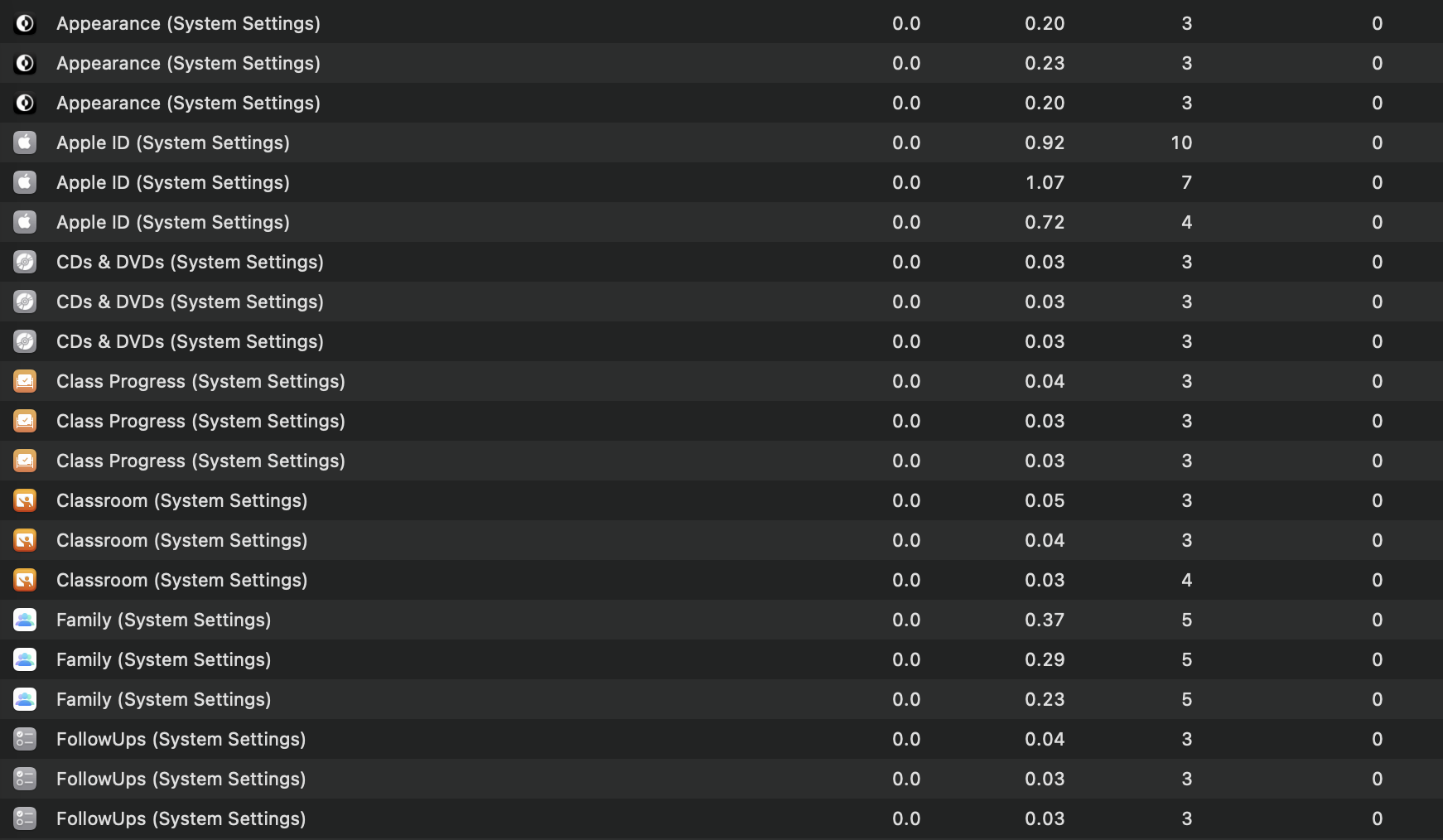
And this only happens on proper sleep, means the screen get darkens and locked (around 5s after sleep). Also happens both when the external monitor is connected or not. I have one external monitor connected. Tested with all other apps turned off, same.
Also noticed this:
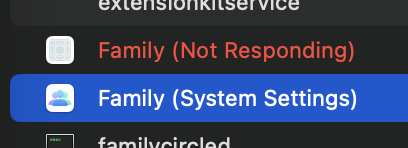
(Note Family and Family (System Settings) are two different apps)
Not sure if it's helpful.
@waydabber commented on GitHub (Nov 14, 2022):
Super weird. Just as a test, can you try BetterDisplay to see if you experience the same phenomenon? Both app uses some similar stuff that might affect how System Settings behaves. Thanks!
@hsugene commented on GitHub (Nov 14, 2022):
I can confirm that the issue occurs in BetterDisplay as well. Lunar seems to work fine, though.
Regarding your earlier comment, all relevant accessibility settings seem to be enabled and sleep seems to be necessary to make it happen reliably. I have to let it sleep for 5-10 seconds though. Less than that and the bug doesn’t occur reliably, perhaps because the Mac takes a bit of time to fully sleep?
@waydabber commented on GitHub (Nov 14, 2022):
All right, I'll investigate this, thanks for the info!
@hsugene commented on GitHub (Nov 14, 2022):
Oof, one correction: I had tested this with DisplayBuddy (which has the same bug) and not BetterDisplay. Got the names mixed up! I will follow up with a BetterDisplay test later today when I’m back in front of my Mac. Apologies for the confusion!
@waydabber commented on GitHub (Nov 14, 2022):
Ahh, all right. DisplayBuddy is an app I am not affiliated with (BetterDisplay is my doing so I can use it as a reference since I know the differences between MC and BD in-depth).
@waydabber commented on GitHub (Nov 14, 2022):
Just did some checking, BetterDisplay does not seem to produce this, but I was able to reproduce it with MonitorControl at my end as well. Sad news is I have no idea at all why this happens.
A theory is that DisplayBuddy (which is an app I am not affiliated with) might have this issue because it might have... hmm... reused some of the... ideas in MonitorControl so faithfully that including some of the bugs as well? (Not that there is anything wrong with that as MC is MIT licensed :)). On the other hand BetterDisplay is a major reimplementation from ground-up so probably by accident I just skipped the same pitfall, even though it uses a many of the same technologies as MC.
I'll try to look into it whenever I can get to it. Meanwhile you can use BetterDisplay if this issue bothers you as a workaround (note that MC and BD functionalities do not fully overlap - BD has a huge amount of stuff not found in MC, while MC does some things that BD still lacks or supports in a more complicated manner).
@x-magic commented on GitHub (Nov 14, 2022):
True. Just downloaded BD and here are functions I can't get compared to MC:
However it seems brightness control logic for built-in display is better (not sure why there's a difference, oh well)
Anyway I'm staying with MC but BD looks promising!
@waydabber commented on GitHub (Nov 15, 2022):
Yes, the mapping curve is still missing from BD (you can play with the scale to compensate for this though). You can change the mute behavior here:
So you were not able to reproduce the issue with BD, right, it was not just me?
@x-magic commented on GitHub (Nov 15, 2022):
Yes BD won't cause the issue with System Settings. Tried several time but can't reproduce so it's all good. Problem with MC still persist.
The volume scale mapping is way better because if I set the volume range to 0-16 it won't go max when I really need it. (Also another reason is that I don't want to enable finer control. Kind of OCD i guess).
DDC Mute won't work in BD for me either ticked or not ticked. In MC when DDC mute control option is not enabled, it emulates mute by set volume to 0 via DDC. However in BD it just won't mute, like mute feature is disabled entirely.
Anyway, I think I should cut off here as those issues should be raised in BD's issue logs. Would you like me to post them there instead? Cheers
@waydabber commented on GitHub (Nov 15, 2022):
Yes, thank you, please post the issue there - I'll fix it. I don't have a display with no mute support so any feedback is appreciated!
@owenzhao commented on GitHub (Dec 7, 2022):
A workaround, register
didWakeNotificationand restart MC each time when macOS wakes up.https://developer.apple.com/documentation/appkit/nsworkspace/1530973-didwakenotification
@owenzhao commented on GitHub (Dec 11, 2022):
I wrote a tool that fixed this kind of issues. You can download it here.
https://github.com/owenzhao/App-Helper
@stale[bot] commented on GitHub (Dec 12, 2023):
Hey there, it looks like there has been no activity on this issue recently. Has the issue been fixed, or does it still require attention? This issue may be closed if no further activity occurs. Thank you for your contributions.