[GH-ISSUE #1187] Volume control is not working on my Dell u2720q display (brightness control does) #689

Closed
opened 2026-05-05 06:30:37 -06:00 by gitea-mirror · 23 comments
Owner

Originally created by @asheenlevrai on GitHub (Sep 22, 2022).
Original GitHub issue: https://github.com/MonitorControl/MonitorControl/issues/1187

Before opening the issue, have you...?

Describe the issue

Volume control is not working on my Dell u2720q display. Brightness control works just fine.

I use a 2018 macbook pro (intel macbookpro15,2) running Monterey 12.6 and MonitorControl 4.1.0 build 7034.
The monitor is connected via a USB-C cable (DP alt mode).
DDC/CI is turned ON in the settings of the monitor.
The monitor has no built-in speakers and discrete speakers are connected through its audio-out port (3.5mm jack).

When I press the volume keys on the keyboard, MonitorControl displays the macOS OSD "scale" but the volume of the speakers is not affected. I can only change the volume by using the physical knob on the speakers.

Again, brightness control works as expected.

Expected behavior

I wish that volume control keys on the keyboard would work as expected (turn the speakers volume up and down).

Anything else?

No response

Environment Information (please complete the following information)

- macOS version: 12.6
- Mac model: macbookpro15,2 (13'' touch 2018)
- MonitorControl version: 4.1.0 build 7034
- Monitor(s): Dell u2720q
- Monitor Cable(s)/Connection(s): macbook pro -> USB-C (DP alt mode) -> Dell u2720q
- Apple Silicon/M1 (yes or no): no
Originally created by @asheenlevrai on GitHub (Sep 22, 2022). Original GitHub issue: https://github.com/MonitorControl/MonitorControl/issues/1187 ### Before opening the issue, have you...? - [X] Searched for existing issues - [X] Read through [the Monitor-Troubleshooting Wiki](https://github.com/MonitorControl/MonitorControl/wiki/Monitor-Troubleshooting) - [X] Updated MonitorControl to the latest version (if applicable) ### Describe the issue Volume control is not working on my Dell u2720q display. Brightness control works just fine. I use a 2018 macbook pro (intel macbookpro15,2) running Monterey 12.6 and MonitorControl 4.1.0 build 7034. The monitor is connected via a USB-C cable (DP alt mode). DDC/CI is turned ON in the settings of the monitor. The monitor has no built-in speakers and discrete speakers are connected through its audio-out port (3.5mm jack). When I press the volume keys on the keyboard, MonitorControl displays the macOS OSD "scale" but the volume of the speakers is not affected. I can only change the volume by using the physical knob on the speakers. Again, brightness control works as expected. ### Expected behavior I wish that volume control keys on the keyboard would work as expected (turn the speakers volume up and down). ### Anything else? _No response_ ### Environment Information (please complete the following information) ```markdown - macOS version: 12.6 - Mac model: macbookpro15,2 (13'' touch 2018) - MonitorControl version: 4.1.0 build 7034 - Monitor(s): Dell u2720q - Monitor Cable(s)/Connection(s): macbook pro -> USB-C (DP alt mode) -> Dell u2720q - Apple Silicon/M1 (yes or no): no ```
gitea-mirror 2026-05-05 06:30:37 -06:00
Author
Owner

@asheenlevrai commented on GitHub (Sep 22, 2022):

I tried switching the USB-C to USB-C cable for something else:

  • macbook pro -> USB-C to DP adapter -> DP cable -> Dell u2720q
  • However, I get exactly the same outcome.
<!-- gh-comment-id:1254698314 --> @asheenlevrai commented on GitHub (Sep 22, 2022): I tried switching the USB-C to USB-C cable for something else: - macbook pro -> USB-C to DP adapter -> DP cable -> Dell u2720q - However, I get exactly the same outcome.
Author
Owner

@askreet commented on GitHub (Sep 22, 2022):

I'm having the exact same issue with my Dell U4021QW, via USB-C with external speakers. Happy to provide additional context or testing if that's helpful.

My system:

- macOS version: 12.4
- Mac model: 16" 2019 Intel
- MonitorControl version: 4.1.0 build 7034
- Monitor(s): Dell U4021QW
- Monitor Cable(s)/Connection(s): MBP USB-C -> Dell USB-C
- Apple Silicon/M1 (yes or no): No
<!-- gh-comment-id:1255054206 --> @askreet commented on GitHub (Sep 22, 2022): I'm having the exact same issue with my Dell U4021QW, via USB-C with external speakers. Happy to provide additional context or testing if that's helpful. My system: ``` - macOS version: 12.4 - Mac model: 16" 2019 Intel - MonitorControl version: 4.1.0 build 7034 - Monitor(s): Dell U4021QW - Monitor Cable(s)/Connection(s): MBP USB-C -> Dell USB-C - Apple Silicon/M1 (yes or no): No ```
Author
Owner

@steveslotnick commented on GitHub (Sep 28, 2022):

Same issue here with an HP monitor. Speakers connected to the monitor via 3.5mm jack. Brightness control works, but sound does not. Only way to actually adjust the volume is directly on the speakers.

Setup:

- macOS version: 12.4
- Mac model: 16" 2021 M1
- MonitorControl version: 4.1.0 build 7034
- Monitor(s): HP U28 4K HDR
- Monitor Cable(s)/Connection(s): MBP USB-C -> HP USB-C
- Apple Silicon/M1 (yes or no): Yes
<!-- gh-comment-id:1261552314 --> @steveslotnick commented on GitHub (Sep 28, 2022): Same issue here with an HP monitor. Speakers connected to the monitor via 3.5mm jack. Brightness control works, but sound does not. Only way to actually adjust the volume is directly on the speakers. Setup: ``` - macOS version: 12.4 - Mac model: 16" 2021 M1 - MonitorControl version: 4.1.0 build 7034 - Monitor(s): HP U28 4K HDR - Monitor Cable(s)/Connection(s): MBP USB-C -> HP USB-C - Apple Silicon/M1 (yes or no): Yes ```
Author
Owner

@the0neyouseek commented on GitHub (Oct 5, 2022):

Hi everyone,

Did you select the right volume output in the macOS native "Sound" menu (or in the "System Settings" app) ?
You can also disable ddc volume control directly in the app which should let macOS handle volume completly

<!-- gh-comment-id:1268217124 --> @the0neyouseek commented on GitHub (Oct 5, 2022): Hi everyone, Did you select the right volume output in the macOS native "Sound" menu (or in the "System Settings" app) ? You can also disable ddc volume control directly in the app which should let macOS handle volume completly
Author
Owner

@steveslotnick commented on GitHub (Oct 5, 2022):

Did you select the right volume output in the macOS native "Sound" menu (or in the "System Settings" app) ?

In the macOS native Sound menu I have the monitor selected, which has the speakers plugged into it.

CleanShot 2022-10-05 at 08 44 18@2x

You can also disable ddc volume control directly in the app which should let macOS handle volume completly

I don't see any ddc volume controls in the app itself, but I've tried setting DDC/CI both ON and OFF in the settings of the monitor. As far as letting macOS handle the volume, if MonitorControl is not running, and I have the output set to my monitor as shown in the screenshot above, I get this:
CleanShot 2022-10-05 at 08 47 57@2x

macOS does not appear to allow controlling external speakers connected to a monitor by default. Using something like:
https://github.com/briankendall/proxy-audio-device works and I'm able to control the external speakers.

<!-- gh-comment-id:1268627372 --> @steveslotnick commented on GitHub (Oct 5, 2022): > Did you select the right volume output in the macOS native "Sound" menu (or in the "System Settings" app) ? In the macOS native Sound menu I have the monitor selected, which has the speakers plugged into it. <img width="669" alt="CleanShot 2022-10-05 at 08 44 18@2x" src="https://user-images.githubusercontent.com/3315773/194103620-bdef860b-1d84-4f96-adef-9fb9107b4a88.png"> > You can also disable ddc volume control directly in the app which should let macOS handle volume completly I don't see any ddc volume controls in the app itself, but I've tried setting DDC/CI both ON and OFF in the settings of the monitor. As far as letting macOS handle the volume, if MonitorControl is not running, and I have the output set to my monitor as shown in the screenshot above, I get this: <img width="197" alt="CleanShot 2022-10-05 at 08 47 57@2x" src="https://user-images.githubusercontent.com/3315773/194104388-2e5b39cd-7489-4c97-9519-567c129edfb4.png"> macOS does not appear to allow controlling external speakers connected to a monitor by default. Using something like: https://github.com/briankendall/proxy-audio-device works and I'm able to control the external speakers.
Author
Owner

@congdinh2008 commented on GitHub (Oct 9, 2022):

I have same issue with a DELL 2419H and MacBook 16inch M1. I can change the external display brightness but the volume control doesn't work.
I'm using USB-C (Mac) to HDMI(Dell).

<!-- gh-comment-id:1272441662 --> @congdinh2008 commented on GitHub (Oct 9, 2022): I have same issue with a DELL 2419H and MacBook 16inch M1. I can change the external display brightness but the volume control doesn't work. I'm using USB-C (Mac) to HDMI(Dell).
Author
Owner

@nafik commented on GitHub (Oct 14, 2022):

I can also confirm same behaviour for Dell U2720Q linked via USB-C cable with Macbook 14 M1 Pro. Sound system is connected via 3.5mm jack into monitor. With MonitorControl 4.1.0 I can easily adjust level of brightness however not sound level at all. Does not change behavior if I turn off or on DDC/CI in monitor settings. In MacOS of course default sound source is set to monitor (see attached image).
Snímek obrazovky 2022-10-14 v 10 51 09

<!-- gh-comment-id:1278701114 --> @nafik commented on GitHub (Oct 14, 2022): I can also confirm same behaviour for Dell U2720Q linked via USB-C cable with Macbook 14 M1 Pro. Sound system is connected via 3.5mm jack into monitor. With MonitorControl 4.1.0 I can easily adjust level of brightness however not sound level at all. Does not change behavior if I turn off or on DDC/CI in monitor settings. In MacOS of course default sound source is set to monitor (see attached image). <img width="715" alt="Snímek obrazovky 2022-10-14 v 10 51 09" src="https://user-images.githubusercontent.com/6586842/195806003-4a8bc705-c506-4ae0-8dfe-3d102642fb5e.png">
Author
Owner

@lalato commented on GitHub (Oct 16, 2022):

Confirming same issue with DELL S2722QC.

Message in Sound Preferences says... "The selected device has no output controls"

image

However, I can set the sound by using the Monitor Control menu app...

image

I just can't control it via the keyboard at all.

<!-- gh-comment-id:1280078970 --> @lalato commented on GitHub (Oct 16, 2022): Confirming same issue with DELL S2722QC. Message in Sound Preferences says... "The selected device has no output controls" <img width="657" alt="image" src="https://user-images.githubusercontent.com/9371670/196062650-c8ee81ff-6d48-4129-97ce-b267425c1457.png"> However, I can set the sound by using the Monitor Control menu app... <img width="237" alt="image" src="https://user-images.githubusercontent.com/9371670/196062858-f61594f1-b554-45bd-8b1e-63a6ae8e3255.png"> I just can't control it via the keyboard at all.
Author
Owner

@lalato commented on GitHub (Oct 17, 2022):

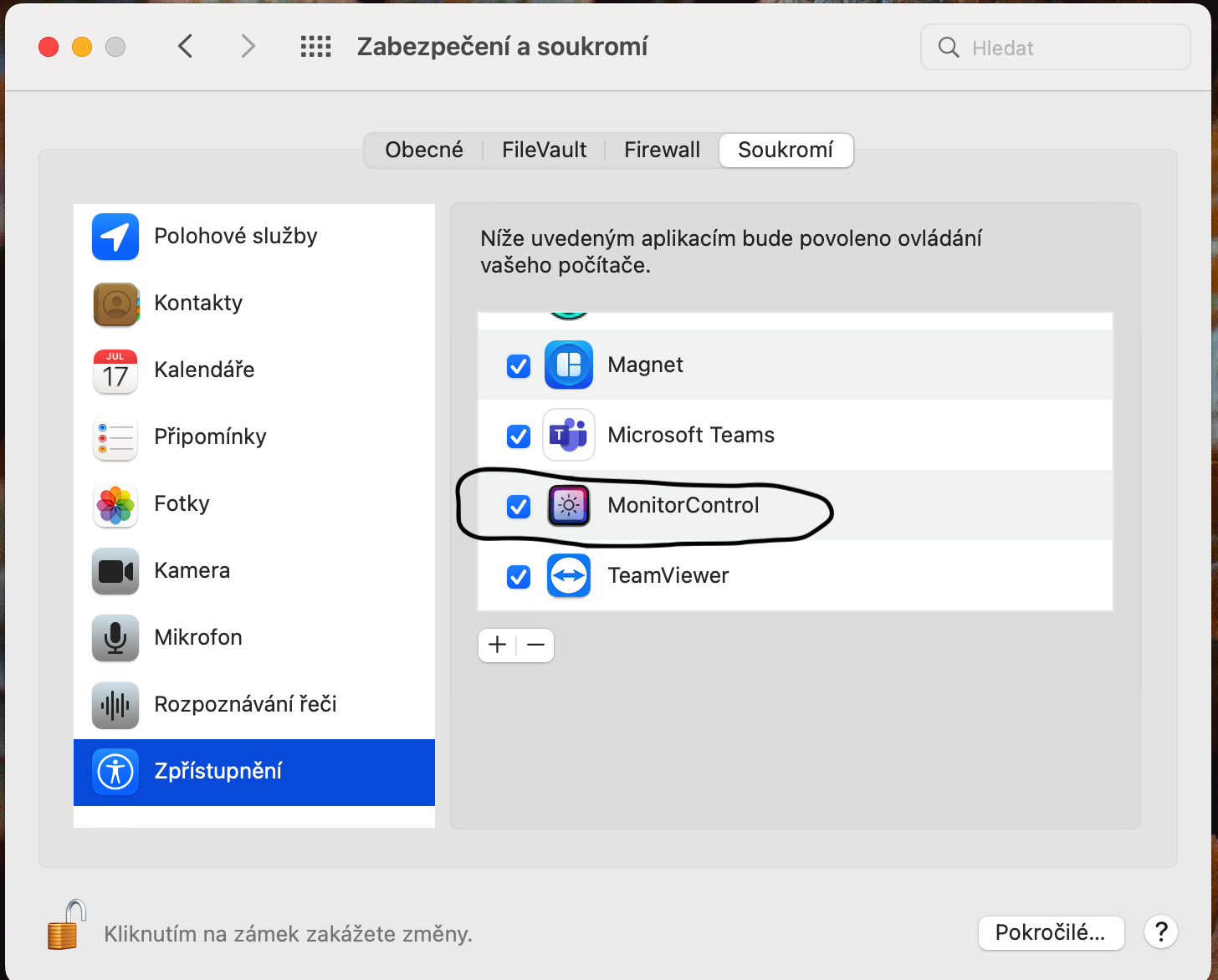
Actually, disregard my previous comment. Issue appears to be resolved after I Enabled Accessibility in Security & Privacy control panel and rebooted my machine. Now volume control appears too be working.

I did have to disable to "Use hardware DDC control" as it was causing the internal monitor "are you sure" message to pop up on screen repeatedly.

<!-- gh-comment-id:1280112685 --> @lalato commented on GitHub (Oct 17, 2022): Actually, disregard my previous comment. Issue appears to be resolved after I Enabled Accessibility in Security & Privacy control panel and rebooted my machine. Now volume control appears too be working. I did have to disable to "Use hardware DDC control" as it was causing the internal monitor "are you sure" message to pop up on screen repeatedly.
Author
Owner

@nafik commented on GitHub (Oct 17, 2022):

I have checked and did not help for me.
On Dell U2720Q I have no pop up messages.
I have checked Accessibility and it is on.
I have tried to disable DDC hardware control and reboot computer and still same "not function" situation.
Snímek obrazovky 2022-10-17 v 7 41 52
Snímek obrazovky 2022-10-17 v 7 48 21

<!-- gh-comment-id:1280325482 --> @nafik commented on GitHub (Oct 17, 2022): I have checked and did not help for me. On Dell U2720Q I have no pop up messages. I have checked Accessibility and it is on. I have tried to disable DDC hardware control and reboot computer and still same "not function" situation. <img width="728" alt="Snímek obrazovky 2022-10-17 v 7 41 52" src="https://user-images.githubusercontent.com/6586842/196099517-cfd11b95-d0b0-434a-8690-001ba4f6885e.png"> <img width="741" alt="Snímek obrazovky 2022-10-17 v 7 48 21" src="https://user-images.githubusercontent.com/6586842/196099538-bd20dd27-0194-4472-add5-cd9f738ee183.png">
Author
Owner

@lalato commented on GitHub (Oct 21, 2022):

Adding one more detail.
Keyboard mute doesn't work. I can reduce the volume to zero using the volume down... or by adjusting volume in the Monitor Control menu. But some sound will still play through the speakers.

<!-- gh-comment-id:1287535739 --> @lalato commented on GitHub (Oct 21, 2022): Adding one more detail. Keyboard mute doesn't work. I can reduce the volume to zero using the volume down... or by adjusting volume in the Monitor Control menu. But some sound will still play through the speakers.
Author
Owner

@the0neyouseek commented on GitHub (Oct 24, 2022):

@lalato You can try to enable "true" mute using "Advanced settings" for your monitor

<!-- gh-comment-id:1288550487 --> @the0neyouseek commented on GitHub (Oct 24, 2022): @lalato You can try to enable "true" mute using "Advanced settings" for your monitor
Author
Owner

@lalato commented on GitHub (Oct 25, 2022):

@the0neyouseek If you mean this setting, then it is already set in MonitorControl advanced settings.

image
<!-- gh-comment-id:1289821115 --> @lalato commented on GitHub (Oct 25, 2022): @the0neyouseek If you mean this setting, then it is already set in MonitorControl advanced settings. <img width="613" alt="image" src="https://user-images.githubusercontent.com/9371670/197655511-5ebd0dcf-3544-44d4-a690-358ce39524de.png">
Author
Owner

@tjk213 commented on GitHub (Oct 25, 2022):

I'm having the same issue with my Dell U2723QE. I have the display connected to my M1 macbook pro, with headphones playing through the 3.5mm jack. When I press the volume keys, the animations indicating a volume change display correctly, but no such change occurs on the audio.

Setup:

- macOS version: 12.6
- Mac model: 16" 2021 Apple
- MonitorControl version: 4.1.0 build 7034
- Monitor(s): Dell U2723QE
- Monitor Cable(s)/Connection(s): MBP USB-C -> Dell USB-C
- Apple Silicon/M1 (yes or no): Yes

I tried messing with the DDC & OSD settings, nothing seemed to help. I also checked the m1ddc tool, which doesn't seem to work with this display either.

It would be awesome if this could get fixed. The brightness control works great though, thanks!!

<!-- gh-comment-id:1291217250 --> @tjk213 commented on GitHub (Oct 25, 2022): I'm having the same issue with my Dell U2723QE. I have the display connected to my M1 macbook pro, with headphones playing through the 3.5mm jack. When I press the volume keys, the animations indicating a volume change display correctly, but no such change occurs on the audio. Setup: ``` - macOS version: 12.6 - Mac model: 16" 2021 Apple - MonitorControl version: 4.1.0 build 7034 - Monitor(s): Dell U2723QE - Monitor Cable(s)/Connection(s): MBP USB-C -> Dell USB-C - Apple Silicon/M1 (yes or no): Yes ``` I tried messing with the DDC & OSD settings, nothing seemed to help. I also checked the `m1ddc` tool, which doesn't seem to work with this display either. It would be awesome if this could get fixed. The brightness control works great though, thanks!!
Author
Owner

@tevariou commented on GitHub (Nov 16, 2022):

Dell U2520D same issue on Monterey Intel cpu.

<!-- gh-comment-id:1317841227 --> @tevariou commented on GitHub (Nov 16, 2022): Dell U2520D same issue on Monterey Intel cpu.
Author
Owner

@maxime-michel commented on GitHub (Nov 17, 2022):

Same here with Lenovo T27p-10 and M1 Macbook Pro and Air.

<!-- gh-comment-id:1318532050 --> @maxime-michel commented on GitHub (Nov 17, 2022): Same here with Lenovo T27p-10 and M1 Macbook Pro and Air.
Author
Owner

@jmreeves11 commented on GitHub (Nov 30, 2022):

I'm having the same issue where my MacBook pro with M1 chip connected USB-C port to adaptor to HDMI to Dell monitor (new as of this black friday) displays the animation of volume going up and down but the volume stays the same volume in reality. The volume is coming out of the Dell monitor's built-in speakers just fine, just no volume change via the buttons.

<!-- gh-comment-id:1331642713 --> @jmreeves11 commented on GitHub (Nov 30, 2022): I'm having the same issue where my MacBook pro with M1 chip connected USB-C port to adaptor to HDMI to Dell monitor (new as of this black friday) displays the animation of volume going up and down but the volume stays the same volume in reality. The volume is coming out of the Dell monitor's built-in speakers just fine, just no volume change via the buttons.
Author
Owner

@bwiernik commented on GitHub (Nov 30, 2022):

I had the same issue with an Acer monitor using a HDMI- or DisplayPort- to USC-C dongle on an M1 MacBook Pro

Using a direct USB-C connection from monitor to MacBook worked fine.

<!-- gh-comment-id:1332666299 --> @bwiernik commented on GitHub (Nov 30, 2022): I had the same issue with an Acer monitor using a HDMI- or DisplayPort- to USC-C dongle on an M1 MacBook Pro Using a direct USB-C connection from monitor to MacBook worked fine.
Author
Owner

@jmreeves11 commented on GitHub (Dec 1, 2022):

I had the same issue with an Acer monitor using a HDMI- or DisplayPort- to USC-C dongle on an M1 MacBook Pro

Using a direct USB-C connection from monitor to MacBook worked fine.

@bwiernik when you say "I had the same issue" are you referring to the choppy sound issue (#1238) that has been resolved, or this issue here (#1187) of volume control not actually adjusting the volume? Thanks for the clarification!

<!-- gh-comment-id:1333144215 --> @jmreeves11 commented on GitHub (Dec 1, 2022): > I had the same issue with an Acer monitor using a HDMI- or DisplayPort- to USC-C dongle on an M1 MacBook Pro > > Using a direct USB-C connection from monitor to MacBook worked fine. @bwiernik when you say "I had the same issue" are you referring to the choppy sound issue (#1238) that has been resolved, or this issue here (#1187) of volume control not actually adjusting the volume? Thanks for the clarification!
Author
Owner

@bwiernik commented on GitHub (Dec 1, 2022):

The volume control not working. The volume control UI shows up and changes, but the volume doesn't actually adjust.

<!-- gh-comment-id:1333651905 --> @bwiernik commented on GitHub (Dec 1, 2022): The volume control not working. The volume control UI shows up and changes, but the volume doesn't actually adjust.
Author
Owner

@rroseselavy42 commented on GitHub (Dec 6, 2022):

can confirm same volume control not actually changing volume or mute on Gigabyte M27Q connected via USB-C on M1

<!-- gh-comment-id:1339711213 --> @rroseselavy42 commented on GitHub (Dec 6, 2022): can confirm same volume control not actually changing volume or mute on Gigabyte M27Q connected via USB-C on M1
Author
Owner

@AtzeDeVries commented on GitHub (Dec 20, 2022):

same issues with Lenovo T34W-20 connected via usb-c on MacBookPro M1Max

<!-- gh-comment-id:1359006975 --> @AtzeDeVries commented on GitHub (Dec 20, 2022): same issues with Lenovo T34W-20 connected via usb-c on MacBookPro M1Max
Author
Owner

@waydabber commented on GitHub (Dec 21, 2022):

Just a reminder - monitor support for volume control is all over the place, some displays do support it, some don't. Even big name manufacturers and expensive displays have issues with this (my super expensive mini-LED Lenovo Creator Extreme does not support it for example).

<!-- gh-comment-id:1361192422 --> @waydabber commented on GitHub (Dec 21, 2022): Just a reminder - monitor support for volume control is all over the place, some displays do support it, some don't. Even big name manufacturers and expensive displays have issues with this (my super expensive mini-LED Lenovo Creator Extreme does not support it for example).
Sign in to join this conversation.
No milestone
No project
No assignees
1 participant
Notifications
Due date
The due date is invalid or out of range. Please use the format "yyyy-mm-dd".

No due date set.

Dependencies

No dependencies set.

Reference: github-starred/MonitorControl#689
No description provided.