[GH-ISSUE #1119] MonitorControl changing brightness on wrong external monitor #663

Closed
opened 2026-05-05 06:28:01 -06:00 by gitea-mirror · 7 comments
Owner

Originally created by @landoncope on GitHub (Jul 25, 2022).
Original GitHub issue: https://github.com/MonitorControl/MonitorControl/issues/1119

Before opening the issue, have you...?

  • Searched for existing issues
  • Looked through the wiki
  • Updated MonitorControl to the latest version (if applicable)

Describe the bug

I have two identical p32u-10 monitors plugged into my MacBook Pro (14-inch M1 2021, Monterey 12.4). Most of the time, MonitorControl controls the brightness on the wrong monitor when I use the brightness keys.

I perused https://github.com/MonitorControl/MonitorControl/issues/49 already, but the test build is no longer available.

Steps to reproduce

Bring mouse cursor to screen 1. Press brightness up/down keys. Watch brightness change on screen 2. Vice versa.

Expected behavior

When I have my mouse on screen 1, I expect the brightness to change on screen 1 when using the brightness keys.

Anything else?

No response

Environment Information (please complete the following information)

- macOS version: 12.4
- Mac model: 14-inch M1 2021
- MonitorControl version: 4.1.0 build 7034
- Monitor(s): p32u-10
- Apple Silicon/M1 (yes or no): yes
Originally created by @landoncope on GitHub (Jul 25, 2022). Original GitHub issue: https://github.com/MonitorControl/MonitorControl/issues/1119 ### Before opening the issue, have you...? - [X] Searched for existing issues - [X] Looked through [the wiki](https://github.com/MonitorControl/MonitorControl/wiki) - [X] Updated MonitorControl to the latest version (if applicable) ### Describe the bug I have two identical p32u-10 monitors plugged into my MacBook Pro (14-inch M1 2021, Monterey 12.4). Most of the time, MonitorControl controls the brightness on the wrong monitor when I use the brightness keys. I perused https://github.com/MonitorControl/MonitorControl/issues/49 already, but the test build is no longer available. ### Steps to reproduce Bring mouse cursor to screen 1. Press brightness up/down keys. Watch brightness change on screen 2. Vice versa. ### Expected behavior When I have my mouse on screen 1, I expect the brightness to change on screen 1 when using the brightness keys. ### Anything else? _No response_ ### Environment Information (please complete the following information) ```markdown - macOS version: 12.4 - Mac model: 14-inch M1 2021 - MonitorControl version: 4.1.0 build 7034 - Monitor(s): p32u-10 - Apple Silicon/M1 (yes or no): yes ```
Author
Owner

@waydabber commented on GitHub (Jul 26, 2022):

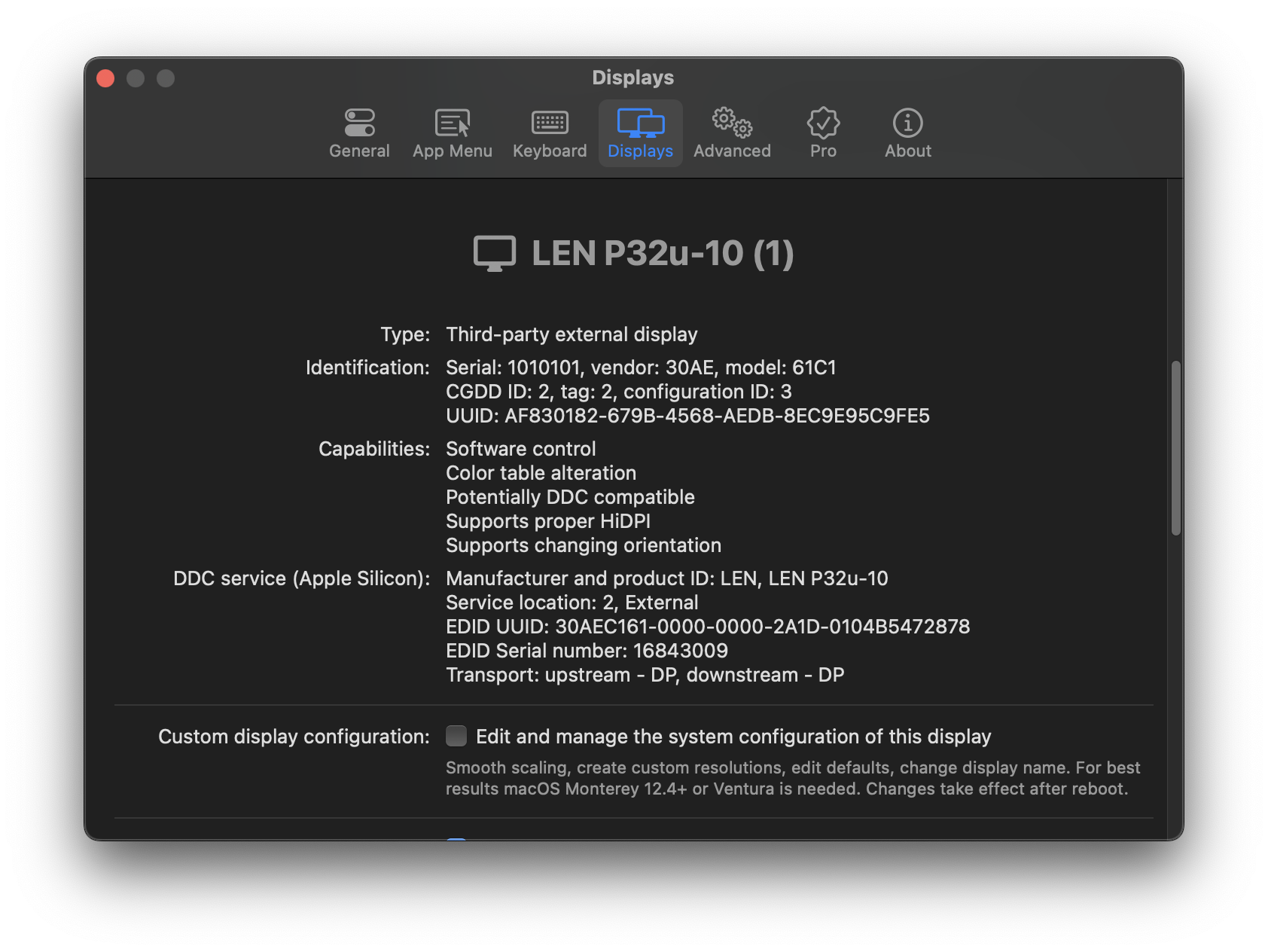
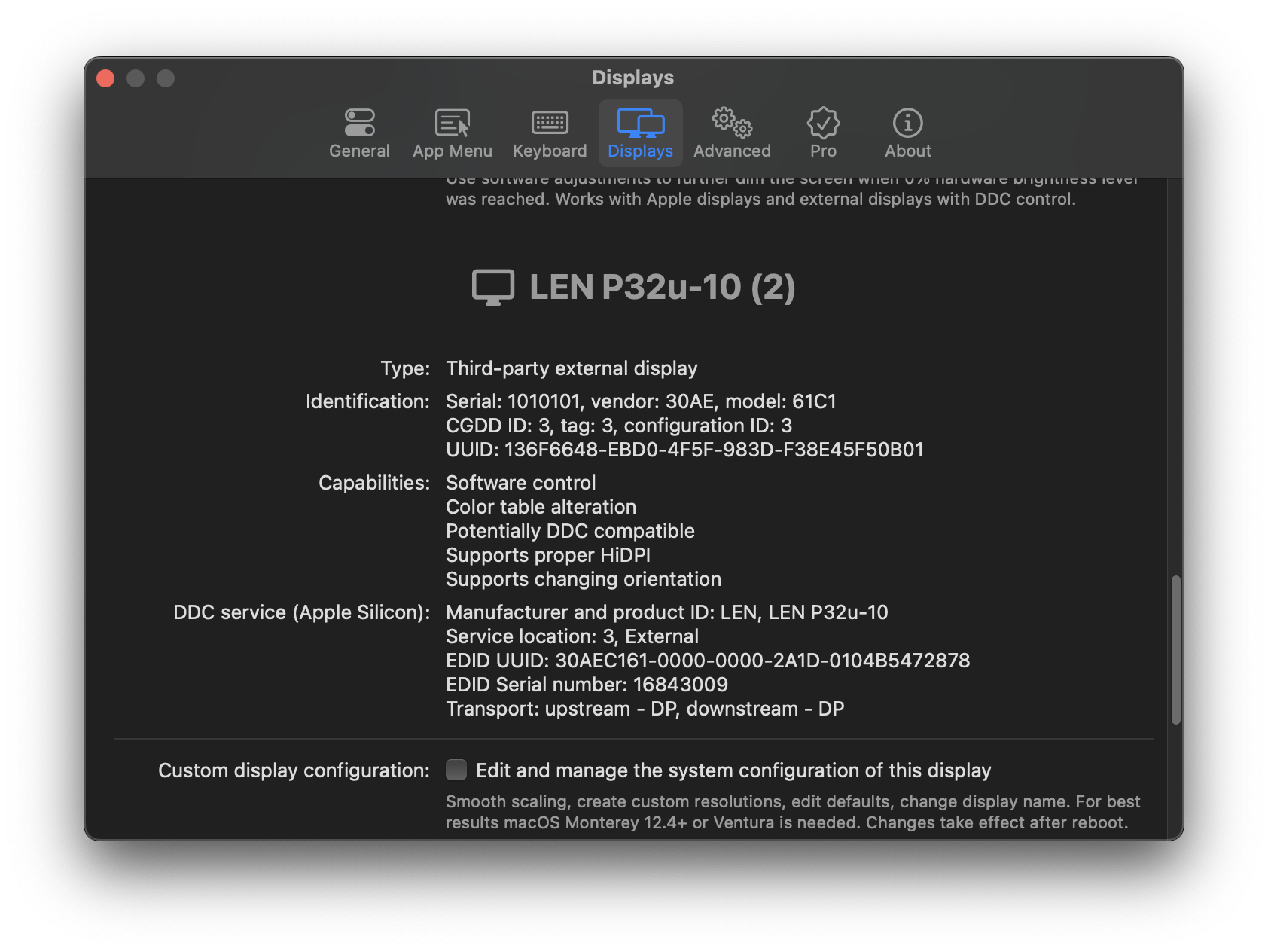
How are the displays connected? Natively or via a dock? Can you try downloading BetterDisplay, go to Settings (gear icon)/Displays and click on the display's name (big text with an icon) to reveal details/identifiers? Make a screenshot of what you see for both displays. Thank you!

<!-- gh-comment-id:1195696294 --> @waydabber commented on GitHub (Jul 26, 2022): How are the displays connected? Natively or via a dock? Can you try downloading [BetterDisplay](https://github.com/waydabber/BetterDisplay), go to Settings (gear icon)/Displays and click on the display's name (big text with an icon) to reveal details/identifiers? Make a screenshot of what you see for both displays. Thank you!
Author
Owner

@landoncope commented on GitHub (Jul 27, 2022):

The monitors are connected natively via USB-C.

Screenshots from BetterDisplay:
Screen Shot 2022-07-26 at 11 41 01 PM
Screen Shot 2022-07-26 at 11 41 12 PM
.

<!-- gh-comment-id:1196289606 --> @landoncope commented on GitHub (Jul 27, 2022): The monitors are connected natively via USB-C. Screenshots from BetterDisplay: <img width="842" alt="Screen Shot 2022-07-26 at 11 41 01 PM" src="https://user-images.githubusercontent.com/5022641/181170154-ff0cf0f9-b63d-43c3-b734-6ab5022cb59a.png"> <img width="842" alt="Screen Shot 2022-07-26 at 11 41 12 PM" src="https://user-images.githubusercontent.com/5022641/181170162-b99a2b16-7fe8-4261-afb4-f34e69bb96ee.png"> .
Author
Owner

@waydabber commented on GitHub (Jul 27, 2022):

Does brightness control BetterDisplay exhibit the same issue with brightness control as MonitorControl?

MonitorControl uses vendor/model id to identify displays while BetterDisplay uses UUID by default. If identifiers match up exactly, the OS itself has difficulties telling the displays apart in some scenarios, but the UUID method might be better in this case. The thing is even more complicated for DDC control - as you see, the two displays look exactly the same except for the service location (order in the ioreg tree) which is not very reliable and might change. In some situations it might happen that software and hardware controls got mixed up (software dimming affects one display, while for hardware the other).

<!-- gh-comment-id:1196356032 --> @waydabber commented on GitHub (Jul 27, 2022): Does brightness control BetterDisplay exhibit the same issue with brightness control as MonitorControl? MonitorControl uses vendor/model id to identify displays while BetterDisplay uses UUID by default. If identifiers match up exactly, the OS itself has difficulties telling the displays apart in some scenarios, but the UUID method might be better in this case. The thing is even more complicated for DDC control - as you see, the two displays look exactly the same except for the service location (order in the ioreg tree) which is not very reliable and might change. In some situations it might happen that software and hardware controls got mixed up (software dimming affects one display, while for hardware the other).
Author
Owner

@landoncope commented on GitHub (Jul 29, 2022):

I played around with BetterDisplay. At first, it was controlling the correct monitor. However, after changing a few settings/restarting the app, it started controlling the wrong monitor. I couldn't get it to control the correct monitor again - I tried reverting my changes, and I also tried the "Use alternative method to identify displays," to no avail - and I finally gave up.

I prefer the simplicity of MonitorControl anyway. I'll make do with having my cursor on the opposite external monitor for brightness control :). Thanks for your help.

<!-- gh-comment-id:1198887902 --> @landoncope commented on GitHub (Jul 29, 2022): I played around with BetterDisplay. At first, it was controlling the correct monitor. However, after changing a few settings/restarting the app, it started controlling the wrong monitor. I couldn't get it to control the correct monitor again - I tried reverting my changes, and I also tried the "Use alternative method to identify displays," to no avail - and I finally gave up. I prefer the simplicity of MonitorControl anyway. I'll make do with having my cursor on the opposite external monitor for brightness control :). Thanks for your help.
Author
Owner

@busti commented on GitHub (Aug 13, 2022):

I am facing the exact same issues. I also downloaded BetterDisplay, using it solves the issue of DDC Volume control being linked to the wrong monitor, since both monitors audio devices have the same name and BetterDisplay has an option to control both at the same time. However, it still mixes up the displays. DDC Control applies to the wrong display (without the cursor present) while software brightness control applies to the correct display.

This is the metadata of the screens I am using provided by BetterDisplay:

Screenshot 2022-08-13 at 15 25 47 Screenshot 2022-08-13 at 15 26 36

I have another clue about what might be going on here though. MacOS (without any extra software installed) also frequently switches up the monitors I am using, as if it were just identifying them by their name and not by their id. Whenever I reboot or reattach both screens via USB-C they randomly switch positions. To mitigate this I am using the displayplacer command line tool with the following command, which is activated by a launchd agent whenever any of the two monitors is plugged in:

displayplacer "id:82870237-92A9-4ADE-8FC2-4BB588A6E433 res:3008x1692 hz:144 color_depth:7 scaling:on origin:(0,0) degree:0" "id:37D8832A-2D66-02CA-B9F7-8F30A301B230 res:1496x967 hz:120 color_depth:8 scaling:on origin:(-1496,914) degree:0" "id:0E37B605-4D39-4A31-9962-E33EDA8F7E73 res:3008x1692 hz:144 color_depth:7 scaling:on origin:(3008,0) degree:0"

In case you require any additional information to fix this, I will happily provide it.

<!-- gh-comment-id:1214160338 --> @busti commented on GitHub (Aug 13, 2022): I am facing the exact same issues. I also downloaded BetterDisplay, using it solves the issue of DDC Volume control being linked to the wrong monitor, since both monitors audio devices have the same name and BetterDisplay has an option to control both at the same time. However, it still mixes up the displays. DDC Control applies to the wrong display (without the cursor present) while software brightness control applies to the correct display. This is the metadata of the screens I am using provided by BetterDisplay: <img width="842" alt="Screenshot 2022-08-13 at 15 25 47" src="https://user-images.githubusercontent.com/3575167/184496158-58bb3a67-c5d7-424a-943f-731ace550040.png"> <img width="842" alt="Screenshot 2022-08-13 at 15 26 36" src="https://user-images.githubusercontent.com/3575167/184496180-55346c46-0c9c-47c0-b700-19f71ab5548a.png"> I have another clue about what might be going on here though. MacOS (without any extra software installed) also frequently switches up the monitors I am using, as if it were just identifying them by their name and not by their id. Whenever I reboot or reattach both screens via USB-C they randomly switch positions. To mitigate this I am using the `displayplacer` command line tool with the following command, which is activated by a launchd agent whenever any of the two monitors is plugged in: ``` displayplacer "id:82870237-92A9-4ADE-8FC2-4BB588A6E433 res:3008x1692 hz:144 color_depth:7 scaling:on origin:(0,0) degree:0" "id:37D8832A-2D66-02CA-B9F7-8F30A301B230 res:1496x967 hz:120 color_depth:8 scaling:on origin:(-1496,914) degree:0" "id:0E37B605-4D39-4A31-9962-E33EDA8F7E73 res:3008x1692 hz:144 color_depth:7 scaling:on origin:(3008,0) degree:0" ``` In case you require any additional information to fix this, I will happily provide it.
Author
Owner

@landoncope commented on GitHub (Aug 15, 2022):

The odd thing for me now is that MonitorControl always controls the wrong monitor's brightness, every time, no matter what I do.

Whenever I reboot or reattach both screens via USB-C they randomly switch positions

Whenever this happens for me, I simply power off my left monitor, wait a second, and power it back on. This consistently resolves the issue.

<!-- gh-comment-id:1214547708 --> @landoncope commented on GitHub (Aug 15, 2022): The odd thing for me now is that MonitorControl always controls the wrong monitor's brightness, every time, no matter what I do. `Whenever I reboot or reattach both screens via USB-C they randomly switch positions` Whenever this happens for me, I simply power off my left monitor, wait a second, and power it back on. This consistently resolves the issue.
Author
Owner

@waydabber commented on GitHub (Aug 26, 2022):

It simply depends on the order the displays are enumerated and which gets the lower CGDirectDisplayID ("CGDD ID" in BetterDisplay). When reattaching one of the displays, the order is reversed. As you guys say, even macOS cannot tell the displays apart as they have the same identifier.

Maybe we could add an option to simply reverse the detection order which might help with these kinds of issues. This would not be an exact solution to the problem, but a practical one that would work most of the time. If you could open an issue related to this under BetterDisplay, I could provide a test build to see if this approach helps.

<!-- gh-comment-id:1228650029 --> @waydabber commented on GitHub (Aug 26, 2022): It simply depends on the order the displays are enumerated and which gets the lower CGDirectDisplayID ("CGDD ID" in BetterDisplay). When reattaching one of the displays, the order is reversed. As you guys say, even macOS cannot tell the displays apart as they have the same identifier. Maybe we could add an option to simply reverse the detection order which might help with these kinds of issues. This would not be an exact solution to the problem, but a practical one that would work most of the time. If you could open an issue related to this under BetterDisplay, I could provide a test build to see if this approach helps.
Sign in to join this conversation.
No milestone
No project
No assignees
1 participant
Notifications
Due date
The due date is invalid or out of range. Please use the format "yyyy-mm-dd".

No due date set.

Dependencies

No dependencies set.

Reference: github-starred/MonitorControl#663
No description provided.