[GH-ISSUE #1048] Cannot adjust macbook audio #627

Closed
opened 2026-05-05 06:23:54 -06:00 by gitea-mirror · 4 comments
Owner

Originally created by @KhoiHoang2410 on GitHub (May 25, 2022).
Original GitHub issue: https://github.com/MonitorControl/MonitorControl/issues/1048

Before opening the issue, have you...?

  • Searched for existing issues
  • Looked through the wiki
  • Updated MonitorControl to the latest version (if applicable)

Describe the bug

I am using M1 Pro 14 connect with LG24QP-750, the application can adjust

  • External monitor: brightness, contrast, volume
  • Macbook: brightness, not volume
    Screen Shot 2022-05-25 at 23 19 11

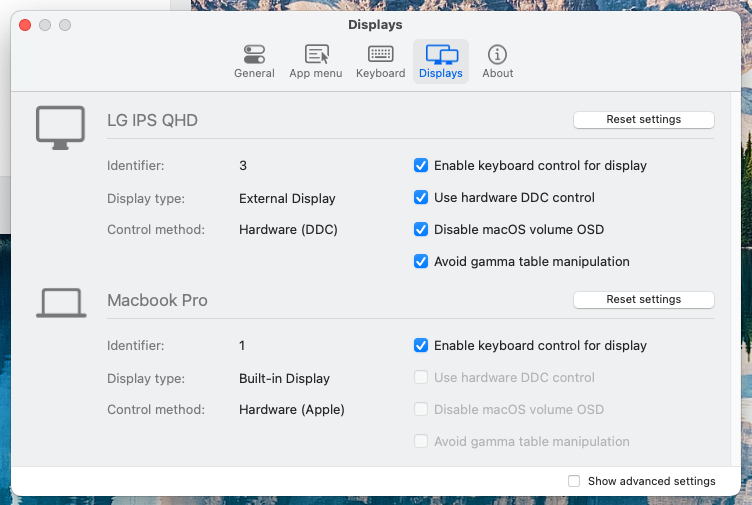
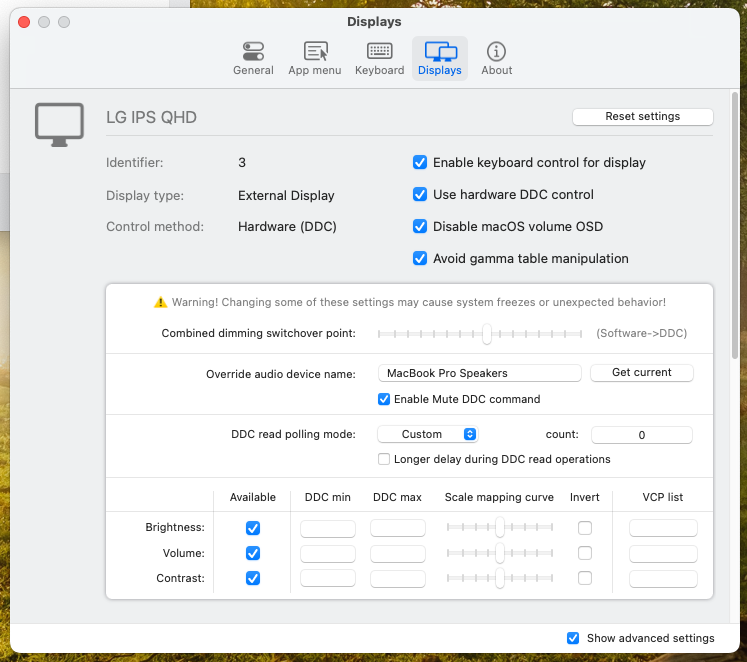
My setting
Screen Shot 2022-05-25 at 23 19 25
Screen Shot 2022-05-25 at 23 19 39
Screen Shot 2022-05-25 at 23 20 15

Note: I have move cursor to the Macbook screen but not work

Steps to reproduce

  • Using macbook M1 Pro (note sure with other mac because I don't have)
  • Install app
  • Setup keyboard and displays like picture in describe section
  • Moving cursor to macbook monitor
  • Press F2 or F3 and nothing happen

Expected behavior

  • Able to adjust Macbook Pro Speakers volume

Anything else?

No response

Environment Information (please complete the following information)

- macOS version: 12.4
- Mac model: M1 Pro 14inch
- MonitorControl version: 4.1.0 Build 7034
- Monitor(s): LG24QP-750
- Apple Silicon/M1 (yes or no): yes
Originally created by @KhoiHoang2410 on GitHub (May 25, 2022). Original GitHub issue: https://github.com/MonitorControl/MonitorControl/issues/1048 ### Before opening the issue, have you...? - [X] Searched for existing issues - [X] Looked through [the wiki](https://github.com/MonitorControl/MonitorControl/wiki) - [X] Updated MonitorControl to the latest version (if applicable) ### Describe the bug I am using M1 Pro 14 connect with LG24QP-750, the application can adjust - External monitor: brightness, contrast, volume - Macbook: brightness, not volume ![Screen Shot 2022-05-25 at 23 19 11](https://user-images.githubusercontent.com/45021350/170310860-1b94b694-e7c7-4495-abea-d78619d64309.png) My setting ![Screen Shot 2022-05-25 at 23 19 25](https://user-images.githubusercontent.com/45021350/170310958-9f105764-35bf-445b-95e9-74b2337b1a15.png) ![Screen Shot 2022-05-25 at 23 19 39](https://user-images.githubusercontent.com/45021350/170311014-85a242cd-2ab9-4d5c-ad73-079b870962af.png) ![Screen Shot 2022-05-25 at 23 20 15](https://user-images.githubusercontent.com/45021350/170311222-c9335107-9a6c-4e40-ac1e-3bbb4d1c03dc.png) Note: I have move cursor to the Macbook screen but not work ### Steps to reproduce - Using macbook M1 Pro (note sure with other mac because I don't have) - Install app - Setup `keyboard` and `displays` like picture in `describe` section - Moving cursor to macbook monitor - Press `F2` or `F3` and nothing happen ### Expected behavior - Able to adjust `Macbook Pro Speakers` volume ### Anything else? _No response_ ### Environment Information (please complete the following information) ```markdown - macOS version: 12.4 - Mac model: M1 Pro 14inch - MonitorControl version: 4.1.0 Build 7034 - Monitor(s): LG24QP-750 - Apple Silicon/M1 (yes or no): yes ```
Author
Owner

@anarchy89 commented on GitHub (May 28, 2022):

hey I'm using a Mac m1 max as well. The volume feature used to work on my intel Mac. But it's not working on the m1 chip.

<!-- gh-comment-id:1140334411 --> @anarchy89 commented on GitHub (May 28, 2022): hey I'm using a Mac m1 max as well. The volume feature used to work on my intel Mac. But it's not working on the m1 chip.
Author
Owner

@unfrostedpoptart commented on GitHub (May 31, 2022):

Me too! M1 Pro Macbook Pro 16". Monterey 12.5 Beta (21G5027d). Caldigit TS3-Plus dock. Two AOC CU32V3 32" Super-Curved 4K UHD monitors.
Brightness control works fine on both monitors but volume does nothing.

<!-- gh-comment-id:1142736478 --> @unfrostedpoptart commented on GitHub (May 31, 2022): Me too! M1 Pro Macbook Pro 16". Monterey 12.5 Beta (21G5027d). Caldigit TS3-Plus dock. Two AOC CU32V3 32" Super-Curved 4K UHD monitors. Brightness control works fine on both monitors but volume does nothing.
Author
Owner

@waydabber commented on GitHub (Jun 2, 2022):

You can adjust the MacBook's audio with the built-in macOS audio slider. The volume control is made exlusively for DDC compatible external displays since macOS cannot control those displays natively.

<!-- gh-comment-id:1144906301 --> @waydabber commented on GitHub (Jun 2, 2022): You can adjust the MacBook's audio with the built-in macOS audio slider. The volume control is made exlusively for DDC compatible external displays since macOS cannot control those displays natively.
Author
Owner

@waydabber commented on GitHub (Jun 2, 2022):

As for external monitors connected to Macs, if volume control does not respond, then there is a DDC communication issue. Probably brightness does not work as well beyond 50% only under 50% in this case (since between 0-50% the app is using software dimming, not DDC).

<!-- gh-comment-id:1144908065 --> @waydabber commented on GitHub (Jun 2, 2022): As for external monitors connected to Macs, if volume control does not respond, then there is a DDC communication issue. Probably brightness does not work as well beyond 50% only under 50% in this case (since between 0-50% the app is using software dimming, not DDC).
Sign in to join this conversation.
No milestone
No project
No assignees
1 participant
Notifications
Due date
The due date is invalid or out of range. Please use the format "yyyy-mm-dd".

No due date set.

Dependencies

No dependencies set.

Reference: github-starred/MonitorControl#627
No description provided.