[GH-ISSUE #1046] Volume not Working When Connecting with Caldigit USBC Pro Dock #626

Closed
opened 2026-05-05 06:23:53 -06:00 by gitea-mirror · 9 comments
Owner

Originally created by @patshan3 on GitHub (May 23, 2022).
Original GitHub issue: https://github.com/MonitorControl/MonitorControl/issues/1046

Before opening the issue, have you...?

Describe the issue

When connecting to my monitor through a Caldigit USBC Pro DisplayPort dock I am unable to control the monitor volume using the keyboard buttons. However, when I connect directly with my monitor using a USBC to Displayport cable I have no issues

Expected behavior

When adjusting the volume using keyboard button I would expect the monitor volume to change

Anything else?

n/a

Environment Information (please complete the following information)

- macOS version: 12.3.1
- Mac model: Macbook Pro 16" 2019 Intel
- MonitorControl version: 4.1.0
- Monitor(s): LG 4k HDR 32UN500-W
- Monitor Cable(s)/Connection(s): Thunderbolt 3 to Caldigit USBC Pro Displayport dock
- Apple Silicon/M1 (yes or no): N
Originally created by @patshan3 on GitHub (May 23, 2022). Original GitHub issue: https://github.com/MonitorControl/MonitorControl/issues/1046 ### Before opening the issue, have you...? - [X] Searched for existing issues - [X] Read through [the Monitor-Troubleshooting Wiki](https://github.com/MonitorControl/MonitorControl/wiki/Monitor-Troubleshooting) - [X] Updated MonitorControl to the latest version (if applicable) ### Describe the issue When connecting to my monitor through a Caldigit USBC Pro DisplayPort dock I am unable to control the monitor volume using the keyboard buttons. However, when I connect directly with my monitor using a USBC to Displayport cable I have no issues ### Expected behavior When adjusting the volume using keyboard button I would expect the monitor volume to change ### Anything else? n/a ### Environment Information (please complete the following information) ```markdown - macOS version: 12.3.1 - Mac model: Macbook Pro 16" 2019 Intel - MonitorControl version: 4.1.0 - Monitor(s): LG 4k HDR 32UN500-W - Monitor Cable(s)/Connection(s): Thunderbolt 3 to Caldigit USBC Pro Displayport dock - Apple Silicon/M1 (yes or no): N ```
gitea-mirror 2026-05-05 06:23:53 -06:00
Author
Owner

@waydabber commented on GitHub (May 24, 2022):

Hi there - does brightness control work or only the bottom 50% of the slider affects brightness? If the latter, then DDC control is generally broken as the bottom 50% of the brightness slider is doing software adjustments only, not backlight control. I'd advise to use direct connection as not all docks/hubs can pass the DDC I2C communication properly.

<!-- gh-comment-id:1135720611 --> @waydabber commented on GitHub (May 24, 2022): Hi there - does brightness control work or only the bottom 50% of the slider affects brightness? If the latter, then DDC control is generally broken as the bottom 50% of the brightness slider is doing software adjustments only, not backlight control. I'd advise to use direct connection as not all docks/hubs can pass the DDC I2C communication properly.
Author
Owner

@patshan3 commented on GitHub (May 24, 2022):

does brightness control work or does only the bottom 50% of the slider affect brightness?

So the brightness buttons work dimming the screen all the way from bright to dim.

However, it is the volume control that is not working at all when connecting using the dock. I have updated the dock and restarted it.

<!-- gh-comment-id:1136115041 --> @patshan3 commented on GitHub (May 24, 2022): > does brightness control work or does only the bottom 50% of the slider affect brightness? So the brightness buttons work dimming the screen all the way from bright to dim. However, it is the volume control that is not working at all when connecting using the dock. I have updated the dock and restarted it.
Author
Owner

@waydabber commented on GitHub (May 24, 2022):

And the brightness is using hardware DDC control (so DDC is not disabled), right? If so then I don't have a clear idea - I don't think the dock would selectively somehow disable the volume DDC command but pass through the brightness command (but who knows what the dock actually does, maybe it interprets and reconstructs these commands and the makers forgot about volume controls?)

<!-- gh-comment-id:1136140630 --> @waydabber commented on GitHub (May 24, 2022): And the brightness is using hardware DDC control (so DDC is not disabled), right? If so then I don't have a clear idea - I don't think the dock would selectively somehow disable the volume DDC command but pass through the brightness command (but who knows what the dock actually does, maybe it interprets and reconstructs these commands and the makers forgot about volume controls?)
Author
Owner

@patshan3 commented on GitHub (May 24, 2022):

I believe it is not using DDC as the monitor's brightness in settings stays the same. However when directly connecting using a usbc-display port I believe it uses a DDC hardware as the monitor actually shows the volume going down

<!-- gh-comment-id:1136145508 --> @patshan3 commented on GitHub (May 24, 2022): I believe it is not using DDC as the monitor's brightness in settings stays the same. However when directly connecting using a usbc-display port I believe it uses a DDC hardware as the monitor actually shows the volume going down
Author
Owner

@waydabber commented on GitHub (May 24, 2022):

Hmm. Do you see DDC as Control method in Preferences? Is the volume slider shown in the app menu under the display? If not then the app is not detecting the display as DDC controllable for some reason.

Screen Shot 2022-05-24 at 18 33 17
<!-- gh-comment-id:1136148045 --> @waydabber commented on GitHub (May 24, 2022): Hmm. Do you see DDC as Control method in Preferences? Is the volume slider shown in the app menu under the display? If not then the app is not detecting the display as DDC controllable for some reason. <img width="842" alt="Screen Shot 2022-05-24 at 18 33 17" src="https://user-images.githubusercontent.com/37590873/170087128-0a4bad74-1300-4f0b-83e9-1b568d1932db.png">
Author
Owner

@patshan3 commented on GitHub (May 24, 2022):

So I am showing the method as Hardware DDC

<!-- gh-comment-id:1136153217 --> @patshan3 commented on GitHub (May 24, 2022): So I am showing the method as Hardware DDC
Author
Owner

@patshan3 commented on GitHub (May 24, 2022):

I emailed Caldigit to ask them about what may be going on

<!-- gh-comment-id:1136169466 --> @patshan3 commented on GitHub (May 24, 2022): I emailed Caldigit to ask them about what may be going on
Author
Owner

@patshan3 commented on GitHub (May 24, 2022):

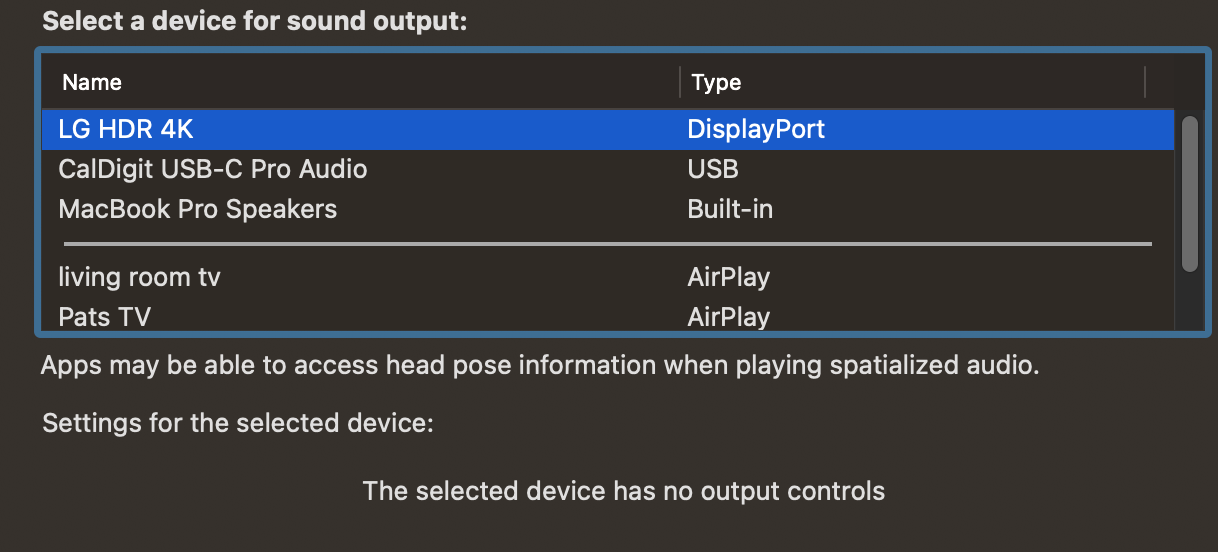
I believe this may be a Dock issue and will work with caldigit
Screen Shot 2022-05-24 at 12 27 30 PM

<!-- gh-comment-id:1136349094 --> @patshan3 commented on GitHub (May 24, 2022): I believe this may be a Dock issue and will work with caldigit <img width="609" alt="Screen Shot 2022-05-24 at 12 27 30 PM" src="https://user-images.githubusercontent.com/106102651/170116622-1df21258-8625-440a-b89d-b1ffd6b672b9.png">
Author
Owner

@waydabber commented on GitHub (Jun 2, 2022):

Great, thanks for the response. I'll convert this one into a discussion so other Caldigit users can chime in.

<!-- gh-comment-id:1144910537 --> @waydabber commented on GitHub (Jun 2, 2022): Great, thanks for the response. I'll convert this one into a discussion so other Caldigit users can chime in.
Sign in to join this conversation.
No milestone
No project
No assignees
1 participant
Notifications
Due date
The due date is invalid or out of range. Please use the format "yyyy-mm-dd".

No due date set.

Dependencies

No dependencies set.

Reference: github-starred/MonitorControl#626
No description provided.