mirror of
https://github.com/MonitorControl/MonitorControl.git
synced 2026-10-23 08:07:35 -06:00
[GH-ISSUE #978] Shift Brightness Curve for Each Display #594
Labels
No labels
Status: Abandoned
arm64
beta
beta
bug
done
duplicate
enhancement
feedback needed from reporter
in progress
information
invalid
investigating
known Issue
monitor Issue
pull-request
translation
unable to reproduce
unreleased
x86
No milestone
No project
No assignees
1 participant

Notifications
Due date
No due date set.
Dependencies
No dependencies set
Reference
github-starred/MonitorControl#594
Loading…
Reference in a new issue
No description provided.
Delete branch "%!s()"
Deleting a branch is permanent. Although the deleted branch may continue to exist for a short time before it actually gets removed, it CANNOT be undone in most cases. Continue?
Originally created by @waydabber on GitHub (Mar 15, 2022).
Original GitHub issue: https://github.com/MonitorControl/MonitorControl/issues/978
Discussed in https://github.com/MonitorControl/MonitorControl/discussions/977
Originally posted by dhrchan March 15, 2022
Hi,
The issue I'm having is that the maximum brightness on my MacBook is higher than the maximum brightness on my external display. I've tuned the "scale mapping curve" and "combined dimming switchover point" to sync the brightness between my MacBook and external display, but it is impossible to match the brightness at higher brightness settings due to the difference in maximum brightness for each display.
I would like to be able to shift the brightness curve for my external display. For example, if I shift the brightness curve of my external display by + 10%, it will be at maximum brightness when the brightness slider is at 90%, and it will be at 10% brightness when the brightness slider is at 0%, and so on.
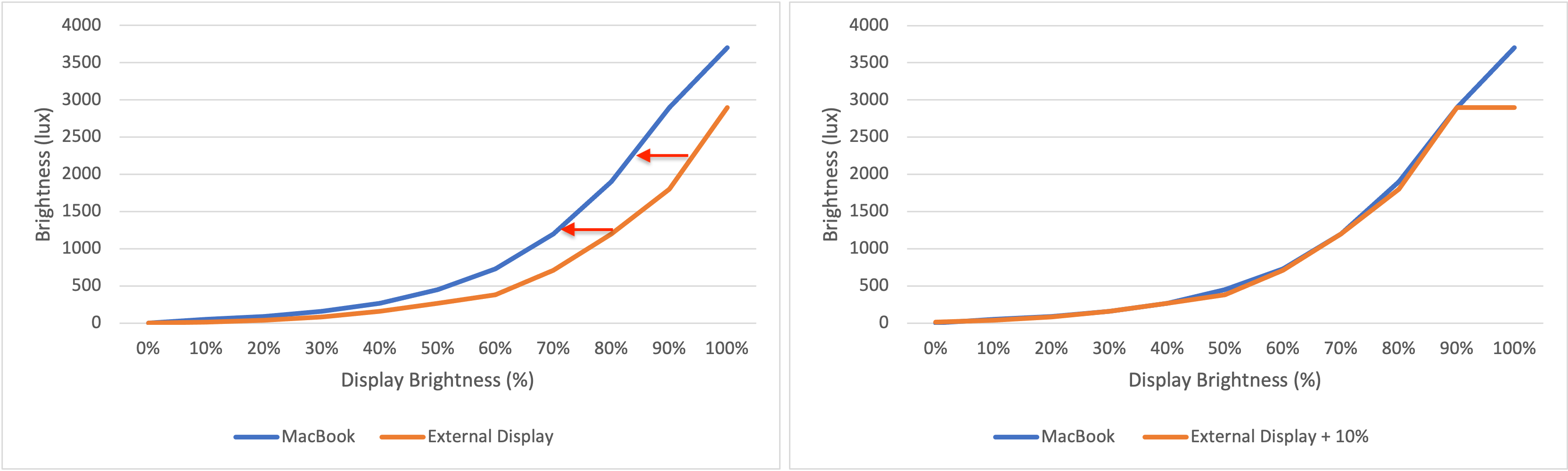
That way, I can use a combined brightness slider for all displays, and the brightness of all my monitors will be synced. (Obviously, the external display won't be able to match the maximum brightness of my MacBook, but it will at least be at its maximum brightness.)
@waydabber commented on GitHub (Mar 15, 2022):
This is related to advanced absolute syncing (with calibration involved) in general. There are some other items that should go under this umbrella - see https://github.com/MonitorControl/MonitorControl/issues/943 fro example.
@stale[bot] commented on GitHub (Mar 16, 2023):
Hey there, it looks like there has been no activity on this issue recently. Has the issue been fixed, or does it still require attention? This issue may be closed if no further activity occurs. Thank you for your contributions.