mirror of
https://github.com/MonitorControl/MonitorControl.git
synced 2026-10-23 08:07:35 -06:00
[GH-ISSUE #927] It doesn't work for the sidecar display with ipad #571
Labels
No labels
Status: Abandoned
arm64
beta
beta
bug
done
duplicate
enhancement
feedback needed from reporter
in progress
information
invalid
investigating
known Issue
monitor Issue
pull-request
translation
unable to reproduce
unreleased
x86
No milestone
No project
No assignees
1 participant

Notifications
Due date
No due date set.
Dependencies
No dependencies set
Reference
github-starred/MonitorControl#571
Loading…
Reference in a new issue
No description provided.
Delete branch "%!s()"
Deleting a branch is permanent. Although the deleted branch may continue to exist for a short time before it actually gets removed, it CANNOT be undone in most cases. Continue?
Originally created by @ycxbox on GitHub (Feb 2, 2022).
Original GitHub issue: https://github.com/MonitorControl/MonitorControl/issues/927
Before opening the issue, have you...?
Describe the issue
Hi Bro,
Does anyone has ever tried the monitorcontrol for the iPad sidecar display with mac book pro?
it doesn't work in this scenario, or maybe it doesn't support it well. when I tried in this way, it popup with an error message asking me to decide eighter to quit the blocking program or stop something with gamma which i don't understand.... but anyway, it just can not adjust the sidecar iPad brightness as it does with any other monitor else.
wish it can support the sidecar approach, thanks, guys !!
Best regards,
Jeff Yu
Expected behavior
hope it can support sidecar display brightness control
Anything else?
nothing else ~
Environment Information (please complete the following information)
@waydabber commented on GitHub (Feb 2, 2022):
Sidecar brightness change should work in software mode. Sidecar does not support gamma mode so there should not be a popup like that.
@ycxbox commented on GitHub (Feb 9, 2022):
Hi Bros~
it does give an error message like what I mentioned above, I tried to replicate the same error by using another mac book pro, please see the message below:
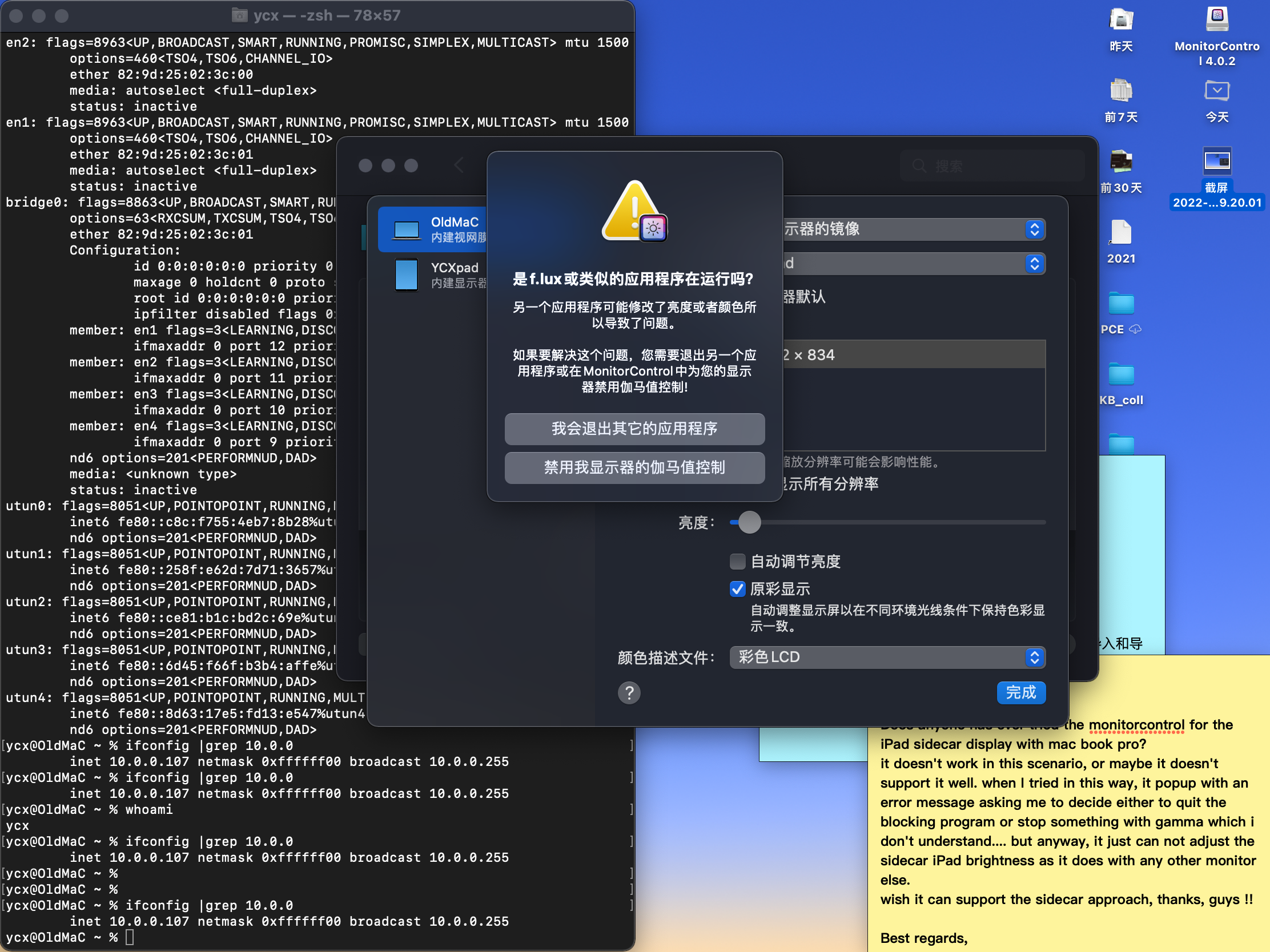
Is there any workaround that I can do to make it works under the sidecar scenario, thanks, man!
Best regards,
Jeff
@waydabber commented on GitHub (Feb 9, 2022):
Sidecar control should work just fine. The message (I think - I can't read Chinese) is about some other app interfering with MonitorControl when trying to use gamma control - this method of control is not used with Sidecar. What happens if you just allow the app to disable gamma control?
@waydabber commented on GitHub (Feb 23, 2022):
I'll close this one for now due to inactivity. If there is any more info about this, please let me know!