[GH-ISSUE #917] Adjust Brightness Separately On Mac Touch Bar Has An Unexpected behaviour #565

Closed
opened 2026-05-05 06:15:57 -06:00 by gitea-mirror · 3 comments
Owner

Originally created by @josep11 on GitHub (Jan 26, 2022).
Original GitHub issue: https://github.com/MonitorControl/MonitorControl/issues/917

Before opening the issue, have you...?

  • Searched for existing issues
  • Looked through the wiki
  • Updated MonitorControl to the latest version (if applicable)

Describe the bug

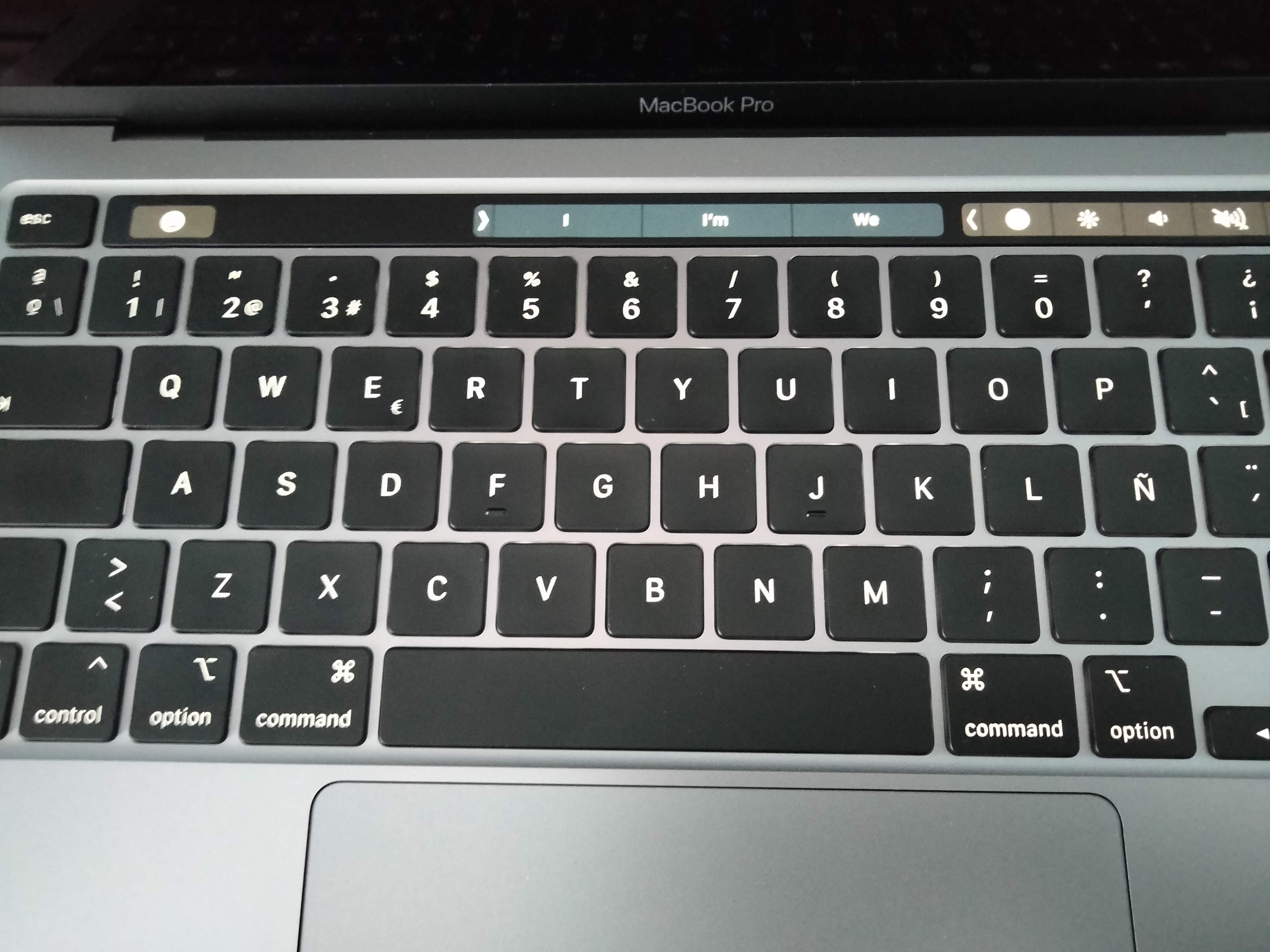
On the touch bar of newer Macs the adjust brightness for only one screen using the "Control" key is only working when the adjust brightness key is on the left:

IMG20220126131358

But not when it is on the right:
IMG20220126131413

Steps to reproduce

I recorded a 30 second video where I do 3 steps.

  1. Pressing the brightness button will change and synchronise both the laptop and external display's brightness. This works as expected.
  2. From here trying to change only the laptop's brightness but not the one on the external display. Pressing the brightness slider on the touch bar (when it appears on the right of the bar) together with the "Control" key still changes both screens' brightness.
  3. However when the brightness button is on the very left of the touch bar and it is pressed together with the "Control" key, the behaviour is the expected one: aka that only the laptop's brightness is changed.

Expected behavior

Explained above

Anything else?

No response

Environment Information (please complete the following information)

- macOS version: 12.1
- Mac model: M1, 2020
- MonitorControl version: 4.0.2 build 6965
- Monitor(s): Dell S2419H
- Apple Silicon/M1 (yes or no): yes
Originally created by @josep11 on GitHub (Jan 26, 2022). Original GitHub issue: https://github.com/MonitorControl/MonitorControl/issues/917 ### Before opening the issue, have you...? - [X] Searched for existing issues - [X] Looked through [the wiki](https://github.com/MonitorControl/MonitorControl/wiki) - [X] Updated MonitorControl to the latest version (if applicable) ### Describe the bug On the touch bar of newer Macs the adjust brightness for only one screen using the "Control" key is only working when the adjust brightness key is on the left: ![IMG20220126131358](https://user-images.githubusercontent.com/5558911/151161226-9dfa96cc-47ed-4839-a752-3569760f8e0c.jpg) But not when it is on the right: ![IMG20220126131413](https://user-images.githubusercontent.com/5558911/151161267-0ad22cf4-06b8-4976-ae57-e13333ddecb7.jpg) ### Steps to reproduce I recorded [a 30 second video](https://www.dropbox.com/s/4zhloft24ovtwxh/MonitorControl%20bug%20report%20brightness.mp4?dl=0) where I do 3 steps. 1. Pressing the brightness button will change and synchronise both the laptop and external display's brightness. This works as expected. 2. From here trying to change only the laptop's brightness but not the one on the external display. Pressing the brightness slider on the touch bar (when it appears on the right of the bar) together with the "Control" key still changes both screens' brightness. 3. However when the brightness button is on the very left of the touch bar and it is pressed together with the "Control" key, the behaviour is the expected one: aka that only the laptop's brightness is changed. ### Expected behavior Explained above ### Anything else? _No response_ ### Environment Information (please complete the following information) ```markdown - macOS version: 12.1 - Mac model: M1, 2020 - MonitorControl version: 4.0.2 build 6965 - Monitor(s): Dell S2419H - Apple Silicon/M1 (yes or no): yes ```
Author
Owner

@waydabber commented on GitHub (Jan 26, 2022):

Hi @josep11 - Sadly Touch Bar sliders are not supported and won't be supported. There is however some limited support via the ability of syncing internal display brightness changes over to external displays. This does not read the slider itself, the change in the external display happens because of the syncing (the same way as when the brightness is changed by the ambient light sensor).

If your issue is that the internal display brightness change affects the external display change in this indirect way, you need to disable Sync brightness changes from Built-in and Apple dispalys (this option is not enabled by default, but is probably enabled in your setup).

Let me know if this helps!

<!-- gh-comment-id:1022155388 --> @waydabber commented on GitHub (Jan 26, 2022): Hi @josep11 - Sadly Touch Bar sliders are not supported and won't be supported. There is however some limited support via the ability of syncing internal display brightness changes over to external displays. This does not read the slider itself, the change in the external display happens because of the syncing (the same way as when the brightness is changed by the ambient light sensor). If your issue is that the internal display brightness change affects the external display change in this indirect way, you need to disable `Sync brightness changes from Built-in and Apple dispalys` (this option is not enabled by default, but is probably enabled in your setup). Let me know if this helps!
Author
Owner

@josep11 commented on GitHub (Jan 26, 2022):

Hi @josep11 - Sadly Touch Bar sliders are not supported and won't be supported. There is however some limited support via the ability of syncing internal display brightness changes over to external displays. This does not read the slider itself, the change in the external display happens because of the syncing (the same way as when the brightness is changed by the ambient light sensor).

If your issue is that the internal display brightness change affects the external display change in this indirect way, you need to disable Sync brightness changes from Built-in and Apple dispalys (this option is not enabled by default, but is probably enabled in your setup).

Let me know if this helps!

Hi @waydabber, thanks for the quick reply. Alright I understand. Actually, today it's my first day with a Mac with slider (the company one) and I think the slider is more of a nuisance than anything else hehe

It is fine, as there is the workaround and I can 1. control the brightness of the external display with the Mac and then 2. turn off my laptop's display, then everything is perfect. The app is great, by the way. Thanks!

<!-- gh-comment-id:1022305041 --> @josep11 commented on GitHub (Jan 26, 2022): > Hi @josep11 - Sadly Touch Bar sliders are not supported and won't be supported. There is however some limited support via the ability of syncing internal display brightness changes over to external displays. This does not read the slider itself, the change in the external display happens because of the syncing (the same way as when the brightness is changed by the ambient light sensor). > > If your issue is that the internal display brightness change affects the external display change in this indirect way, you need to disable `Sync brightness changes from Built-in and Apple dispalys` (this option is not enabled by default, but is probably enabled in your setup). > > Let me know if this helps! Hi @waydabber, thanks for the quick reply. Alright I understand. Actually, today it's my first day with a Mac with slider (the company one) and I think the slider is more of a nuisance than anything else hehe It is fine, as there is the workaround and I can 1. control the brightness of the external display with the Mac and then 2. turn off my laptop's display, then everything is perfect. The app is great, by the way. Thanks!
Author
Owner

@waydabber commented on GitHub (Jan 26, 2022):

Hey @josep11 thanks for the reply. Well, the touchbar is a divisive issue. I am not a fan of it either but I know others who said they can't live without it (hopefully they'll cope as Apple apparently started to move away from it :)).

<!-- gh-comment-id:1022317448 --> @waydabber commented on GitHub (Jan 26, 2022): Hey @josep11 thanks for the reply. Well, the touchbar is a divisive issue. I am not a fan of it either but I know others who said they can't live without it (hopefully they'll cope as Apple apparently started to move away from it :)).
Sign in to join this conversation.
No milestone
No project
No assignees
1 participant
Notifications
Due date
The due date is invalid or out of range. Please use the format "yyyy-mm-dd".

No due date set.

Dependencies

No dependencies set.

Reference: github-starred/MonitorControl#565
No description provided.