[GH-ISSUE #872] Fails to intercept bright/dim keys after wake from sleep #546

Closed
opened 2026-05-05 06:12:50 -06:00 by gitea-mirror · 10 comments
Owner

Originally created by @webdeck on GitHub (Jan 3, 2022).
Original GitHub issue: https://github.com/MonitorControl/MonitorControl/issues/872

Before opening the issue, have you...?

  • Searched for existing issues
  • Looked through the wiki
  • Updated MonitorControl to the latest version (if applicable)

Describe the bug

Sometimes when waking from sleep on my M1 Max MacBook Pro, MonitorControl no longer intercepts the brightness keys. I have two LG 5K UltraWide displays connected, and the laptop is in clamshell mode. I have it configured so that the monitor brightness keys adjust both monitors at the same time. When this bug happens, the brightness keys only effect the monitor where the mouse is.

Steps to reproduce

  1. Connect two monitors
  2. Set preferences to have brightness keys adjust both monitors
  3. Sleep computer
  4. Wake computer
  5. Press brightness key
  6. Repeat steps 3-5 until issue appears where brightness is only adjusted on one monitor

Expected behavior

Brightness key adjusts brightness on both monitors

Anything else?

If I configure custom keys, those always work - it's only the dedicated keys that have this issue.

This appears to be a TCC issue, as if I go to Privacy and disable accessibility, quit the app, enable accessibility, and relaunch the app, it starts working again.

Environment Information (please complete the following information)

- macOS version: 12.1 Monterey
- Mac model: MacBook Pro M1 Max 16"
- MonitorControl version: 4.0.2 build 6965
- Monitor(s): 2 x LG UltraFine 5K
- Apple Silicon/M1 (yes or no): yes
Originally created by @webdeck on GitHub (Jan 3, 2022). Original GitHub issue: https://github.com/MonitorControl/MonitorControl/issues/872 ### Before opening the issue, have you...? - [X] Searched for existing issues - [X] Looked through [the wiki](https://github.com/MonitorControl/MonitorControl/wiki) - [X] Updated MonitorControl to the latest version (if applicable) ### Describe the bug Sometimes when waking from sleep on my M1 Max MacBook Pro, MonitorControl no longer intercepts the brightness keys. I have two LG 5K UltraWide displays connected, and the laptop is in clamshell mode. I have it configured so that the monitor brightness keys adjust both monitors at the same time. When this bug happens, the brightness keys only effect the monitor where the mouse is. ### Steps to reproduce 1. Connect two monitors 2. Set preferences to have brightness keys adjust both monitors 3. Sleep computer 4. Wake computer 5. Press brightness key 6. Repeat steps 3-5 until issue appears where brightness is only adjusted on one monitor ### Expected behavior Brightness key adjusts brightness on both monitors ### Anything else? If I configure custom keys, those always work - it's only the dedicated keys that have this issue. This appears to be a TCC issue, as if I go to Privacy and disable accessibility, quit the app, enable accessibility, and relaunch the app, it starts working again. ### Environment Information (please complete the following information) ```markdown - macOS version: 12.1 Monterey - Mac model: MacBook Pro M1 Max 16" - MonitorControl version: 4.0.2 build 6965 - Monitor(s): 2 x LG UltraFine 5K - Apple Silicon/M1 (yes or no): yes ```
Author
Owner

@waydabber commented on GitHub (Jan 3, 2022):

Since the Ultrafine 5K display can be controlled natively via macOS, we need to figure out whether when this issue happens, do the control using the native keys are routed through MC or not. Most probably not, but to make sure, please check if the mouse slider is moving as you adjust the brightness with the keyboard or if it moves with some delay. In the latter case MC does not control the display but reads the current brightness and applies to the slider with some delay.

<!-- gh-comment-id:1004307969 --> @waydabber commented on GitHub (Jan 3, 2022): Since the Ultrafine 5K display can be controlled natively via macOS, we need to figure out whether when this issue happens, do the control using the native keys are routed through MC or not. Most probably not, but to make sure, please check if the mouse slider is moving as you adjust the brightness with the keyboard or if it moves with some delay. In the latter case MC does not control the display but reads the current brightness and applies to the slider with some delay.
Author
Owner

@webdeck commented on GitHub (Jan 7, 2022):

I just had this happen again. The sliders do not update at all when I change brightness with the keyboard brightness keys.

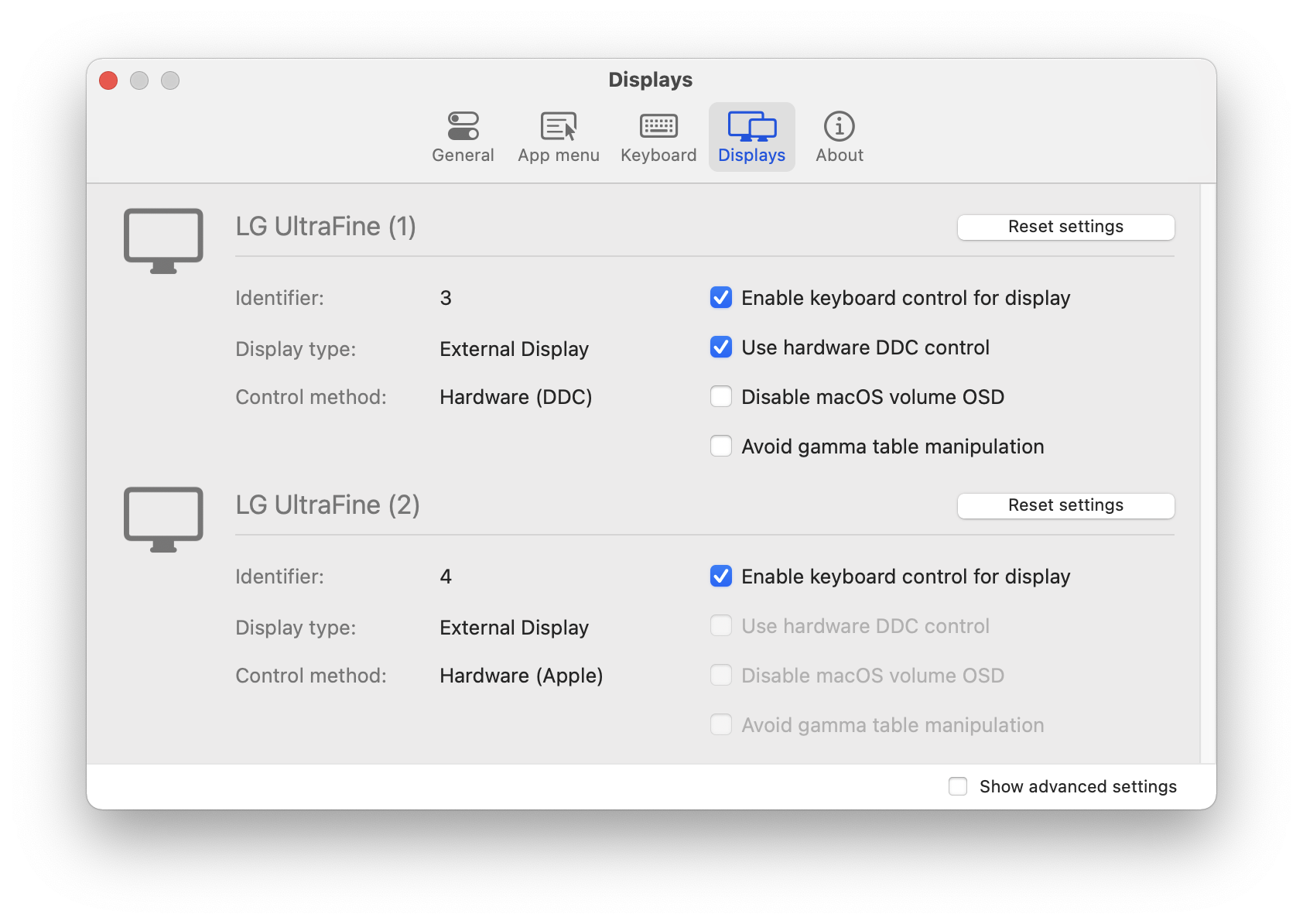
I also see that in preferences it is now showing one of the monitors as DCC instead of Apple, which is incorrect as they are both UltraFine 5ks connected to thunderbolt ports directly (one on left port and one on right port.)
Screen Shot 2022-01-07 at 8 00 05 AM

<!-- gh-comment-id:1007525263 --> @webdeck commented on GitHub (Jan 7, 2022): I just had this happen again. The sliders do not update at all when I change brightness with the keyboard brightness keys. I also see that in preferences it is now showing one of the monitors as DCC instead of Apple, which is incorrect as they are both UltraFine 5ks connected to thunderbolt ports directly (one on left port and one on right port.) <img width="842" alt="Screen Shot 2022-01-07 at 8 00 05 AM" src="https://user-images.githubusercontent.com/5542961/148570872-edc1932a-0636-45b4-8b3f-c82e9d6e04dd.png">
Author
Owner

@webdeck commented on GitHub (Jan 7, 2022):

A quit and restart of the app now shows both as Apple again and the slider is updating with a delay.

<!-- gh-comment-id:1007526618 --> @webdeck commented on GitHub (Jan 7, 2022): A quit and restart of the app now shows both as Apple again and the slider is updating with a delay.
Author
Owner

@webdeck commented on GitHub (Jan 7, 2022):

I see these warnings in the console:

error	08:05:10.568327-0800	tccd	<TCCDProcess: identifier=me.guillaumeb.MonitorControl, pid=47356, auid=501, euid=501, binary_path=/Applications/MonitorControl.app/Contents/MacOS/MonitorControl> attempted to call TCCAccessRequest for kTCCServiceAccessibility without the recommended com.apple.private.tcc.manager.check-by-audit-token entitlement
error	08:05:10.598494-0800	tccd	Prompting policy for hardened runtime; service: kTCCServiceAppleEvents requires entitlement com.apple.security.automation.apple-events but it is missing for accessing={<TCCDProcess: identifier=me.guillaumeb.MonitorControl, pid=47356, auid=501, euid=501, binary_path=/Applications/MonitorControl.app/Contents/MacOS/MonitorControl>}, requesting={<TCCDProcess: identifier=com.apple.appleeventsd, pid=634, auid=55, euid=55, binary_path=/System/Library/CoreServices/appleeventsd>},
error	08:05:11.009808-0800	tccd	<TCCDProcess: identifier=me.guillaumeb.MonitorControl, pid=47356, auid=501, euid=501, binary_path=/Applications/MonitorControl.app/Contents/MacOS/MonitorControl> attempted to call TCCAccessRequest for kTCCServiceAccessibility without the recommended com.apple.private.tcc.manager.check-by-audit-token entitlement
<!-- gh-comment-id:1007532688 --> @webdeck commented on GitHub (Jan 7, 2022): I see these warnings in the console: ``` error 08:05:10.568327-0800 tccd <TCCDProcess: identifier=me.guillaumeb.MonitorControl, pid=47356, auid=501, euid=501, binary_path=/Applications/MonitorControl.app/Contents/MacOS/MonitorControl> attempted to call TCCAccessRequest for kTCCServiceAccessibility without the recommended com.apple.private.tcc.manager.check-by-audit-token entitlement error 08:05:10.598494-0800 tccd Prompting policy for hardened runtime; service: kTCCServiceAppleEvents requires entitlement com.apple.security.automation.apple-events but it is missing for accessing={<TCCDProcess: identifier=me.guillaumeb.MonitorControl, pid=47356, auid=501, euid=501, binary_path=/Applications/MonitorControl.app/Contents/MacOS/MonitorControl>}, requesting={<TCCDProcess: identifier=com.apple.appleeventsd, pid=634, auid=55, euid=55, binary_path=/System/Library/CoreServices/appleeventsd>}, error 08:05:11.009808-0800 tccd <TCCDProcess: identifier=me.guillaumeb.MonitorControl, pid=47356, auid=501, euid=501, binary_path=/Applications/MonitorControl.app/Contents/MacOS/MonitorControl> attempted to call TCCAccessRequest for kTCCServiceAccessibility without the recommended com.apple.private.tcc.manager.check-by-audit-token entitlement ```
Author
Owner

@waydabber commented on GitHub (Jan 7, 2022):

Hi, tccd manages privacy stuff (the only thing this is needed for in case of MonitorControl is access to the media keys on the keyboard). Something seems to be wrong there if this fails after sleep. You might want to try resetting the Security&Privacy settings in macOS by issuing the following commands in Terminal after exiting MonitorControl:

tccutil reset All
defaults delete me.guillaumeb.MonitorControl

This will both reset the security settings and MonitorControl.

<!-- gh-comment-id:1007610394 --> @waydabber commented on GitHub (Jan 7, 2022): Hi, tccd manages privacy stuff (the only thing this is needed for in case of MonitorControl is access to the media keys on the keyboard). Something seems to be wrong there if this fails after sleep. You might want to try resetting the Security&Privacy settings in macOS by issuing the following commands in Terminal after exiting MonitorControl: `tccutil reset All` `defaults delete me.guillaumeb.MonitorControl` This will both reset the security settings and MonitorControl.
Author
Owner

@webdeck commented on GitHub (Jan 8, 2022):

Okay, I first recorded all the permissions I had granted, then reset them and rebooted, and re-granted everything. I will reply if I encounter the issue again.

<!-- gh-comment-id:1007853120 --> @webdeck commented on GitHub (Jan 8, 2022): Okay, I first recorded all the permissions I had granted, then reset them and rebooted, and re-granted everything. I will reply if I encounter the issue again.
Author
Owner

@waydabber commented on GitHub (Jan 8, 2022):

Thanks for the response. I'll close the issue but feel free to comment if there is still a problem with this!

<!-- gh-comment-id:1008165162 --> @waydabber commented on GitHub (Jan 8, 2022): Thanks for the response. I'll close the issue but feel free to comment if there is still a problem with this!
Author
Owner

@webdeck commented on GitHub (Jan 9, 2022):

Sadly, it just happened again. I have to correct my reproduction steps as I don't sleep the computer - all I do is lock it (command-control-Q, followed by escape to turn off the monitors.)

For what it's worth, when this happens, SteerMouse also suffers a similar problem of not being able to send key presses when a mouse button is pressed (e.g. the forward and back commands for Safari.)

<!-- gh-comment-id:1008239106 --> @webdeck commented on GitHub (Jan 9, 2022): Sadly, it just happened again. I have to correct my reproduction steps as I don't sleep the computer - all I do is lock it (command-control-Q, followed by escape to turn off the monitors.) For what it's worth, when this happens, SteerMouse also suffers a similar problem of not being able to send key presses when a mouse button is pressed (e.g. the forward and back commands for Safari.)
Author
Owner

@waydabber commented on GitHub (Jan 9, 2022):

Well, if this happens with other apps as well then it is either a macOS issue or you might have some other utilities installed that somehow interfere with tccd. Maybe you can experiment with a vanilla user (or installation?) and see if this happens. Sorry for not having a better idea for this. :)

<!-- gh-comment-id:1008254833 --> @waydabber commented on GitHub (Jan 9, 2022): Well, if this happens with other apps as well then it is either a macOS issue or you might have some other utilities installed that somehow interfere with tccd. Maybe you can experiment with a vanilla user (or installation?) and see if this happens. Sorry for not having a better idea for this. :)
Author
Owner

@webdeck commented on GitHub (Jan 9, 2022):

Yes, this is something strange going on. It gets even stranger - after this happened, rather than rebooting, I locked the screen, waited a few seconds, and unlocked it, and then MonitorControl (and SteerMouse) started working again. So it seems like something isn't unlocking properly sometimes???

<!-- gh-comment-id:1008312256 --> @webdeck commented on GitHub (Jan 9, 2022): Yes, this is something strange going on. It gets even stranger - after this happened, rather than rebooting, I locked the screen, waited a few seconds, and unlocked it, and then MonitorControl (and SteerMouse) started working again. So it seems like something isn't unlocking properly sometimes???
Sign in to join this conversation.
No milestone
No project
No assignees
1 participant
Notifications
Due date
The due date is invalid or out of range. Please use the format "yyyy-mm-dd".

No due date set.

Dependencies

No dependencies set.

Reference: github-starred/MonitorControl#546
No description provided.