[GH-ISSUE #844] Volume control with TouchBar? #532

Closed
opened 2026-05-05 06:11:50 -06:00 by gitea-mirror · 5 comments
Owner

Originally created by @Erik262 on GitHub (Dec 13, 2021).
Original GitHub issue: https://github.com/MonitorControl/MonitorControl/issues/844

Originally assigned to: @waydabber on GitHub.

Before opening the issue, have you...?

  • Searched for existing issues
  • Looked through the wiki
  • Updated MonitorControl to the latest version (if applicable)

Describe the bug

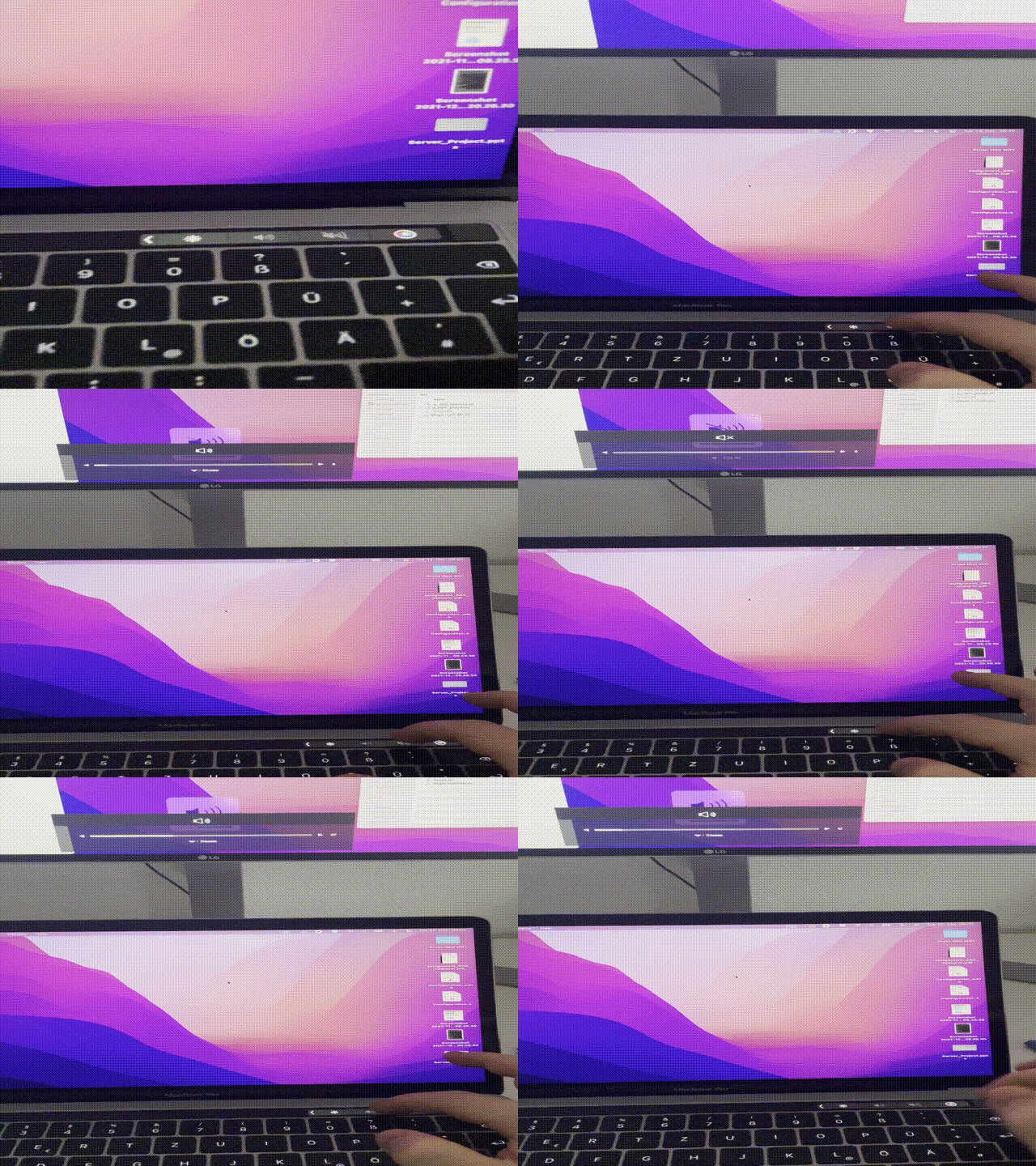
I can't change the volume through my TouchBar on my MacBook, but the volume slider of MonitorControl works. The speaker symbols for volume and mute are greyed out, but the mute symbol still works even it is colored grey.

Touch Bar Shot 2021-12-13 at 22 05 40

EDIT:
I also figured something new about that problem
IMG_4880

Steps to reproduce

Try to adjust the volume via TouchBar speaker symbols on your TouchBar.

Expected behavior

Adjusted volume through MacBook TouchBar

Anything else?

Nope. :)

Environment Information (please complete the following information)

- macOS version: 12.1
- Mac model: MacBook Pro (13-inch, 2016, Four Thunderbolt 3 Ports)
- MonitorControl version: 4.0.2 Build 6965
- Monitor(s): 1
- Apple Silicon/M1 (yes or no): no
Originally created by @Erik262 on GitHub (Dec 13, 2021). Original GitHub issue: https://github.com/MonitorControl/MonitorControl/issues/844 Originally assigned to: @waydabber on GitHub. ### Before opening the issue, have you...? - [X] Searched for existing issues - [X] Looked through [the wiki](https://github.com/MonitorControl/MonitorControl/wiki) - [X] Updated MonitorControl to the latest version (if applicable) ### Describe the bug I can't change the volume through my TouchBar on my MacBook, but the volume slider of MonitorControl works. The speaker symbols for volume and mute are greyed out, but the mute symbol still works even it is colored grey. <img width="1085" alt="Touch Bar Shot 2021-12-13 at 22 05 40" src="https://user-images.githubusercontent.com/11977647/145889026-108b2fd9-64c0-4a63-a00f-f6813f448c31.png"> EDIT: I also figured something new about that problem ![IMG_4880](https://user-images.githubusercontent.com/11977647/145972575-c1ed5385-a76a-4988-b8e5-98dbcc30dbdb.gif) ### Steps to reproduce Try to adjust the volume via TouchBar speaker symbols on your TouchBar. ### Expected behavior Adjusted volume through MacBook TouchBar ### Anything else? Nope. :) ### Environment Information (please complete the following information) ```markdown - macOS version: 12.1 - Mac model: MacBook Pro (13-inch, 2016, Four Thunderbolt 3 Ports) - MonitorControl version: 4.0.2 Build 6965 - Monitor(s): 1 - Apple Silicon/M1 (yes or no): no ```
Author
Owner

@waydabber commented on GitHub (Dec 14, 2021):

hi @Erik262 - to me it seems like the touchbar keys do work (base don the gif you sent). Or am I missing something? :)

<!-- gh-comment-id:993495045 --> @waydabber commented on GitHub (Dec 14, 2021): hi @Erik262 - to me it seems like the touchbar keys do work (base don the gif you sent). Or am I missing something? :)
Author
Owner

@Erik262 commented on GitHub (Dec 14, 2021):

@waydabber Yes this works, have to do it manually via the slider in the app.

<!-- gh-comment-id:993540098 --> @Erik262 commented on GitHub (Dec 14, 2021): @waydabber Yes this works, have to do it manually via the slider in the app.
Author
Owner

@waydabber commented on GitHub (Dec 14, 2021):

Hi, just saw that what I wrote "mouse keys work" does not make sense lol - I meant "touchbar keys work". So it seems you are using the key up/down button on the touch bar and the volume is controlled in your GIF.

<!-- gh-comment-id:993707752 --> @waydabber commented on GitHub (Dec 14, 2021): Hi, just saw that what I wrote "mouse keys work" does not make sense lol - I meant "touchbar keys work". So it seems you are using the key up/down button on the touch bar and the volume is controlled in your GIF.
Author
Owner

@Erik262 commented on GitHub (Dec 14, 2021):

@waydabber, haha I also thought, what is this guy meaning xD. Yes, the touch bar is completely working, and the volume buttons on the touch bar as well when the computer is not plugged into the monitor.

By tapping on the volume button, there should be a volume slider that should look like this. (In this example I connected my Headphones)
Touch Bar Shot 2021-12-14 at 18 16 46

<!-- gh-comment-id:993804415 --> @Erik262 commented on GitHub (Dec 14, 2021): @waydabber, haha I also thought, what is this guy meaning xD. Yes, the touch bar is completely working, and the volume buttons on the touch bar as well when the computer is not plugged into the monitor. By tapping on the volume button, there should be a volume slider that should look like this. (In this example I connected my Headphones) <img width="1085" alt="Touch Bar Shot 2021-12-14 at 18 16 46" src="https://user-images.githubusercontent.com/11977647/146047338-3ee06017-ee43-473a-9a52-6c3437b300ed.png">
Author
Owner

@waydabber commented on GitHub (Dec 14, 2021):

Oh I understand. Unfortunately just like the built-in volume slider is not available for digital outputs in macOS, the touchbar slider is not available as well. There is no known workaround for that at this time. Keyboard control is possible by capturing the keyboard events and building upon that a custom logic to control volume via DDC.

<!-- gh-comment-id:993997634 --> @waydabber commented on GitHub (Dec 14, 2021): Oh I understand. Unfortunately just like the built-in volume slider is not available for digital outputs in macOS, the touchbar slider is not available as well. There is no known workaround for that at this time. Keyboard control is possible by capturing the keyboard events and building upon that a custom logic to control volume via DDC.
Sign in to join this conversation.
No milestone
No project
No assignees
1 participant
Notifications
Due date
The due date is invalid or out of range. Please use the format "yyyy-mm-dd".

No due date set.

Dependencies

No dependencies set.

Reference: github-starred/MonitorControl#532
No description provided.