mirror of
https://github.com/MonitorControl/MonitorControl.git
synced 2026-10-23 08:07:35 -06:00
[GH-ISSUE #824] LG Ultrawide Volume Control #524
Labels
No labels
Status: Abandoned
arm64
beta
beta
bug
done
duplicate
enhancement
feedback needed from reporter
in progress
information
invalid
investigating
known Issue
monitor Issue
pull-request
translation
unable to reproduce
unreleased
x86
No milestone
No project
No assignees
1 participant

Notifications
Due date
No due date set.
Dependencies
No dependencies set
Reference
github-starred/MonitorControl#524
Loading…
Reference in a new issue
No description provided.
Delete branch "%!s()"
Deleting a branch is permanent. Although the deleted branch may continue to exist for a short time before it actually gets removed, it CANNOT be undone in most cases. Continue?
Originally created by @Duskcyclist on GitHub (Dec 3, 2021).
Original GitHub issue: https://github.com/MonitorControl/MonitorControl/issues/824
Before opening the issue, have you...?
Describe the issue
Hi there,
I'm having a few issues with the volume control on my LG 34WN80C-B UltraWide Monitor. Using the Mac keyboards to turn the sound up & down does work but it brings up the LG volume indicator overlay on the screen which is a bit in the way & not as sleek as the Mac volume indicator. While the Mac volume indicator still shows up, it is hidden b
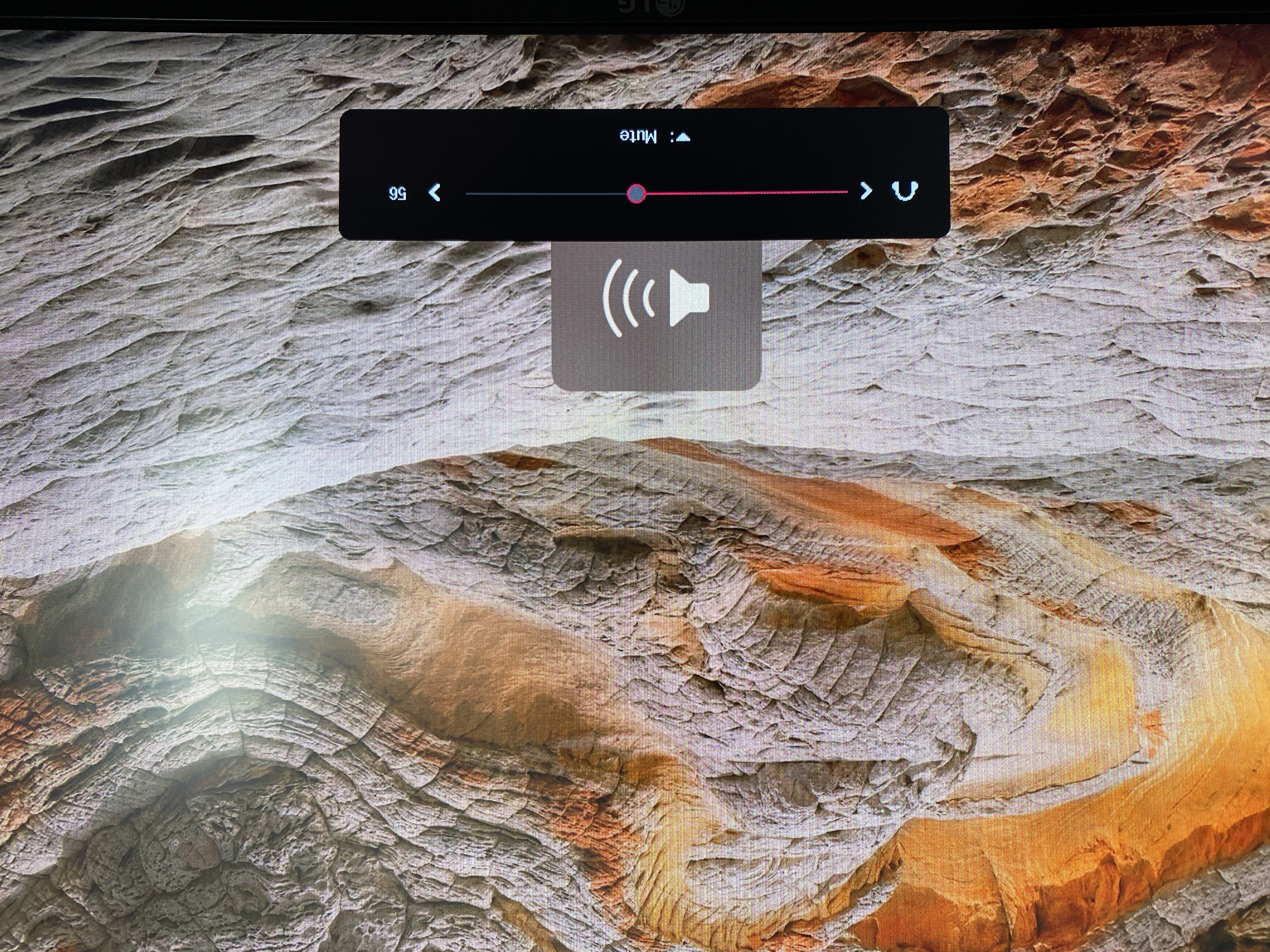
ehind the LG volume indicator. Photo attached.
The other issue is that when I mute the system audio (via the Mac keyboard button) it does mute however, when I unmute, the LG monitor stays muted. The only want to unmute is to toggle the nob below the monitor.
Otherwise, this app is awesome & does a great job.
Expected behavior
I'd love for the volume indicator on the Mac to only show up & the LG volume indicator remain inactive. I've tried SoundSource & it works in that regard. Also MonitorControl does work perfectly when adjusting the brightness (no LG monitor overlays).
I'm also hoping muting & unmuting would work as expected without having to toggle LG monitor settings.
Anything else?
No response
Environment Information (please complete the following information)
@JoniVR commented on GitHub (Dec 3, 2021):
Hi @Duskcyclist!
This is expected behaviour. The difference between things like SoundSource is that MonitorControl controls the display itself instead of using a virtual audio channel. We used to have a feature that spammed a certain command that removed the LG OSD (aka overlay), but it didn't work very reliably, so it got removed. There's not much more we can do there.
This is LG specific. I have almost the same model as you do. There is no LG OSD for brightness like there is for volume. The reason there's an OSD for volume is because you can use the knob to adjust volume, it's displaying that OSD.
Can you try:
Show advanced settingsat the bottomEnable Mute DDC commandfor the display.@Duskcyclist commented on GitHub (Dec 3, 2021):
Thank you so much for your speedy response! I really appreciate it. I can certainly live with the LG overlay. All good. But that mute toggle suggestion did fix it! Much better. Sorry I didn't see that option to show advanced settings.
Really appreciate your assistance & great app! Have a wonderful weekend.
[GH-ISSUE #824] LG Ultrawide Volume Controlto [GH-ISSUE #824] LG Ultrawide Volume Control