mirror of
https://github.com/MonitorControl/MonitorControl.git
synced 2026-10-23 08:07:35 -06:00
[GH-ISSUE #49] App does not work with multiple identical monitors #47
Labels
No labels
Status: Abandoned
arm64
beta
beta
bug
done
duplicate
enhancement
feedback needed from reporter
in progress
information
invalid
investigating
known Issue
monitor Issue
pull-request
translation
unable to reproduce
unreleased
x86
No milestone
No project
No assignees
1 participant

Notifications
Due date
No due date set.
Dependencies
No dependencies set
Reference
github-starred/MonitorControl#47
Loading…
Reference in a new issue
No description provided.
Delete branch "%!s()"
Deleting a branch is permanent. Although the deleted branch may continue to exist for a short time before it actually gets removed, it CANNOT be undone in most cases. Continue?
Originally created by @drewcotten on GitHub (Sep 25, 2018).
Original GitHub issue: https://github.com/MonitorControl/MonitorControl/issues/49
Originally assigned to: @waydabber on GitHub.
Unexpected behavior w/ 2 identical BenQ BL3201PH monitors connected via DisplayPort on a GTX 980ti, running 10.13.6. App is only able to control DDC on one of the two monitors. When the working monitor is the primary "Mac" monitor as chose in Display Preferences in the Arrangement tab.
Disabling the primary monitor in MonitorControl settings does not fix this issue. When I disable the "main" working monitor in Monitor Control preferences, adjusting the other monitor brightness causes the main monitor brightness to then change. Same applies for the brightness sliders in menubar. Has anyone else experienced this?
I've tried changing the system monitor names with no luck, no change in name in the MonitorControl app. Will keep trying other options.
@KrissHeo commented on GitHub (Sep 25, 2018):
I have same issue. two identical monitor (alphascan 5K27), connected to rx480(egpu)
@drewcotten commented on GitHub (Sep 25, 2018):
It appears most DDC control apps on Github have this same issue. It must be a root setting in ddctl (which all Mac apps that control via DDC use as far as I can tell) that is causing the issue - https://github.com/kfix/ddcctl
Edit: In fact, this is an unresolved issue on the ddcctl Github. If we can fix there, we should be able to fix here. See: https://github.com/kfix/ddcctl/issues/17
@the0neyouseek commented on GitHub (May 23, 2019):
Hi, is this still an issue with the latest version ?
@esetnik commented on GitHub (Jun 3, 2019):
I am able to control brightness on multiple monitors in latest version.
@drewcotten commented on GitHub (Jun 4, 2019):
This issue does not relate to multiple monitors - it relates to identical monitors. Unfortunately, in the latest version of monitor control, I still have this issue with my two identical displays. I believe the root problem is with ddcctl and further down the line Apple's APIs. I would recommend anyone having this issue post here https://github.com/kfix/ddcctl/issues/17
@esetnik commented on GitHub (Jun 4, 2019):
Ok sorry for the lack of helpful feedback on my part. In case it matters I am using dual identical P2715Q monitors without any issue.
@drewcotten commented on GitHub (Jun 4, 2019):
Not a problem at all. If your dual monitor setup works, it appears the problem is on my end. I will review tomorrow.
@geoffmyers commented on GitHub (Jun 12, 2019):
I am experiencing the same issue with two Samsung U28E590 monitors both connected via DisplayPort to a Radeon RX 580. The brightness controls only work for one monitor but not the other.
@leo150 commented on GitHub (Jun 13, 2019):
Same for me with two BenQ GW2760HL. It doesn't look like there is any progress on kfix/ddcctl/issues/17. Is it possible to override vendor or model for a specific monitor to trick ddcctl?
@JoniVR commented on GitHub (Jun 13, 2019):
ddcctl is no longer used internally. No point to link to that specific issue anymore since it's already been linked multiple times.
We now use DDC.swift. But I think the source code is based on ddcctl so it's probably the same underlying issue.
@kevinjohncutler commented on GitHub (Sep 28, 2019):
Same issue with dual viewsonic vp2780-4k monitors. Can only adjust the second display by turning the primary one off. On the latest version.
@jasonbarrows commented on GitHub (Oct 23, 2019):
I have just noticed the very same issue using 2 x BenQ PD2700Q monitors using integrated Intel HD4000 graphics. Audio over DisplayPort is only possible via one out of the two ports. I don't know if that will have something to do with it.
@dmarin commented on GitHub (Nov 19, 2019):
Same issue, 2 hp monitors. I can see the 2 devices in "monitorControl", but it does not matter which one I choose it always changes the settings for the "main" one
@leo150 commented on GitHub (Nov 20, 2019):
We need a hero with carthage experience.
@sndwch commented on GitHub (May 27, 2020):
Same issue, but this app works for brightness of my identical displays: https://github.com/fnesveda/ExternalDisplayBrightness/
@leo150 commented on GitHub (May 28, 2020):
They did a fix for the identical monitors: commit
@leo150 commented on GitHub (Jun 6, 2020):
If anyone's interested in a solution, I've adopted the fix mentioned above to DDC framework which is used in MonitorControl. It works with my identical BENQ displays, didn't test with anything else. Here's the fork.
If you want to try it out, update the
Cartfile.resolvedto point ongithub "leo150/DDC.swift" "be2d2a3f5662b3d529e5ecd13b9c97fadec46d3b"@JoniVR commented on GitHub (Jun 6, 2020):
I can provide a full test build with your fork included soon in here if you want. That way if more people can confirm it works for them you can open a PR in DDC.swift.
@ndrwstn commented on GitHub (Jun 6, 2020):
I would be interested in trying this; I have identical BenQ PD3220Us that are exhibiting this issue.
@leo150 commented on GitHub (Jun 6, 2020):
@JoniVR sounds good. Thank you.
@JoniVR commented on GitHub (Jun 6, 2020):
I just tested it on my own system (I only have 1 external monitor) and it's no longer getting detected, I think you'll probably also have to add a fallback like implemented in the other framework.
Anyways, I archived the build anyways so other people can already test and maybe even use it too if it works until a fix is available.
MonitorControl.app.zip
The .app inside the zip should be a signed and notarised test build.
@leo150 commented on GitHub (Jun 6, 2020):
I've pushed a fallback, could you test it please?
@JoniVR commented on GitHub (Jun 6, 2020):
Working now, nice work! I'm exporting a new build, will update answer once done 🙂
It would be nice if as many people as possible can test this on their respective setups so we ensure it works for everyone (or at least more people than before).
Updated build:
MonitorControl.app.zip
@ndrwstn commented on GitHub (Jun 6, 2020):
Does not work for me. Using @JoniVR 's updated build, it detects both displays, but both sliders control only the first monitor in a DisplayPort chain. If I can run any commands or gets logs to help debug, please advise.
@leo150 commented on GitHub (Jun 6, 2020):
IMO the best option would be to debug the DDC.swift on your computer. The workaround is very fragile because it uses a regex to extract the unit number. I don't have any knowledge about ddc, but I believe that this kind of solution was used because it isn't possible to extract the unit number with an api call. As result, the regex should be updated based on
displayLocationof your display in the workaround.@SuperMarcus commented on GitHub (Jun 20, 2020):
I have two VA2252 connected to a 5700xt eGPU, and none of the builds above worked for me. Also, to me it seems like the
IODisplayLocationvalues didn't include the unit numbers at all:I ended up storing the
CGDirectDisplayIDand the service port number in a map, and force theDDC.servicePort(from:)to skip the current port if it was matched to anotherCGDirectDisplayID. This worked reasonably well for me as I don't care if theNSScreenand the service port are mismatched, as long as I can control each display.@Rykian commented on GitHub (Jun 22, 2020):
Same result as @ndrwstn here with 2 ViewSonic VP2468.
@CharlKlein commented on GitHub (Jul 18, 2020):
Same Issue Here, 2 Viewsonic VX3276-QHD
@glumb commented on GitHub (Jul 29, 2020):
@JoniVR Unfortunately the version does not work for me. My setup: https://github.com/MonitorControl/MonitorControl/issues/225
@jricks92 commented on GitHub (Aug 9, 2020):
@JoniVR This build works with my dual Samsung U28E590 displays. Thank you!
@AndroidKitKat commented on GitHub (Aug 26, 2020):
This version works great for me!
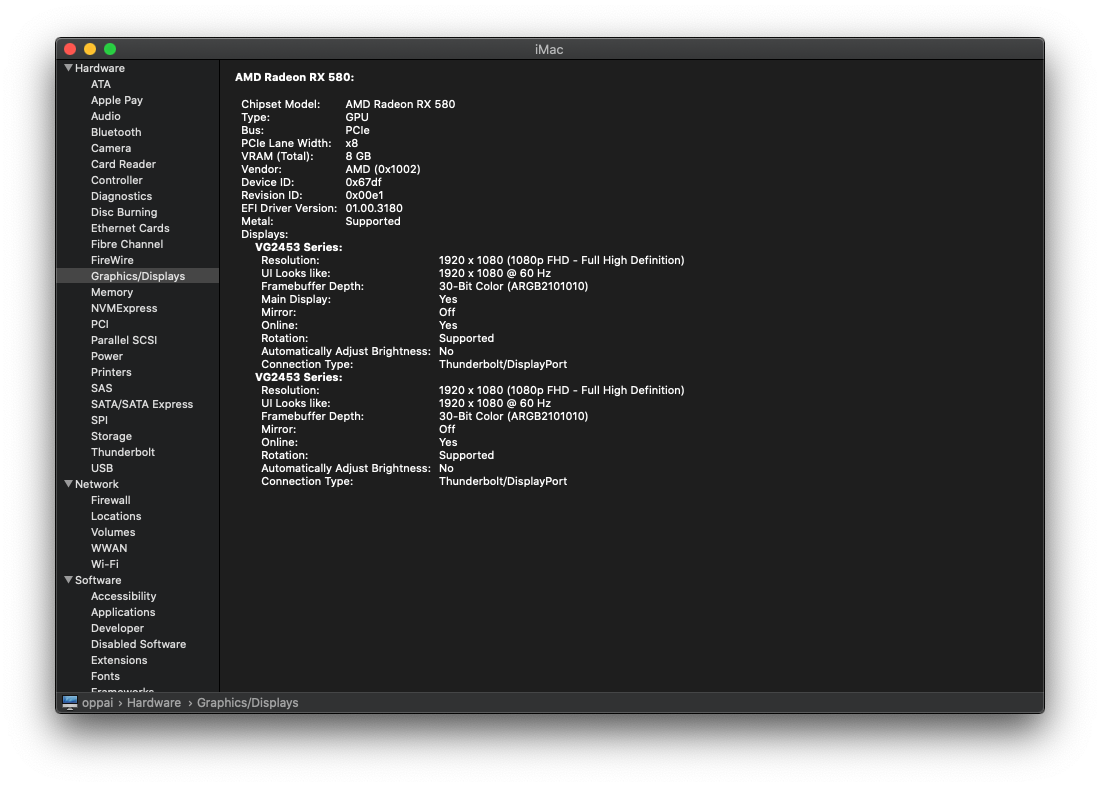
Using an AMD RX 590 and two ViewSonic VG2453 monitors!
(I don't know why macOS reports my 590 as a 580)
UPDATE:
This new build works good well with Big Sur Beta 9
@Chaldron commented on GitHub (Sep 15, 2020):
This also works for me with three monitors using the RX 580!
@simondemeule commented on GitHub (Sep 16, 2020):
This unfortunately doesn't work on my setup. Only one of the two monitors reacts to changes in brightness. This is running two LG 27UL650-W 4K60 monitors together with the integrated display of a late 2019 MacBook Pro equipped with a Vega 20 through a Caldigit USB-C (Thunderbolt 3) Pro Dock.
@thajcak commented on GitHub (Oct 2, 2020):
Just found this project and unfortunately have this issue. Using the build from this comment the brightness is still only changing on one monitor. In my case, I have two ViewSonic VP2771 connected via USB-C to separate ports on my MacBook Pro (16-inch, 2019).
@themaxx32000 commented on GitHub (Oct 5, 2020):
this works for me too (2x BenQ PD2720U, daisy-chained via TB3)
@B0rax commented on GitHub (Oct 8, 2020):
This one works for me as well with 2x Lenovo L24q-30 and an AMD RX 570. Thanks!!
@Gravemint commented on GitHub (Oct 15, 2020):
Unfortunately, the updated build is not working with my configuration. I have tried with two and with three identical monitors, in every combination. Each tweak always results in all brightness sliders only affecting one monitor.
@dthiery commented on GitHub (Nov 13, 2020):
This version (as well as 2.1.0) still has the same broken behavior on my identical Lenovo L24q monitors. Only one monitor reacts to the brightness changes.
@mebemellow commented on GitHub (Nov 25, 2020):
Unfortunately, the updated build is not working with my configuration. The brightness is still only changing on one monitor. In my case, I have two Asus Proart PA24A connected via USB-C to separate ports on my MacBook Pro (15-inch, 2018).
@jrdotel commented on GitHub (Nov 28, 2020):
This is perfect! Thank you!
@rgjr commented on GitHub (Dec 3, 2020):
Awesome, confirmed working on dual ASUS PB328Q connected via TB3 to Mac mini (2018) on MacOS Big Sur 11.0.1
@sher85 commented on GitHub (Dec 5, 2020):
Unfortunately, this did not work on my set up. The app will control the brightness of both the iMac and primary external monitor, but not the secondary external monitor.
Side note: The brightness adjust icon appears on the screen of all monitors, but the brightness is only changed on 2 of the 3.
Set up:
@norenjr commented on GitHub (Dec 5, 2020):
Did not work for me either:
Macbook Air M1
USB-C connection to LG 4K Display
@JoniVR commented on GitHub (Dec 5, 2020):
@leo150 Given that your DDC.swift modifications seem to help for some people (and I don't think it'll break anything for existing setups), could you open a Pull Request to DDC.swift? I'm not affiliated with it in any way (@reitermarkus wrote it), but it's used under the hood so It'd be best submitting a PR there.
@ndrwstn commented on GitHub (Dec 7, 2020):
@leo150 I was trying to figure out why some (my) dual monitors don't work while others do and I got into my com.apple.windowserver.plist. It shows a multitude of (duplicate?) displays with the same IODisplayLocation. However, I only have three: 2 x BenQ PD3220U and a MBP16 (with the lid closed). SystemProfiler correctly shows only two displays though.
I was trying to debug DDC.swift as you suggested when I saw the recent activity, but I didn't really get anywhere. However, I thought this might be interesting to someone who knows what they are doing?
windowserver.txt
SPDisplaysDataType.txt
@GuanhongW commented on GitHub (Jan 19, 2021):
Both are not working for my case. I use TS3 Plus to connect two BenQ EW2780U.
@arnisoph commented on GitHub (Feb 2, 2021):
Awesome! Works for me too now! Ivanky dock with two BenQ PD2700U.
@antana013 commented on GitHub (Feb 3, 2021):
Version 2.1.0 (Build 721)
It's not work for me.
Devices
@alpayne commented on GitHub (Feb 18, 2021):
@ndrwstn commented on GitHub (Mar 17, 2021):
While JoniVR's build did not work for me, I believe this has been solved in a different project (see kfix/ddcctl#17). I'm able to address both monitors using that cli program.
@stiligFox commented on GitHub (Jun 7, 2021):
Having the same issue; I have three ViewSonic XG2705 monitors, and only one will be adjusted. For a while, the modified 2.1.0 linked above worked, but one of the most recent updates to Big Sur seems to have broken it again. Using a 5700 XT. The Lunar app is able to control all three, but I greatly miss MonitorControl's simplicity! I just want to be able to control them all at once.
@iRayanKhan commented on GitHub (Jun 16, 2021):
@stiligFox,
I cloned the projected, and ran it from Xcode, and it works.
I am using macOS Monterey Beta 1, Xcode 13 Beta 1, and had to do a few fixes in Xcode that it knew how to fix, I also updated the dependencies using
File > Swift Packages > Update to Latest Package Versions, and it's been working so far.For anyone who wants to try this, don't forget to update the signing info under MonitorControl, and MonitorControlHelper.
@JoniVR, can we have an updated pre-compiled build once Monterey is out? The commits between 2.1.0, and now have fixed this issue.
@stiligFox commented on GitHub (Jun 16, 2021):
@iRayanKhan Nice! Glad to hear it works, sadly even though I have Xcode installed and use it for certain things, I that all looks a bit over my head D:
I'll give it a shot, but I will be stuck with Big Sur for sometime yet...
@iRayanKhan commented on GitHub (Jun 16, 2021):
@stiligFox It should work on Big Sur. I was just pointing out my environment for anyone who was curious. macOS Monterey updated the display preferences page too.
In Xcode, there were 4 errors I had to fix, it was about certain things being deprecated in Swift 3.2, and one click on each error fixed it.
@JoniVR commented on GitHub (Jun 16, 2021):
@iRayanKhan I don't think the macOS version has much to do with it. I did just fix the last build and upgraded all dependencies + migrated to SPM etc...
The new dependency updates included the fix made by @leo150, which is probably why building from from Xcode will now make it work for some people.
The new preferences menu you see when you build the app yourself is also part of the latest changes I made a few days ago and has nothing to do with the new macOS beta afaik 😉 (See #453)
I'll try to do a new version soon™️ when I get some more time for it. No promises though, this is entirely in my free time, whenever I have some time and feel like spending time on it.
@stiligFox commented on GitHub (Jun 16, 2021):
I just rebuilt it with the latest Xcode in Big Sur using the master branch, and still have the same problem - all three monitor sliders only control one of my monitors!
I should add that I'm using three identical Viewsonic monitors on an 5700 XT; two are on DisplayPort and one is on HDMI, and technically I am using this on a hackintosh.
Thanks for the help all!
EDIT: I did get three issues - SwiftFormat, SwiftLint, and BartyCrouch are not installed. It says to download them, but I wouldn't know where to put them!
@iRayanKhan commented on GitHub (Jun 17, 2021):
@JoniVR
The new preference menu is nice, but I was referring to the one in System Preferences
https://user-images.githubusercontent.com/34495712/122336867-13dc7a80-cf03-11eb-9ac6-2090215134bb.mov
Yup, I feel you. I'm still figuring out how to export this app as a dmg that I can run instead of keeping Xcode open. Thanks again for the updates, I don't want to install LG crapware on my machine.
@stiligFox I too have those 3 Warnings, but mine worked fine. Check the Xcode runtime log to see if it says "DDC not supported"
Edit:
When trying to export the project
Product > ArchiveI was getting an error about OSD.framework not having an archive for arm64, I fixed this by changingBuild Active Architecture OnlyDebug, and Release settings to "Yes".Edit 2, realized I accidentally left sound on, oops.
https://user-images.githubusercontent.com/34495712/122339126-4d62b500-cf06-11eb-8e65-39af7e679150.mov
@stiligFox commented on GitHub (Jun 19, 2021):
So I tried building it again - I'm not seeing any "unsupported" issues, but there are some things it's not expecting I think.
Strangely, this used to work with Catalina, and my RX 580, but seems to struggle in Big Sur with my 5700 XT. I created a paste bin with my build log from Xcode, in case this might help....
EDIT: Updated pastebin with a proper link: https://pastebin.com/RFnmKBt0
The monitor that gets controlled by default is on the second DP port on the GPU. All three sliders in MonitorControl just adjust that one monitor. If there was a way to just lock them all together, I'd be happy - I'd only ever want to raise them all the same amount.
I don't know how it's written, but Lunar is able to control each one, but it's such a bulky app that does way more than I want... MonitorControl is just that perfect amount of simplicity and control that I'm looking for!
@iRayanKhan commented on GitHub (Jun 20, 2021):
One thing I noticed, is when I run the built app, my monitors either respond with a delay, or don't respond at all. Running it from Xcode works 100%. Not sure if it's how I build the app.
@stiligFox commented on GitHub (Jul 2, 2021):
Just as an update! I have been using a Hackintosh, and updating a few settings that changed how the internal Intel iGPU was utilized, and making sure that the dGPU 5700 XT is fully being used, and now monitor control works properly again across all three monitors! So it was an issue with my computer, not MonitorControl! My apologies for not doing all the proper work on my end!
@waydabber commented on GitHub (Aug 21, 2021):
Hi @stiligFox - thank you for your feedback.
I just want to let everybody know that version 3.0.0 out and the display detection logic is somewhat changed so this might help solve this issue. I'll close this issue for now but if you have any problem with 3.0.0 please open a specific issue for that or if this issue still persist, we'll reopen it. Thank you!
@thajcak commented on GitHub (Aug 23, 2021):
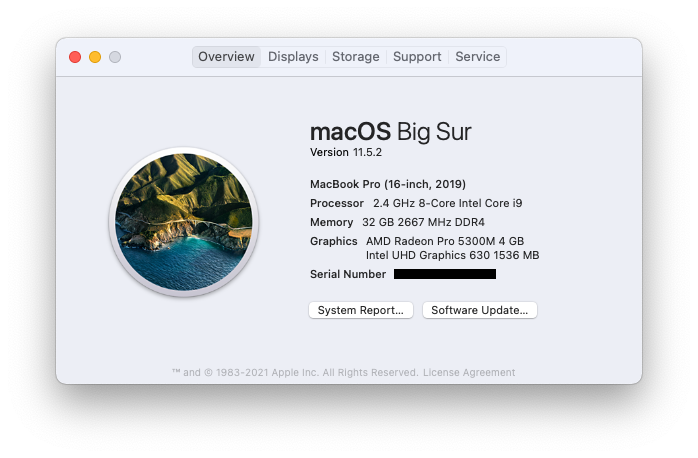
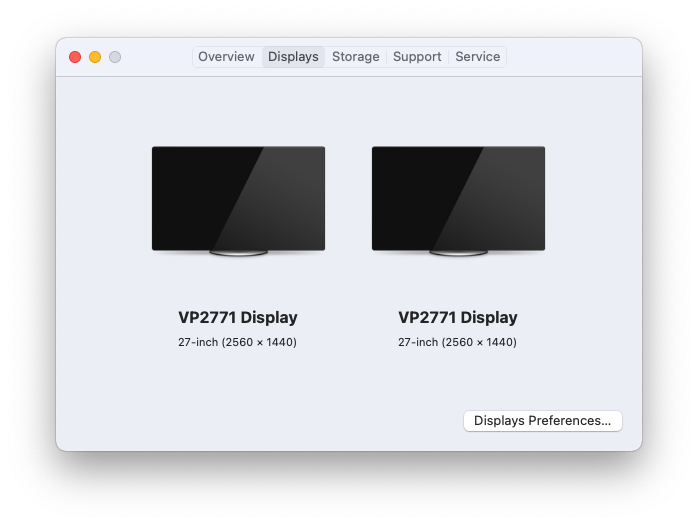
@waydabber This is still a problem under 3.0.0 RC1 with 2 ViewSonic VP2771 monitors.
@waydabber commented on GitHub (Aug 23, 2021):
Hi @thajcak, can you make a screenshot of the Displays tab of MonitorControl as well? Thank you!
@thajcak commented on GitHub (Aug 23, 2021):
@waydabber Let me know if you need anything else.
@iRayanKhan commented on GitHub (Aug 23, 2021):
@thajcak try disabling hardware control on one monitor.
I have 2 of the same LG monitors, and when I opened Monitor Control, it would keep doing the display refresh thing as if you added or removed a display in a loop, until you managed to disable hardware control on one monitor.
@waydabber commented on GitHub (Aug 24, 2021):
@iRayanKhan, MC refreshes the display if it receives a call from the OS using
CGDisplayRegisterReconfigurationCallback()- the fact that the app is continuously reconfiguring (if I understand correctly) would mean that the OS is constantly doing something with the display configuration (but not as frequently as 2 seconds because within a 2 second window the app is still waiting if there are further changes as macOS tends to send several callbacks during a single change). So it might be that MC itself is forcing the reconfiguration. But MC should not do anything actively with the display except read its settings via DDC. If this forces a reconfiguration (it should not), then my theory is that one of the displays might not like DDC reads and behaves badly because of this and disconnects/reconnects briefly which triggers a reconfiguration. You can make it stop doing this if you enable Advanced in General and then set the polling mode to 'None' - this still enables DDC writes so it should not impair usability. Does that fix the issue?@thajcak - from the screenshot as far as I see the two displays have a separate DirectDisplay IDs so they should be controlled independently. I don't clearly see what the problem is. The fact that the two displays have the same name should not matter since the app works using IDs not names. Reading the earlier remarks, this might be an Intel issue (as I see from the IDs, since such IDs are never given by the OS on M1) and might have something to do with DDC.Swift (which is an external library the app uses for Intel control). Unfortunatelly I don't know in depth how DDC.Swift works (I was working on the M1 control library) as I don't have an Intel machine (and two identical displays), so its a bit hard to debug this problem as of now. It would be great if somebody with an Intel setup and two displays would volunteer to understand what is happening exactly.
I added a "Help wanted" tag to this thread. (@JoniVR - is there a better way to raise awareness to an issue in the community?)
@glumb commented on GitHub (Aug 24, 2021):
Also for me the same issue persists. Unfortunately I can not volunteer right now since I'll be on vacation without my external monitors 😄
@thajcak commented on GitHub (Aug 24, 2021):
Yea, I'm not sure what's going on either. @waydabber I'm happy to help out with testing anything you need but I won't have time to dig into code.
I'll just throw out there that there's an app called Lunar that does work properly on my system as a data point. It's closed source so it's not very helpful other than knowing that it is a solvable problem.
@waydabber commented on GitHub (Aug 24, 2021):
Yes, I know Lunar which is a great app who's developer @alin23 became a buddy of sort of mine, but it uses a completely different code for DDC control both for Intel and M1.
I am sure this is not an issue that can't be fixed, I just don't have the hardware to debug this one so it doesn't make sense for me to try to figure out what is happening.
Anyway, to make some progress, I went through the relevant code quickly in MonitorControl and it does not seem to use the Display name for anything other than superficial purposes (showing stuff on the GUI) - from the earliest moment it uses the display ID provided by CoreGraphics DisplayID (which is an unique identifier, in case of Intel macs its a long number, for M1 macs its a short one) for identification so the two displays are not mixed up somehow. It seems like the problem is in DDC.swift which is an external library used for Intel communication. I followed that trail and I think the issue is in
DDC.servicePort(from displayId: CGDirectDisplayID, detectUnitNumber: Bool)where there is a service matching logic that might not be able to distinguish between similarly named displays (since all the identifiers it uses are ones that might be exaclty similar for two different displays, including display serial number which is not really too unique for most display makers). There is a similar challange for M1 but since that logic was written by me ;) I recognized this trap early on and made sure that such mixups won't happen (not that it is anything beyond a theoretical possibility since M1 macs can control a single external display as of now - even including M1 due to the HDMI issue with the minis). So anyway, there seems to be an approach problem in DDC.swift as its matching logic is designed to work attached to an instantiated object representing a display, but it does not know about other displays - so it is unaware if a service port which is found to be matching to a display is already taken by an other display - this results in the situation where in case of totally similar displays the same service port will be associated to each display (precisely because of this the M1 matching logic is an external, static solution that matches all service slots to possible displays using a score based fuzzy logic thing and if there are two similar displays, never two display gets associated to the same service, since the solution it is aware which one is taken and which one is free). A more serious rework might be needed to fix this (or maybe we should replace DDC.Swift and use our own logic). I could try to somehow fix it but without an Intel Mac it would be impossible for me to see what's happening and this is not something I can do blindly. :( I think ddcctl might have the same issue (as I read above somewhere) precisely because it works with individual displays on the fly just as it is the case with DDC.swift.@waydabber commented on GitHub (Aug 24, 2021):
A quick solution might be that since MC can recognize the fact that two or more displays have exaclty the same characteristics, it can pass this information along to DDC.swift as an orchestrator, signifying which display is regarded as first, which one second etc. DDC.swift could be modified in a way that this info is passed along the required layers (I counted about 3 or 4) to the service matching logic, where it would be factored in during matching - if the display is the second one, then the first service port match is skipped and the second one is served, if the display is the third one, then the first two are skipped etc.
But this requires modifying DDC.Swift (which doesn't seem to be maintained nowadays) or moving it into MonitorControl proper (probably this is the better way). Still, somebody with an Intel machine should do this I think.
@alin23 commented on GitHub (Aug 24, 2021):
Hi @thajcak !
More than 90% of Lunar (including the display detection part) is still open source here: https://github.com/alin23/Lunar
Just leaving this here so we don't mislead people. I'd be happy to help with relevant parts from the Lunar code that solve this same monitor model differentiation problem.
For the Intel Macs, the solution is very simple. Instead of doing error prone EDID matching to get the framebuffer, it's better to use the private
CGSServiceForDisplayNumberfunction:github.com/alin23/Lunar@04df526af5/Lunar/DDC/DDC.c (L158-L167)For M1, the problem is a lot more complex and @waydabber knows it very well. But last time I checked the ioreg matching code of MC, everything looked well.
Is this happening only on Intel or on M1 as well?
@waydabber commented on GitHub (Aug 24, 2021):
Hi @alin23 - this is an Intel only problem. MC uses DDC.swift for Intel which is an external library. DDC.swift does not use
CGSServiceForDisplayNumberfor sure but instead a solution that is similar to EDID matching (if you look at its code, you'll see that it is searching for the service port using model id, vendor id, serial number match). I think this approach would still work if it was implemented with some orchestration in mind in light of the possibility of multiple identical displays. I don't know (didn't look) whether ddcctl uses the same logic or did use it in only in the past (DDC.swift was modelled after it) but maybe has an updated logic now.Anyway, if there is such a great thing as
CGSServiceForDisplayNumberfor Intel (lol!) then we should definitely use that (am I seeing correctly that this a recent - 2 months old - development in Lunar as well?). But that requires disengaging MC from DDC.swift (which I think is a good idea) and still somebody with an access to an Intel mac should do it as I can't even try out if what I am doing works or not.UPDATE: I quickly checked ddcctl out, it also does not use CGSServiceForDisplayNumber() but has a logic what you would describe as EDID matching. :)
@alin23 commented on GitHub (Aug 24, 2021):
The EDID matching started from ddcctl and survived into Lunar and DDC.swift but no matter what you try, there will always be cases where the EDID data is identical between monitors.
Like in the AVService matching logic, you could just assign the framebuffers randomly for identical monitors but you wouldn't have a persistent ID to store settings per monitor in that case.
The CGS API is indeed a very recent addition and has been worked perfectly so far. I recommend it.
It's stolen from a different branch of ddcctl:
github.com/kfix/ddcctl@c9d8fb79bf@waydabber commented on GitHub (Aug 24, 2021):
Nice find indeed! I say MC should... appropriate this then as well. :) When I'm back from holiday, I'll probably make a test version that... purloins DDC.swift (in the name of democracy or something) and replaces the offending logic with this single good looking private API call. I won't be able to test it without an Intel Mac but since I know how noble of heart you are @alin23, I am sure you'll help testing it with me at least at a basic level (which might be awkward since theoretically MC is a competitor to Lunar but this is for science and also good PR), and then let folks here with Intel macs and similar displays do the rest of testing. What do you say? ;)
@alin23 commented on GitHub (Aug 24, 2021):
Sure, I still have an Intel MacBook around that I keep for testing stuff like this. I'd be glad to help 😊
@waydabber commented on GitHub (Aug 30, 2021):
Here is an unsigned test build that uses
CGSServiceForDisplayNumberto acquire the proper service port and should not confuse identical displays - if somebody would like to try it out (the source of this build is here). Thank you!@waydabber commented on GitHub (Aug 30, 2021):
Also, I'd like to thank @alin23 for trying out this code and confirming that it indeed uses
CGSServiceForDisplayNumberas intended on his Intel Mac.@thajcak commented on GitHub (Aug 30, 2021):
I appreciate the the attempt, this works for me!