mirror of
https://github.com/MonitorControl/MonitorControl.git
synced 2026-10-23 08:07:35 -06:00
[GH-ISSUE #676] Some form of onboarding experience #461
Labels
No labels
Status: Abandoned
arm64
beta
beta
bug
done
duplicate
enhancement
feedback needed from reporter
in progress
information
invalid
investigating
known Issue
monitor Issue
pull-request
translation
unable to reproduce
unreleased
x86
No milestone
No project
No assignees
1 participant

Notifications
Due date
No due date set.
Dependencies
No dependencies set
Reference
github-starred/MonitorControl#461
Loading…
Reference in a new issue
No description provided.
Delete branch "%!s()"
Deleting a branch is permanent. Although the deleted branch may continue to exist for a short time before it actually gets removed, it CANNOT be undone in most cases. Continue?
Originally created by @waydabber on GitHub (Oct 6, 2021).
Original GitHub issue: https://github.com/MonitorControl/MonitorControl/issues/676
Originally assigned to: @the0neyouseek on GitHub.
Before opening the issue, have you...?
Is your feature request related to a problem? Please describe
First time users may not clearly understand what this app does, how does it work, etc. The first thing they encounter is a popup message and some complaints about missing permissions in Privacy. This could be improved with a simple onboarding experience on first run.
Describe the solution you'd like
Just a nice welcome window with 2-3 sliding pages explaining some basic stuff, next steps, etc.
Describe alternatives you've considered
Not having onboarding. :)
Anything else?
No response
@JoniVR commented on GitHub (Oct 7, 2021):
100% agree!
@the0neyouseek commented on GitHub (Oct 9, 2021):
I completely agree, and I also agree that it should not be more than 3 slides (and provide a
Skipaction)@bandtank commented on GitHub (Oct 9, 2021):
Even a few comments in the readme would suffice. On that note, the readme doesn't even say how to run the program. I built it in xcode, but now what? A few sentences about how to go from start to finish, including installation, in the readme would be extremely little effort. It is pretty frustrating that nothing is written about OP's request or anything else. "Clone and open in xcode" as the only instructions is a little hard to believe - especially considering how much time was spent developing this project.
@waydabber commented on GitHub (Oct 9, 2021):
@bandtank - yes, the readme should be improved. But the main method of using the app is to download a release and install it as any normal Mac app.
Building it in XCode is mainly for developers and they will probably have no problem doing it. I can't think of much else in terms of instruction for a developer than clone the project, open it and then press build and solve the issues that might arise meanwhile as XCode will clearly complain if it has a problem.
@waydabber commented on GitHub (Oct 9, 2021):
Probably we should place the Download link in a more obvious location, now that I look at it with fresh eyes, it's not exactly emphasized. :)
@waydabber commented on GitHub (Oct 10, 2021):
@bandtank - the README was updated a bit with additional information on the app and a prominent Download app badge.
@the0neyouseek commented on GitHub (Jan 15, 2022):
Here's an onboarding screen I designed, feel free to tell what you think
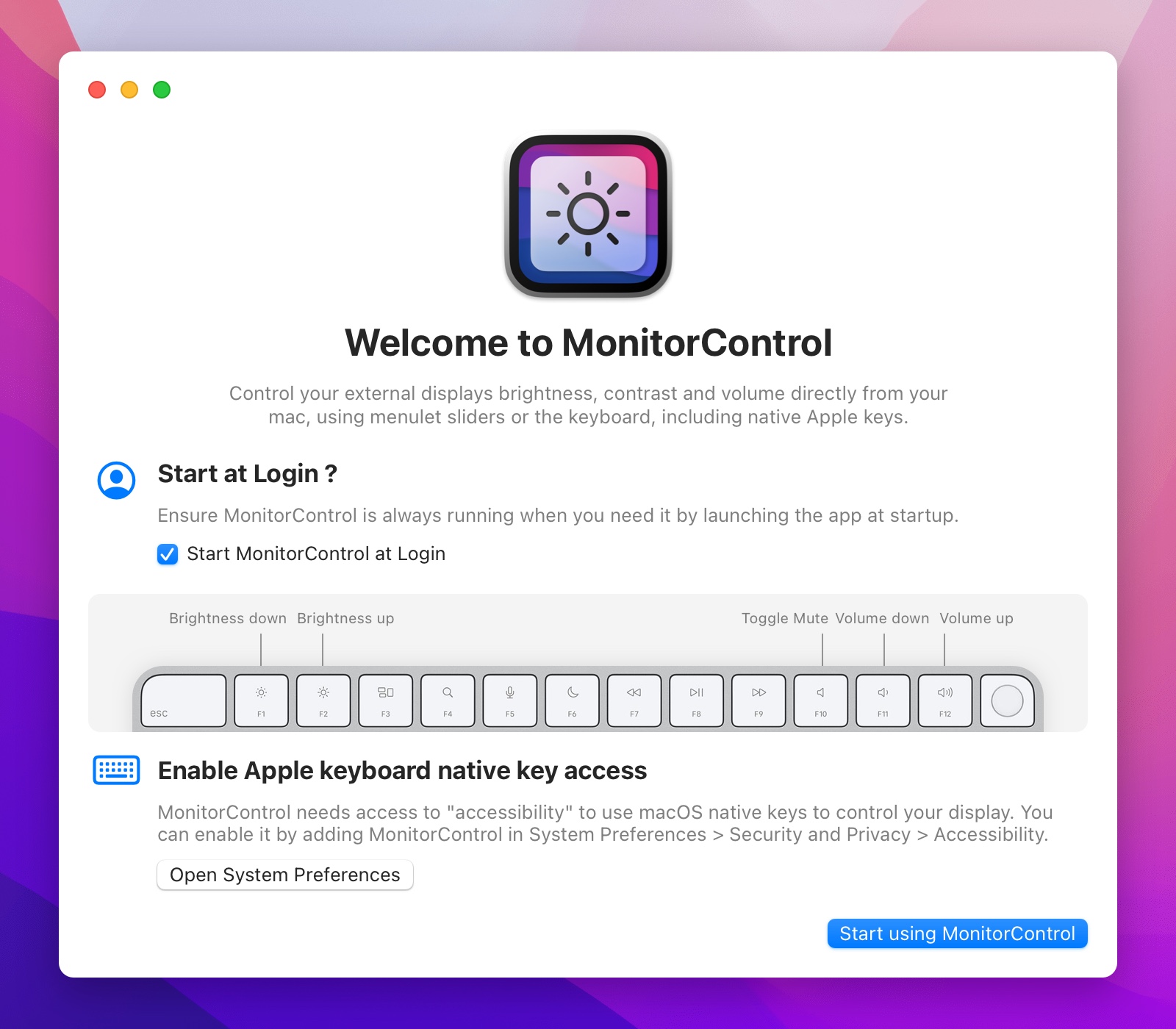
@waydabber commented on GitHub (Jan 15, 2022):
I love it! Looks super cool!
@waydabber commented on GitHub (Jan 23, 2022):
I like the new onboarding screen very much! Well done!
Maybe just one suggestion/idea (for the future): we might want to let the user know that after
Start using MonitorControlthe app can be reached via the menu extra. There were some feedbacks previously if I remember correctly that this was not 100% obvious for some.@the0neyouseek commented on GitHub (Jan 23, 2022):
Maybe simply opening the menu would be enough. What do you think ?
@waydabber commented on GitHub (Jan 23, 2022):
Yes, that makes things obvious. Neat solution.
@waydabber commented on GitHub (Jan 26, 2022):
Hey @the0neyouseek
I added a Hungarian translation PR for the onboarding.
Additionally I found two minor issues that might need a bit of an investigation:
Start using MonitorControlthe menu automatically opens - but when this happens, the menu sliders, keyboard etc do not actually work - which is not an ideal first experience imho. :)Open System Preferencesbutton does nothing. I think in this case the button should not present itself in the first place or we should tell the user that the app already has the privileges so no need to do anything. This is a rare issue, might happen only on a manual preferences reset I think or when the user (based on some tutorial) adds MonitorControl to the list even before first firing up the app - so this is really a low priority issue, just saying it for completeness' sake.@the0neyouseek commented on GitHub (Jan 26, 2022):
@waydabber I approved the PR.
@waydabber commented on GitHub (Jan 26, 2022):
That would be a great solution (+ would not need change in translation).