[GH-ISSUE #600] Volume can't be controlled!!! #438

Closed
opened 2026-05-05 05:59:38 -06:00 by gitea-mirror · 3 comments
Owner

Originally created by @FoodieLT on GitHub (Sep 16, 2021).
Original GitHub issue: https://github.com/MonitorControl/MonitorControl/issues/600

Before opening the issue, have you...?

Describe the issue

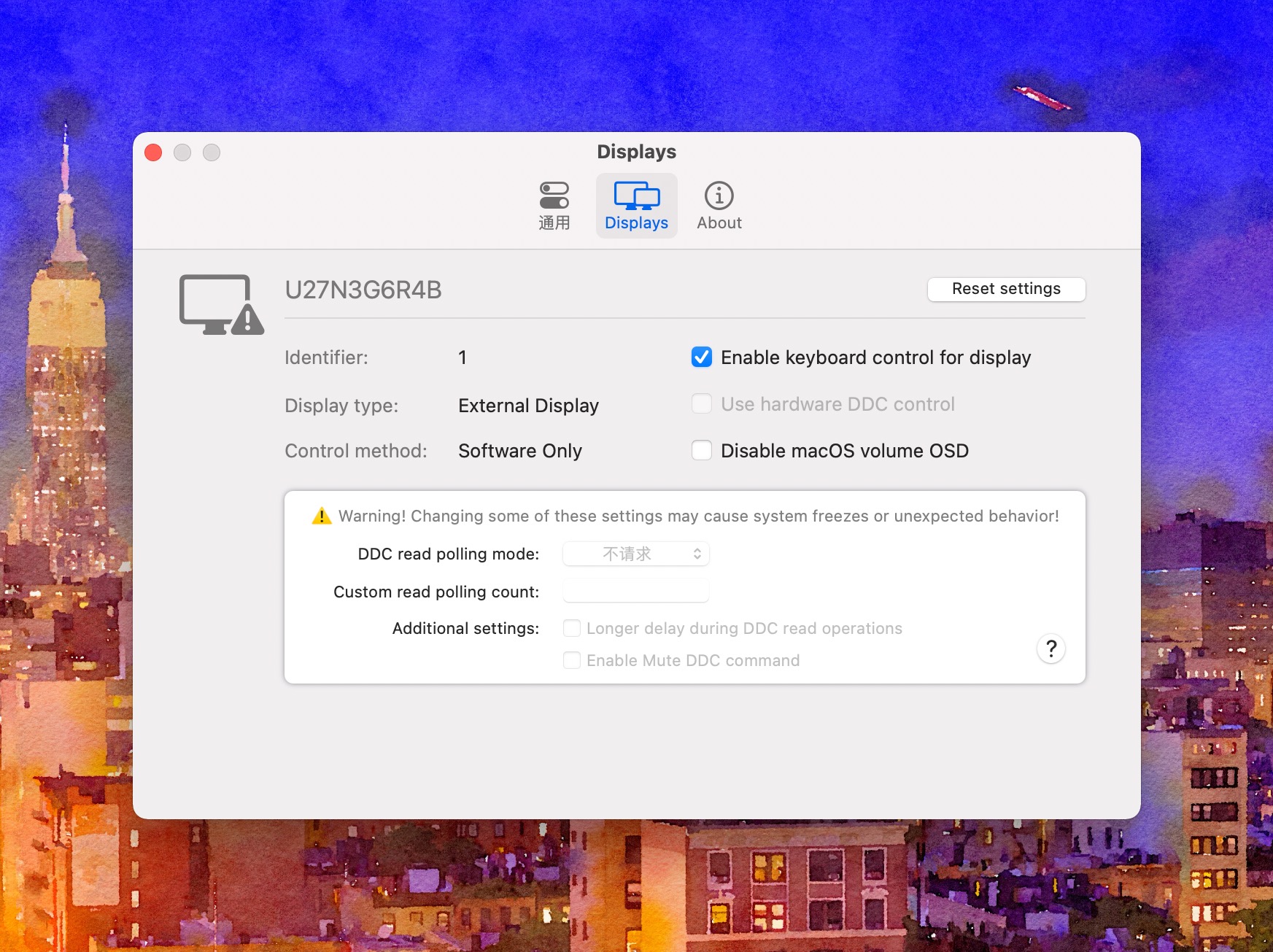
Volume can't be controlled on my monitor (U27N3G6R4B). It could be controlled while I was connecting it with Type-C cable. But after I connected it with HDMI, it does not work anymore.
截图 2021-09-16@18 40 50@2x

Expected behavior

Hope somebody can explain it for me.

Anything else?

No response

Environment Information (please complete the following information)

- macOS version:macOS 12.0 beta
- Mac model:Mac mini(M1)
- MonitorControl version:3.0.0
- Monitor(s):AOC U27N3G6R4B
- Monitor Cable(s)/Connection(s):HDMI
- Apple Silicon/M1 (yes or no):Yes
Originally created by @FoodieLT on GitHub (Sep 16, 2021). Original GitHub issue: https://github.com/MonitorControl/MonitorControl/issues/600 ### Before opening the issue, have you...? - [X] Searched for existing issues - [X] I have read through [the Monitor-Troubleshooting Wiki](https://github.com/MonitorControl/MonitorControl/wiki/Monitor-Troubleshooting) - [X] Updated MonitorControl to the latest version (if applicable) ### Describe the issue Volume can't be controlled on my monitor (U27N3G6R4B). It could be controlled while I was connecting it with Type-C cable. But after I connected it with HDMI, it does not work anymore. ![截图 2021-09-16@18 40 50@2x](https://user-images.githubusercontent.com/90837817/133598441-d91a922a-1d5b-4dd6-ab1e-4b1bd14f8b11.jpg) ### Expected behavior Hope somebody can explain it for me. ### Anything else? _No response_ ### Environment Information (please complete the following information) ```markdown - macOS version:macOS 12.0 beta - Mac model:Mac mini(M1) - MonitorControl version:3.0.0 - Monitor(s):AOC U27N3G6R4B - Monitor Cable(s)/Connection(s):HDMI - Apple Silicon/M1 (yes or no):Yes ```
gitea-mirror 2026-05-05 05:59:38 -06:00
Author
Owner

@JoniVR commented on GitHub (Sep 16, 2021):

See #599

@waydabber Perhaps we should update the issue template to reference this? Or provide a wiki link or something to it as it seems to be generating lots of issues :D Or just a link inside the app with an explainer would probably work even better? Not sure.

<!-- gh-comment-id:920793504 --> @JoniVR commented on GitHub (Sep 16, 2021): See #599 @waydabber Perhaps we should update the issue template to reference this? Or provide a wiki link or something to it as it seems to be generating lots of issues :D Or just a link inside the app with an explainer would probably work even better? Not sure.
Author
Owner

@waydabber commented on GitHub (Sep 16, 2021):

Yes, I'll add a more in depth explanation in 3.1.0 - I already added a tooltip when somebody hovers over "Software mode" but something more obvious would be needed.

Also, I created a Q&A page for it https://github.com/MonitorControl/MonitorControl/discussions/599 but - maybe we should add to the template in the Before opening the issue, have you...? section to check through Discussions, especially Questions as well. Also we could even add this singular issue as well to the list. :)

Something like this:

Before opening the issue, have you...?

  • Searched for existing issues
  • Searched for answered questions in Discussions
  • Not using to use 2018 or 2020 minis via HDMI port
  • I have read through the Monitor-Troubleshooting Wiki
  • Updated MonitorControl to the latest version (if applicable)
<!-- gh-comment-id:920861203 --> @waydabber commented on GitHub (Sep 16, 2021): Yes, I'll add a more in depth explanation in 3.1.0 - I already added a tooltip when somebody hovers over "Software mode" but something more obvious would be needed. Also, I created a Q&A page for it https://github.com/MonitorControl/MonitorControl/discussions/599 but - maybe we should add to the template in the Before opening the issue, have you...? section to check through Discussions, especially Questions as well. Also we could even add this singular issue as well to the list. :) Something like this: **Before opening the issue, have you...?** - [ ] Searched for existing issues - [ ] **Searched for answered questions in Discussions** - [ ] **Not using to use 2018 or 2020 minis via HDMI port** - [ ] I have read through the Monitor-Troubleshooting Wiki - [ ] Updated MonitorControl to the latest version (if applicable)
Author
Owner

@waydabber commented on GitHub (Sep 16, 2021):

@FoodieLT - regarding your question, the 2018 and 2020 Intel and M1 mini blocks DDC communication via the HDMI port. In this case MonitorControl falls back to software dimming (it does not directly access the backlight of the screen to dim the display but uses a cool technique called gammatable manipulation to achieve a similar result).

<!-- gh-comment-id:920862815 --> @waydabber commented on GitHub (Sep 16, 2021): @FoodieLT - regarding your question, the 2018 and 2020 Intel and M1 mini blocks DDC communication via the HDMI port. In this case MonitorControl falls back to software dimming (it does not directly access the backlight of the screen to dim the display but uses a cool technique called gammatable manipulation to achieve a similar result).
Sign in to join this conversation.
No milestone
No project
No assignees
1 participant
Notifications
Due date
The due date is invalid or out of range. Please use the format "yyyy-mm-dd".

No due date set.

Dependencies

No dependencies set.

Reference: github-starred/MonitorControl#438
No description provided.