[GH-ISSUE #568] Option to 'Reapply last set brightness upon startup or wake' #424

Closed
opened 2026-05-05 05:58:44 -06:00 by gitea-mirror · 4 comments
Owner

Originally created by @tsengwaiyong on GitHub (Sep 6, 2021).
Original GitHub issue: https://github.com/MonitorControl/MonitorControl/issues/568

Originally assigned to: @waydabber on GitHub.

Before opening the issue, have you...?

  • Searched for existing issues
  • Looked through the wiki
  • Updated MonitorControl to the latest version (if applicable)

Describe the bug

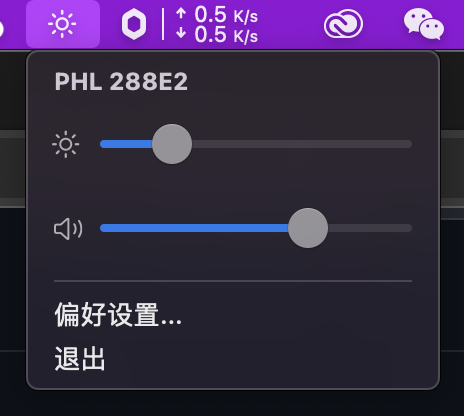
brightness don't take effect when mac wakes up in sleep or launch the MonitorControl

Steps to reproduce

1.Set the monitor brightness to 100%
831630938722_ pic

2.Launch the MonitorControl , set the brightness at about 20%,the brightness is getting lower
image

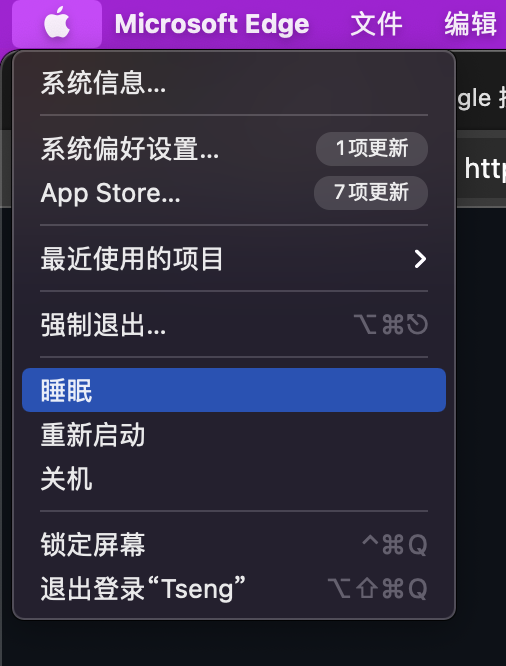
3.Let mac enters sleep mode or restart
image

4.Wake up the mac

5.The monitor brightness will change back to 100% like i never launch the MonitorControl

Expected behavior

The monitor brightness is take effect when mac wake up or launch MonitorControl

Anything else?

No response

Environment Information (please complete the following information)

- macOS version:11.4 Big Sur
- Mac model:Mac mini M1
- MonitorControl version:3.0.0 Build 3095
- Monitor(s):Philips 288E2
- Apple Silicon/M1 (yes or no): yes
Originally created by @tsengwaiyong on GitHub (Sep 6, 2021). Original GitHub issue: https://github.com/MonitorControl/MonitorControl/issues/568 Originally assigned to: @waydabber on GitHub. ### Before opening the issue, have you...? - [x] Searched for existing issues - [X] Looked through [the wiki](https://github.com/MonitorControl/MonitorControl/wiki) - [X] Updated MonitorControl to the latest version (if applicable) ### Describe the bug brightness don't take effect when mac wakes up in sleep or launch the MonitorControl ### Steps to reproduce 1.Set the monitor brightness to 100% ![831630938722_ pic](https://user-images.githubusercontent.com/53459541/132232489-17483255-6cfd-421e-854e-b7cf40ab3335.jpg) 2.Launch the MonitorControl , set the brightness at about 20%,the brightness is getting lower ![image](https://user-images.githubusercontent.com/53459541/132232548-2d049e56-eac6-4aca-aacb-982a7a52bbdb.png) 3.Let mac enters sleep mode or restart ![image](https://user-images.githubusercontent.com/53459541/132232841-c5289053-0bdd-46c6-96d2-2cf0b4a2b775.png) 4.Wake up the mac 5.The monitor brightness will change back to 100% like i never launch the MonitorControl ### Expected behavior The monitor brightness is take effect when mac wake up or launch MonitorControl ### Anything else? _No response_ ### Environment Information (please complete the following information) ```markdown - macOS version:11.4 Big Sur - Mac model:Mac mini M1 - MonitorControl version:3.0.0 Build 3095 - Monitor(s):Philips 288E2 - Apple Silicon/M1 (yes or no): yes ```
gitea-mirror 2026-05-05 05:58:44 -06:00
Author
Owner

@waydabber commented on GitHub (Sep 6, 2021):

Hey @tsengwaiyong - this seems to be a display issue. It is rather rare but some displays don't store brightness set via DDC and after sleep they resume at 100% or the previously set OSD value. MonitorControl currently does not try to re-set the value after sleep but expects the display to retain the last setting.

I convert this issue to a Feature Request, it might be beneficial to have an option for this "Restore last set brightness upon startup or after sleep".

<!-- gh-comment-id:913765185 --> @waydabber commented on GitHub (Sep 6, 2021): Hey @tsengwaiyong - this seems to be a display issue. It is rather rare but some displays don't store brightness set via DDC and after sleep they resume at 100% or the previously set OSD value. MonitorControl currently does not try to re-set the value after sleep but expects the display to retain the last setting. I convert this issue to a Feature Request, it might be beneficial to have an option for this "Restore last set brightness upon startup or after sleep".
Author
Owner

@tsengwaiyong commented on GitHub (Sep 7, 2021):

@waydabber OK,thanks

<!-- gh-comment-id:913906544 --> @tsengwaiyong commented on GitHub (Sep 7, 2021): @waydabber OK,thanks
Author
Owner

@waydabber commented on GitHub (Sep 9, 2021):

See screenshots of the implementation in the v3.1.0 preliminary discussion.

<!-- gh-comment-id:916351921 --> @waydabber commented on GitHub (Sep 9, 2021): See screenshots of the implementation in the [v3.1.0 preliminary discussion](https://github.com/MonitorControl/MonitorControl/discussions/596).
Author
Owner

@tsengwaiyong commented on GitHub (Sep 13, 2021):

😄thank you for solving this issue, I will try it in the next update

<!-- gh-comment-id:918276714 --> @tsengwaiyong commented on GitHub (Sep 13, 2021): 😄thank you for solving this issue, I will try it in the next update
Sign in to join this conversation.
No milestone
No project
No assignees
1 participant
Notifications
Due date
The due date is invalid or out of range. Please use the format "yyyy-mm-dd".

No due date set.

Dependencies

No dependencies set.

Reference: github-starred/MonitorControl#424
No description provided.