[GH-ISSUE #511] ViewSonic VG2439 not working [M1] #402

Closed
opened 2026-05-05 05:55:15 -06:00 by gitea-mirror · 1 comment
Owner

Originally created by @bluSCALE4 on GitHub (Aug 11, 2021).
Original GitHub issue: https://github.com/MonitorControl/MonitorControl/issues/511

Checklist

Describe the issue
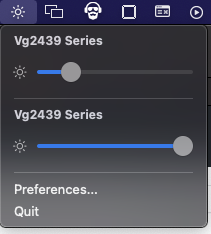
Using slider or keyboard keys does not adjust brightness.

Expected behavior
Brightness should adjust.

Screenshots
Screen Shot 2021-08-11 at 5 40 36 PM
Screen Shot 2021-08-11 at 5 41 44 PM

Additional context
I've downloaded the latest experimental/apple-silicon branch and none of the betas recently released work. Beta3 showed DDC support. The brightness slider moved but did not actually do anything. Also up to version Beta3, when I tried to use keyboard shortcuts, a broken icon would appear with no gauge or icon, just the dark surrounding square.

Beta6 shows the sliders but they do not work. The settings do not show the monitors as supporting DDC.

Environment Information (please complete the following information):

  • macOS version:
  • MonitorControl version: Beta 6
  • Monitor(s): Vg2439
  • Mac model: Mac mini M1
  • Monitor Cable(s)/Connection(s): (e.g. DisplayPort) USB-C Hub (WavLink UG69PD2) USB-C -> DisplayPort
  • Apple Silicon/M1 (yes or no): yes
Originally created by @bluSCALE4 on GitHub (Aug 11, 2021). Original GitHub issue: https://github.com/MonitorControl/MonitorControl/issues/511 **Checklist** <!-- NOTE: M1/Apple Silicon is currently not supported, see: https://github.com/MonitorControl/MonitorControl/issues/323 --> <!-- Before you submit your issue, please make sure to check the following boxes by putting an x in the [ ] (don't: [x ], [ x], do: [x]) --> - [x] I have searched for existing issues - [x] I have looked through [the Monitor Troubleshooting wiki](https://github.com/MonitorControl/MonitorControl/wiki/Monitor-Troubleshooting) - [x] I have updated MonitorControl to the latest version **Describe the issue** Using slider or keyboard keys does not adjust brightness. **Expected behavior** Brightness should adjust. **Screenshots** ![Screen Shot 2021-08-11 at 5 40 36 PM](https://user-images.githubusercontent.com/200427/129112930-08fd78e1-5b42-4e27-bc38-b050e29dc2f5.png) ![Screen Shot 2021-08-11 at 5 41 44 PM](https://user-images.githubusercontent.com/200427/129112975-c67e0c52-413a-4366-8300-42c001c0ee95.png) **Additional context** I've downloaded the latest experimental/apple-silicon branch and none of the betas recently released work. Beta3 showed DDC support. The brightness slider moved but did not actually do anything. Also up to version Beta3, when I tried to use keyboard shortcuts, a broken icon would appear with no gauge or icon, just the dark surrounding square. Beta6 shows the sliders but they do not work. The settings do not show the monitors as supporting DDC. **Environment Information (please complete the following information):** - macOS version: - MonitorControl version: Beta 6 - Monitor(s): Vg2439 - Mac model: Mac mini M1 - Monitor Cable(s)/Connection(s): (e.g. DisplayPort) USB-C Hub (WavLink UG69PD2) USB-C -> DisplayPort - Apple Silicon/M1 (yes or no): yes
Author
Owner

@waydabber commented on GitHub (Aug 12, 2021):

Hello, unfortunatelly this dock actually uses DisplayLink which is not the native hardware connection but more like a virtual display - eg AirPlay or SideCar but wired (displays connected natively always have an ID of 1 or 2 on M1 Macs).

DisplayLink does not support DDC on M1 macs. You can try to increase awareness about this here:

https://support.displaylink.com/forums/287786-displaylink-feature-suggestions/suggestions/16135240-add-brightness-support-to-non-windows-oses

<!-- gh-comment-id:897706255 --> @waydabber commented on GitHub (Aug 12, 2021): Hello, unfortunatelly this dock actually uses DisplayLink which is not the native hardware connection but more like a virtual display - eg AirPlay or SideCar but wired (displays connected natively always have an ID of 1 or 2 on M1 Macs). DisplayLink does not support DDC on M1 macs. You can try to increase awareness about this here: https://support.displaylink.com/forums/287786-displaylink-feature-suggestions/suggestions/16135240-add-brightness-support-to-non-windows-oses
Sign in to join this conversation.
No milestone
No project
No assignees
1 participant
Notifications
Due date
The due date is invalid or out of range. Please use the format "yyyy-mm-dd".

No due date set.

Dependencies

No dependencies set.

Reference: github-starred/MonitorControl#402
No description provided.