[GH-ISSUE #504] MonitorControl Not detected by Sound Preference (Beta 3.0.0) #394

Closed
opened 2026-05-05 05:54:22 -06:00 by gitea-mirror · 3 comments
Owner

Originally created by @vincbeaulieu on GitHub (Aug 6, 2021).
Original GitHub issue: https://github.com/MonitorControl/MonitorControl/issues/504

Checklist

  • I have searched for existing issues
  • I have looked through the wiki
  • I have updated MonitorControl to the latest version

Describe the bug
A clear and concise description of what the bug is.

The control using the keyboard is working. However, volume output is kept constant no matter what volume setting is chosen. Also, the app doesn't display in sound preferences as an output.

To Reproduce
Steps to reproduce the behavior:

  1. Download the latest version (beta 3.0.0)
  2. Launch the app
  3. Go to Sound Preferences in System Preferences
  4. The App is not listed
  5. Click on Name:Samsung Type:HDMI (for testing)
  6. Test volume control on keyboard
  7. Volume indicator on monitor screen is increasing/decreasing, but volume output is kept constant, even when mute is enable.

Expected behavior
A clear and concise description of what you expected to happen.

Volume indicator on screen is increasing/decreasing, and volume output is increasing/decreasing respectively.

Screenshots
If applicable, add screenshots to help explain your problem.

Screen Shot 2021-08-06 at 01 20 02

Figure above shows the "Volume indicator" which appears on my monitor. Sounds is being heard, but volume output is kept constant even when mute is enable.

Additional context
Add any other context about the problem here.

Problem occurs on all port: HDMI and both thunderbolt (thunder-both port are used with a mini-dp to HDMI adaptor).
The monitor is a SAMSUNG M7

Environment Information (please complete the following information):

  • macOS version: Big Sur 11.5
  • Mac model: Macbook Pro Retina mid-2014
  • MonitorControl version: Beta 3.0.0.
  • Monitor(s): Samsung M7
  • Apple Silicon/M1 (yes or no): no (intel i5)
Originally created by @vincbeaulieu on GitHub (Aug 6, 2021). Original GitHub issue: https://github.com/MonitorControl/MonitorControl/issues/504 **Checklist** <!-- NOTE: M1/Apple Silicon is currently not supported, see: https://github.com/MonitorControl/MonitorControl/issues/323 --> <!-- Before you submit your issue, please make sure to check the following boxes by putting an x in the [ ] (don't: [x ], [ x], do: [x]) --> - [x] I have searched for existing issues - [x] I have looked through [the wiki](https://github.com/MonitorControl/MonitorControl/wiki) - [x] I have updated MonitorControl to the latest version **Describe the bug** A clear and concise description of what the bug is. The control using the keyboard is working. However, volume output is kept constant no matter what volume setting is chosen. Also, the app doesn't display in sound preferences as an output. **To Reproduce** Steps to reproduce the behavior: 1. Download the latest version (beta 3.0.0) 2. Launch the app 3. Go to Sound Preferences in System Preferences 4. The App is not listed 5. Click on Name:Samsung Type:HDMI (for testing) 6. Test volume control on keyboard 7. Volume indicator on monitor screen is increasing/decreasing, but volume output is kept constant, even when mute is enable. **Expected behavior** A clear and concise description of what you expected to happen. Volume indicator on screen is increasing/decreasing, and volume output is increasing/decreasing respectively. **Screenshots** If applicable, add screenshots to help explain your problem. <img width="228" alt="Screen Shot 2021-08-06 at 01 20 02" src="https://user-images.githubusercontent.com/37360448/128460103-f028b5d5-621f-4f98-96c8-389aac70d23e.png"> Figure above shows the "Volume indicator" which appears on my monitor. Sounds is being heard, but volume output is kept constant even when mute is enable. **Additional context** Add any other context about the problem here. Problem occurs on all port: HDMI and both thunderbolt (thunder-both port are used with a mini-dp to HDMI adaptor). The monitor is a SAMSUNG M7 **Environment Information (please complete the following information):** - macOS version: Big Sur 11.5 - Mac model: Macbook Pro Retina mid-2014 - MonitorControl version: Beta 3.0.0. - Monitor(s): Samsung M7 - Apple Silicon/M1 (yes or no): no (intel i5)
Author
Owner

@JoniVR commented on GitHub (Aug 7, 2021):

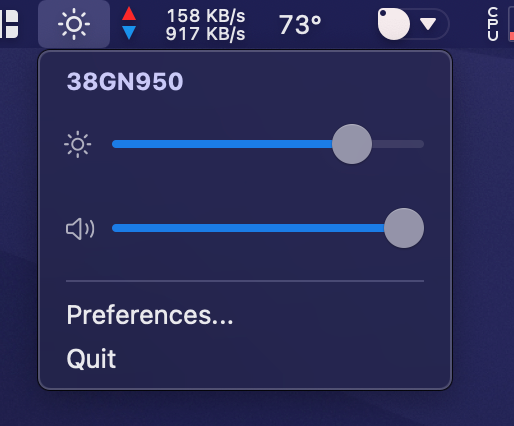
Hi, the app is not supposed to show up in your system preferences. It's a toolbar icon that you can then open or just control the monitor through shortcuts.
image
The app automatically controls the default selected output, so you need to set your monitor as the default sound output for it to work.

Furthermore, what you are describing vaguely resembles #505.

Can you try v2.1.0 and let me know if that version works for you?

<!-- gh-comment-id:894651769 --> @JoniVR commented on GitHub (Aug 7, 2021): Hi, the app is not supposed to show up in your system preferences. It's a toolbar icon that you can then open or just control the monitor through shortcuts. ![image](https://user-images.githubusercontent.com/7591717/128600903-51972656-587a-4760-8466-685b7f606b19.png) The app automatically controls the default selected output, so you need to set your monitor as the default sound output for it to work. Furthermore, what you are describing vaguely resembles #505. Can you try v2.1.0 and let me know if that version works for you?
Author
Owner

@vevek commented on GitHub (Aug 13, 2021):

@JoniVR Both brightness & sound controls were not working for me on v2.2 (on brew). After installing v2.1, brightness controls works as per normal but sound controls don't seem to work despite selecting Monitor for audio out.

<!-- gh-comment-id:898391781 --> @vevek commented on GitHub (Aug 13, 2021): @JoniVR Both brightness & sound controls were not working for me on v2.2 (on brew). After installing v2.1, brightness controls works as per normal but sound controls don't seem to work despite selecting Monitor for audio out.
Author
Owner

@waydabber commented on GitHub (Aug 20, 2021):

@vincbeaulieu, Since the original question was answered and the v2.2 was pulled meanwhile, I'll close this issue for now. If there is anything else to do, please let us know! Thanks!

<!-- gh-comment-id:902822197 --> @waydabber commented on GitHub (Aug 20, 2021): @vincbeaulieu, Since the original question was answered and the v2.2 was pulled meanwhile, I'll close this issue for now. If there is anything else to do, please let us know! Thanks!
Sign in to join this conversation.
No milestone
No project
No assignees
1 participant
Notifications
Due date
The due date is invalid or out of range. Please use the format "yyyy-mm-dd".

No due date set.

Dependencies

No dependencies set.

Reference: github-starred/MonitorControl#394
No description provided.