mirror of
https://github.com/MonitorControl/MonitorControl.git
synced 2026-06-30 06:02:00 -06:00
[GH-ISSUE #493] Clicking point on slider does not change brightness #388
Labels
No labels
Status: Abandoned
arm64
beta
beta
bug
done
duplicate
enhancement
feedback needed from reporter
in progress
invalid
investigating
known Issue
monitor Issue
pull-request
translation
unable to reproduce
unreleased
x86
No milestone
No project
No assignees
1 participant

Notifications
Due date
No due date set.
Dependencies
No dependencies set.
Reference: github-starred/MonitorControl#388
Loading…
Add table
Add a link
Reference in a new issue
No description provided.
Delete branch "%!s()"
Deleting a branch is permanent. Although the deleted branch may continue to exist for a short time before it actually gets removed, it CANNOT be undone in most cases. Continue?
Originally created by @jacobgelling on GitHub (Jul 31, 2021).
Original GitHub issue: https://github.com/MonitorControl/MonitorControl/issues/493
Checklist
Describe the bug
You cannot change the brightness by clicking a point on the slider - it visually changes position but the brightness does not change.
The brightness of the monitor only changes when you click and drag the slider.
To Reproduce
Expected behavior
The brightness of the monitor should be adjusted.
Screenshots
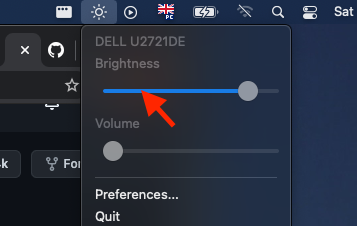
So clicking where the red arrow is pointing changes the position of the slider dot, but does not change the brightness of the monitor. Only when clicking and sliding does the monitor brightness change.
Environment Information (please complete the following information):
@JoniVR commented on GitHub (Aug 2, 2021):
This is related to #478, basically, there's an issue right now where ddc commands on Intel will only succeed when spammed a few times, which is why it's working while sliding but not when clicking (sending multiple times vs only once)
(but thanks for opening the issue anyways 🙂)
Revert to 2.1.0 and it should work.