[GH-ISSUE #479] Volume up/down keys don't change monitor (DELL U3419W) volume on latest updates #379

Closed
opened 2026-05-05 05:51:42 -06:00 by gitea-mirror · 2 comments
Owner

Originally created by @fent on GitHub (Jul 27, 2021).
Original GitHub issue: https://github.com/MonitorControl/MonitorControl/issues/479

Checklist

  • I have searched for existing issues
  • I have looked through the wiki
  • I have updated MonitorControl to the latest version

Describe the bug
Volume up/down keys don't change the volume of the monitor. But, clicking on the MonitorControl icon and adjusting the volume there does change it.

This happens with the latest 2 updates v2.2.0 and v3.0.0-beta1. The issue is not present when downgrading to v2.1.0

To Reproduce
Steps to reproduce the behavior:

  1. Download one of the latest 2 updates from the releases page
  2. Install
  3. Press volume up/down keys and check if the volume on your monitor changes. Easier to test by playing music or video in the background as you do this, and to lower the volume all the way down to mute to be certain.

Expected behavior
Expected volume of the monitor to be adjusted

Screenshots
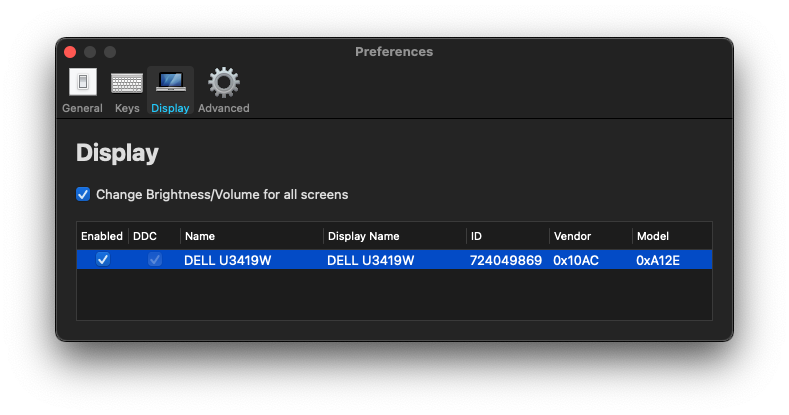
image

Environment Information (please complete the following information):

  • macOS version: Big Sur 11.5
  • Mac model: mbp 13 inch mid 2014
  • MonitorControl version: v2.2.0 and v3.0.0-beta1
  • Monitor(s): DELL U3419W
  • Apple Silicon/M1 (yes or no): no
Originally created by @fent on GitHub (Jul 27, 2021). Original GitHub issue: https://github.com/MonitorControl/MonitorControl/issues/479 **Checklist** <!-- NOTE: M1/Apple Silicon is currently not supported, see: https://github.com/MonitorControl/MonitorControl/issues/323 --> <!-- Before you submit your issue, please make sure to check the following boxes by putting an x in the [ ] (don't: [x ], [ x], do: [x]) --> - [x] I have searched for existing issues - [x] I have looked through [the wiki](https://github.com/MonitorControl/MonitorControl/wiki) - [x] I have updated MonitorControl to the latest version **Describe the bug** Volume up/down keys don't change the volume of the monitor. But, clicking on the MonitorControl icon and adjusting the volume there does change it. This happens with the latest 2 updates v2.2.0 and v3.0.0-beta1. The issue is not present when downgrading to v2.1.0 **To Reproduce** Steps to reproduce the behavior: 1. Download one of the latest 2 updates from the releases page 2. Install 3. Press volume up/down keys and check if the volume on your monitor changes. Easier to test by playing music or video in the background as you do this, and to lower the volume all the way down to mute to be certain. **Expected behavior** Expected volume of the monitor to be adjusted **Screenshots** ![image](https://user-images.githubusercontent.com/933490/127115224-41a03077-d181-4a91-85ad-403358cb75f4.png) **Environment Information (please complete the following information):** - macOS version: Big Sur 11.5 - Mac model: mbp 13 inch mid 2014 - MonitorControl version: v2.2.0 and v3.0.0-beta1 - Monitor(s): DELL U3419W - Apple Silicon/M1 (yes or no): no
gitea-mirror 2026-05-05 05:51:42 -06:00
Author
Owner

@jmtakahashi commented on GitHub (Jul 27, 2021):

Can confirm this bug. Same on my early 2015 macbook pro 13" connected to a LG WQHD monitor.

  • Monitor Control v. 2.2.0
  • OS Big Sur 11.5
    Haven't tried to downgrade the Monitor Control app, but did just install the Big Sur 11.5 update and things stopped working. My volume and brightness buttons work (display the native osd) HOWEVER the buttons do not affect my monitor's brightness or volume. Using the sliders in the app (menu bar) DO work and control my volume/brightness correctly.
<!-- gh-comment-id:887562203 --> @jmtakahashi commented on GitHub (Jul 27, 2021): Can confirm this bug. Same on my early 2015 macbook pro 13" connected to a LG WQHD monitor. - Monitor Control v. 2.2.0 - OS Big Sur 11.5 Haven't tried to downgrade the Monitor Control app, but did just install the Big Sur 11.5 update and things stopped working. My volume and brightness buttons work (display the native osd) HOWEVER the buttons do not affect my monitor's brightness or volume. Using the sliders in the app (menu bar) DO work and control my volume/brightness correctly.
Author
Owner

@JoniVR commented on GitHub (Jul 27, 2021):

Duplicate of #478

<!-- gh-comment-id:887633879 --> @JoniVR commented on GitHub (Jul 27, 2021): Duplicate of #478
Sign in to join this conversation.
No milestone
No project
No assignees
1 participant
Notifications
Due date
The due date is invalid or out of range. Please use the format "yyyy-mm-dd".

No due date set.

Dependencies

No dependencies set.

Reference: github-starred/MonitorControl#379
No description provided.