mirror of
https://github.com/MonitorControl/MonitorControl.git
synced 2026-10-23 08:07:35 -06:00
[GH-ISSUE #345] Separate "Change Brightness/Volume for all screens" into 2 Different Options + option for volume audio device matching #275
Labels
No labels
Status: Abandoned
arm64
beta
beta
bug
done
duplicate
enhancement
feedback needed from reporter
in progress
information
invalid
investigating
known Issue
monitor Issue
pull-request
translation
unable to reproduce
unreleased
x86
No milestone
No project
No assignees
1 participant

Notifications
Due date
No due date set.
Dependencies
No dependencies set
Reference
github-starred/MonitorControl#275
Loading…
Reference in a new issue
No description provided.
Delete branch "%!s()"
Deleting a branch is permanent. Although the deleted branch may continue to exist for a short time before it actually gets removed, it CANNOT be undone in most cases. Continue?
Originally created by @trazaq on GitHub (Dec 14, 2020).
Original GitHub issue: https://github.com/MonitorControl/MonitorControl/issues/345
Originally assigned to: @waydabber on GitHub.
Checklist
Is your feature request related to a problem? Please describe.
First, thanks for this awesome software!
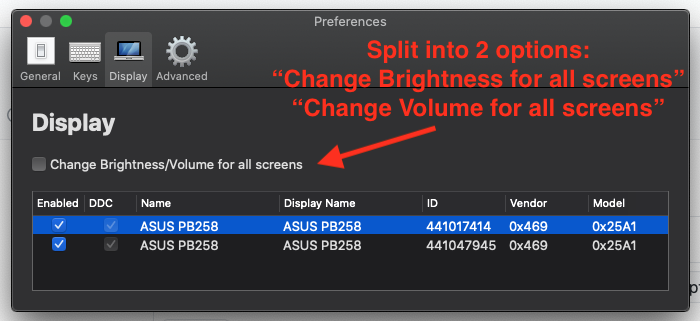
It'll be very helpful to split the "Change Brightness/Volume for all screens" into 2 separate selections:
I have 3 displays, each with their own speakers. If I want to change the volume using my keyboard volume keys, I have to make active the display I want to change the volume for.
For example, if one display is playing a video and another is being used to read a PDF, I have to go the display playing the video then press the volume keys to control the sound. I would like to control the sound output regardless of which screen I'm currently active on.
Describe the solution you'd like
I would like to control the volume for all screens at the same time. I would like to control the Brightness levels individually.
Additional context
@JoniVR commented on GitHub (Dec 27, 2020):
I agree that these could be split up, what we also could do is only change the volume for the active audio output display. Currently we ignore the volume keys if the active output can set its own volume (for example: Airpods, headphones, ...), we could perhaps also only send volume commands to the display that is set as audio output, though some people might not want that.
@waydabber commented on GitHub (Sep 9, 2021):
See screenshots of the implementation in the v3.1.0 preliminary discussion.
@trazaq commented on GitHub (Sep 9, 2021):
THUMBS UP!!!