mirror of
https://github.com/MonitorControl/MonitorControl.git
synced 2026-10-23 08:07:35 -06:00
[GH-ISSUE #267] Same Display is recognized different via Thunderbolt or Displayport #210
Labels
No labels
Status: Abandoned
arm64
beta
beta
bug
done
duplicate
enhancement
feedback needed from reporter
in progress
information
invalid
investigating
known Issue
monitor Issue
pull-request
translation
unable to reproduce
unreleased
x86
No milestone
No project
No assignees
1 participant

Notifications
Due date
No due date set.
Dependencies
No dependencies set
Reference
github-starred/MonitorControl#210
Loading…
Reference in a new issue
No description provided.
Delete branch "%!s()"
Deleting a branch is permanent. Although the deleted branch may continue to exist for a short time before it actually gets removed, it CANNOT be undone in most cases. Continue?
Originally created by @dieoma76 on GitHub (Jul 24, 2020).
Original GitHub issue: https://github.com/MonitorControl/MonitorControl/issues/267
I do connect my LG5k right now via Thunderbolt to my MacMini 2020, MacOS Catalina (10.15.6) MonitorControl is 2.0 b640.
Controlling Brightness and Volume of the Device ONLY works via Displayport, but not when connecting via Thunderbolt - expectation was it will work either way.
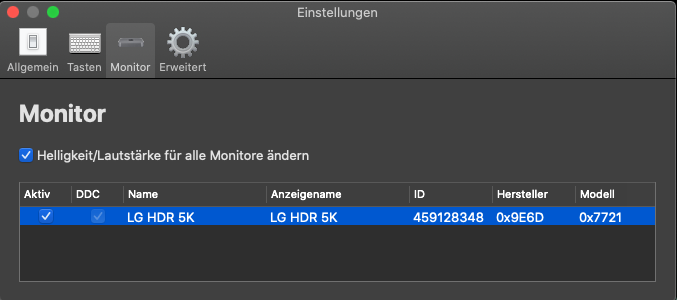
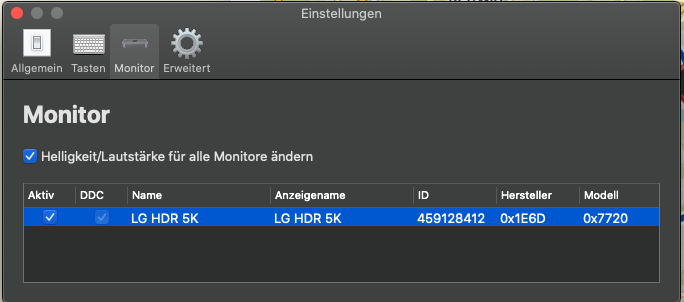
Comparing how Monitor Control detects the Display in Thunderbolt vs Displayport shows it "thinks" its even a different vendor:
Here the Device via Thunderbolt (Volume/Brightness NOT working)
Here the Device via Displayport (Volume/Brightness working fine)
Is there a way to tweak MonitorControl to control the Monitor regardless of the Connection method?
@JoniVR commented on GitHub (Aug 2, 2020):
There is not, it could just be that your thunderbolt cable doesn't properly support DDC. I'd suggest trying a different cable first (if you have one laying around). Maybe try with ddcctl first to isolate if it's a cable or MonitorControl issue.
@dieoma76 commented on GitHub (Aug 2, 2020):
Well, it´s the Thunderbolt Cable that came with the Monitor. I don´t have an other one, but a different Mac: I tested the Monitor with the same cable on a MacBook Pro and here Monitor Control works as expected - i can change Brightness and Volume! But the situation does sound like #265 https://github.com/MonitorControl/MonitorControl/issues/265. The combination of MacMini 2018, Thunderbolt and Monitorcontrol seems to have issues... How can i help to fix it?
@JoniVR commented on GitHub (Aug 14, 2020):
Closing in favour of #265, let's continue tracking there.