mirror of
https://github.com/MonitorControl/MonitorControl.git
synced 2026-10-23 08:07:35 -06:00
[GH-ISSUE #251] Brightness not working on Asus XG35VQ #194
Labels
No labels
Status: Abandoned
arm64
beta
beta
bug
done
duplicate
enhancement
feedback needed from reporter
in progress
information
invalid
investigating
known Issue
monitor Issue
pull-request
translation
unable to reproduce
unreleased
x86
No milestone
No project
No assignees
1 participant

Notifications
Due date
No due date set.
Dependencies
No dependencies set
Reference
github-starred/MonitorControl#194
Loading…
Reference in a new issue
No description provided.
Delete branch "%!s()"
Deleting a branch is permanent. Although the deleted branch may continue to exist for a short time before it actually gets removed, it CANNOT be undone in most cases. Continue?
Originally created by @vikeshhh on GitHub (Jul 9, 2020).
Original GitHub issue: https://github.com/MonitorControl/MonitorControl/issues/251
Checklist
Describe the issue
Installed Monitor Control. Sound Adjustment works fine but Brightness control stopped working. It use to work. Then suddenly stopped. Also when I adjust the brightness via the monitor only, say to 50%, when I use monitor control to increase it drops to 0.
Expected behavior
Pressing Brightness Up and Down will adjust my external Monitor (Asus XG35VQ) Brightness respectively
Screenshots
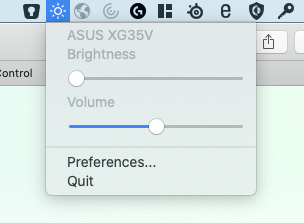
Additional context
Add any other context about the problem here.
Environment Information (please complete the following information):
macOS version: 10.15.5
MonitorControl version: 2.0.0 (Build 640)
Monitor(s): Asus XG35VQ
Mac model: MacBook Pro 13" 2019, Four Thunderbolt 3 Ports
Monitor Cable(s)/Connection(s): Displayport to Elgato Thunderbolt Dock 3
-Asus XG35VQ- <==DisplayPort==>-Elgato Thunderbolt 3 Dock- <==USB 3 thunderbolt cable==> -MacbookPro 13-
@JoniVR commented on GitHub (Jul 9, 2020):
Did it stop working after upgrading MonitorControl or just randomly?
@vikeshhh commented on GitHub (Jul 9, 2020):
I installed v2.0.0 Build 640 and always was on that version. Just stopped working. Volume works great though.
@stale[bot] commented on GitHub (Aug 3, 2021):
Hey there, it looks like there has been no activity on this issue recently. Has the issue been fixed, or does it still require attention? This issue may be closed if no further activity occurs. Thank you for your contributions.