mirror of
https://github.com/MonitorControl/MonitorControl.git
synced 2026-10-23 08:07:35 -06:00
[GH-ISSUE #246] Volume changes only up to 4 boxes #192
Labels
No labels
Status: Abandoned
arm64
beta
beta
bug
done
duplicate
enhancement
feedback needed from reporter
in progress
information
invalid
investigating
known Issue
monitor Issue
pull-request
translation
unable to reproduce
unreleased
x86
No milestone
No project
No assignees
1 participant

Notifications
Due date
No due date set.
Dependencies
No dependencies set
Reference
github-starred/MonitorControl#192
Loading…
Reference in a new issue
No description provided.
Delete branch "%!s()"
Deleting a branch is permanent. Although the deleted branch may continue to exist for a short time before it actually gets removed, it CANNOT be undone in most cases. Continue?
Originally created by @yx1100 on GitHub (Jun 24, 2020).
Original GitHub issue: https://github.com/MonitorControl/MonitorControl/issues/246
Checklist
Describe the issue
(My English is not very good, I hope you can understand what I'm saying.)
My monitor is BenQ EW2780U, the volume control of the monitor itself is form 0 to 50.
After I start the MonitorControl, When I use my magic keyboard to control the volume of the system, the volume can only up from 0 to 4 boxes(=12 of the volume of the monitor itself), like the screenshoot below, and then the up key doesn't work anymore ,but the down key can reduce to 0 in any time.
The volume control in menu bar is always normal.
The volume control of monitor itself is always normal.
And the control of brightness is normal.
Expected behavior
I want the control of the volume can change from 0 to the highest.
Screenshots
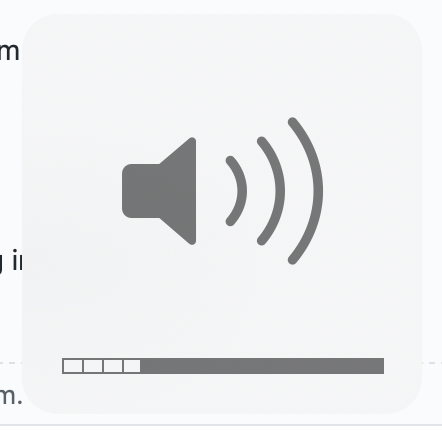
Environment Information (please complete the following information):
@JoniVR commented on GitHub (Jul 9, 2020):
Probably related to #201, closing as duplicate 🙂