mirror of
https://github.com/MonitorControl/MonitorControl.git
synced 2026-10-23 08:07:35 -06:00
[GH-ISSUE #16] Activate / Deactivate any monitor #18
Labels
No labels
Status: Abandoned
arm64
beta
beta
bug
done
duplicate
enhancement
feedback needed from reporter
in progress
information
invalid
investigating
known Issue
monitor Issue
pull-request
translation
unable to reproduce
unreleased
x86
No milestone
No project
No assignees
1 participant

Notifications
Due date
No due date set.
Dependencies
No dependencies set
Reference
github-starred/MonitorControl#18
Loading…
Reference in a new issue
No description provided.
Delete branch "%!s()"
Deleting a branch is permanent. Although the deleted branch may continue to exist for a short time before it actually gets removed, it CANNOT be undone in most cases. Continue?
Originally created by @funbben on GitHub (Feb 19, 2018).
Original GitHub issue: https://github.com/MonitorControl/MonitorControl/issues/16
Originally assigned to: @the0neyouseek on GitHub.
Feature request : be able to Activate / Deactivate any monitor
Here is the the use case :
When my external monitor is plugged, I deactivate my mac internal monitor, using shortcut
(I use SwitchResX to do that)
Also one thing to be careful about with SwitchResX, I sometimes fall in a situation where not display I working. For instance, when unplugging an external display, or when the computer go out of sleep.
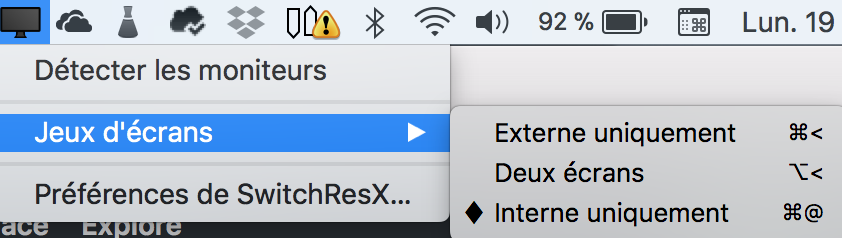
The nice thing with SwitchResX, is that you can define any display scenario and assigne a shortcut for it.
Here is my setting :
@the0neyouseek commented on GitHub (Feb 19, 2018):
Hi @funbben,
By default the app ignore any built-in screen (as it can be controlled normally) but I'm not sure what you mean by "deactivate" ?
If you want to disable the screen, as in, it not showing in the menu and not responding to shortcut keys, you can already do that by unchecking the box next to it's name in the Preference window.
Do you want this settings to be accessible in the menu directly or something else entirely ?
Sent with GitHawk
@funbben commented on GitHub (Feb 19, 2018):
By default MacOs will not let you turn-off built in monitor. This is my reason to use SwitchResX.
So I created a shortcut ⌘ + < to turn-of / Deactivate the internal display, and activate my external one
I created another shortcut to activate both display
I created a final one to activate only internal display.
Is it more clear ?
Si tu veux on peut échanger en français, ici ou ailleurs
@the0neyouseek commented on GitHub (Feb 19, 2018):
J'ai bien compris l'utilité de SwitchResX mais du coup j'ai du mal à voir l'intérêt avec MonitorControl...
Ton but final c'est que l'app puisse faire quoi exactement ? La même chose que SwitchResX ? Avoir des raccourcis pour des scénarios d'écrans à allumer/éteindre ?
Qu'est-ce qui ne fonctionne pas pour toi dans les fonctions actuelles 🙂 ?
Sent with GitHawk
@funbben commented on GitHub (Feb 22, 2018):
For english readers : I would like to only use MonitorControl and get rid of SwitchResX
Ce que j'aimerai c'est pouvoir me passer de SwitchResX qui à la base est une application pour gérer des résolutions. Je trouve que la vocation de MonitorControl répond mieux au Use Case "activer / désactiver des écrans"
A titre d'illustration voici mon installation :

@stale[bot] commented on GitHub (Aug 3, 2021):
Hey there, it looks like there has been no activity on this issue recently. Has the issue been fixed, or does it still require attention? This issue may be closed if no further activity occurs. Thank you for your contributions.