[GH-ISSUE #224] LG 34WK95U-W Compatibility #173

Closed
opened 2026-05-05 05:19:45 -06:00 by gitea-mirror · 13 comments
Owner

Originally created by @micstev2 on GitHub (May 18, 2020).
Original GitHub issue: https://github.com/MonitorControl/MonitorControl/issues/224

Originally assigned to: @waydabber on GitHub.

Hi - are there any known issues with using a MacBook Pro 13 and Intel Iris Pro integrated graphics card?

This works perfectly fine with my 16 inch MacBook Pro and my LG 34WK95U-W. But when connecting to my 2019 MacBook Pro 13 inch - Monitor Control doesn't work. The LG shows up in the app but none of the sliders controls do anything for the monitor.

Originally created by @micstev2 on GitHub (May 18, 2020). Original GitHub issue: https://github.com/MonitorControl/MonitorControl/issues/224 Originally assigned to: @waydabber on GitHub. Hi - are there any known issues with using a MacBook Pro 13 and Intel Iris Pro integrated graphics card? This works perfectly fine with my 16 inch MacBook Pro and my LG 34WK95U-W. But when connecting to my 2019 MacBook Pro 13 inch - Monitor Control doesn't work. The LG shows up in the app but none of the sliders controls do anything for the monitor.
gitea-mirror 2026-05-05 05:19:45 -06:00
Author
Owner

@JoniVR commented on GitHub (May 19, 2020):

Hi, we have a Monitor Troubleshooting wiki for this:
https://github.com/the0neyouseek/MonitorControl/wiki/Monitor-Troubleshooting

This might be a good place to look first 🙂

<!-- gh-comment-id:630773509 --> @JoniVR commented on GitHub (May 19, 2020): Hi, we have a Monitor Troubleshooting wiki for this: https://github.com/the0neyouseek/MonitorControl/wiki/Monitor-Troubleshooting This might be a good place to look first 🙂
Author
Owner

@micstev2 commented on GitHub (May 19, 2020):

Checked all that out. But it doesn’t answer the question/concerns listed.

On May 19, 2020, at 8:02 AM, Joni Van Roost notifications@github.com wrote:


Hi, we have a Monitor Troubleshooting wiki for this:
https://github.com/the0neyouseek/MonitorControl/wiki/Monitor-Troubleshooting

This might be a good place to look first 🙂


You are receiving this because you authored the thread.
Reply to this email directly, view it on GitHub, or unsubscribe.

<!-- gh-comment-id:630840840 --> @micstev2 commented on GitHub (May 19, 2020): Checked all that out. But it doesn’t answer the question/concerns listed. > On May 19, 2020, at 8:02 AM, Joni Van Roost <notifications@github.com> wrote: > >  > Hi, we have a Monitor Troubleshooting wiki for this: > https://github.com/the0neyouseek/MonitorControl/wiki/Monitor-Troubleshooting > > This might be a good place to look first 🙂 > > — > You are receiving this because you authored the thread. > Reply to this email directly, view it on GitHub, or unsubscribe.
Author
Owner

@bryanlee81 commented on GitHub (May 20, 2020):

Have the same monitor and Macbook Pro 13. Having the same issue.

If I use the displayport cable, then it works but when using TB3, it no longer works.

<!-- gh-comment-id:631666305 --> @bryanlee81 commented on GitHub (May 20, 2020): Have the same monitor and Macbook Pro 13. Having the same issue. If I use the displayport cable, then it works but when using TB3, it no longer works.
Author
Owner

@JoniVR commented on GitHub (May 31, 2020):

Like it says in the wiki, it all depends on the combination of gpu, display and cable, the 16 inch probably uses the dgpu while the 13 inch uses igpu.

<!-- gh-comment-id:636469101 --> @JoniVR commented on GitHub (May 31, 2020): Like it says in the wiki, it all depends on the combination of gpu, display and cable, the 16 inch probably uses the dgpu while the 13 inch uses igpu.
Author
Owner

@micstev2 commented on GitHub (May 31, 2020):

I get it. But the responses here are pretty comical. All I asked if anyone else if having issues. It seems it works on most 13 MacBooks. I would highly doubt that a 2020 13 MacBook isn’t enough to run this tool.

On May 31, 2020, at 9:06 AM, Joni Van Roost notifications@github.com wrote:


Like it says in the wiki, it all depends on the combination of gpu, display and cable, the 16 inch probably uses the dgpu while the 13 inch uses igpu.


You are receiving this because you authored the thread.
Reply to this email directly, view it on GitHub, or unsubscribe.

<!-- gh-comment-id:636488623 --> @micstev2 commented on GitHub (May 31, 2020): I get it. But the responses here are pretty comical. All I asked if anyone else if having issues. It seems it works on most 13 MacBooks. I would highly doubt that a 2020 13 MacBook isn’t enough to run this tool. > On May 31, 2020, at 9:06 AM, Joni Van Roost <notifications@github.com> wrote: > >  > Like it says in the wiki, it all depends on the combination of gpu, display and cable, the 16 inch probably uses the dgpu while the 13 inch uses igpu. > > — > You are receiving this because you authored the thread. > Reply to this email directly, view it on GitHub, or unsubscribe.
Author
Owner

@sanguino commented on GitHub (May 1, 2021):

I bought this monitor today, and at first I also have the same issues, and others related to resolution and color schemes in osx.

After updating the firmware, and configuring it to use display port 1.4 (from the OSD menu), it works as expected. Keep in mind that if the brightness is in automatic it does not allow to control it, so I deactivate automatic brightness too.

Now I'm looking for how to control it from the touch bar, because if I use the lg as output, the volume control is deactivated, and the brightness only controls the macbook monitor.

I hope it helps.

<!-- gh-comment-id:830701875 --> @sanguino commented on GitHub (May 1, 2021): I bought this monitor today, and at first I also have the same issues, and others related to resolution and color schemes in osx. After updating the firmware, and configuring it to use display port 1.4 (from the OSD menu), it works as expected. Keep in mind that if the brightness is in automatic it does not allow to control it, so I deactivate automatic brightness too. Now I'm looking for how to control it from the touch bar, because if I use the lg as output, the volume control is deactivated, and the brightness only controls the macbook monitor. I hope it helps.
Author
Owner

@Max-Resilient commented on GitHub (May 2, 2021):

I bought this monitor today, and at first I also have the same issues, and others related to resolution and color schemes in osx.

After updating the firmware, and configuring it to use display port 1.4 (from the OSD menu), it works as expected. Keep in mind that if the brightness is in automatic it does not allow to control it, so I deactivate automatic brightness too.

Now I'm looking for how to control it from the touch bar, because if I use the lg as output, the volume control is deactivated, and the brightness only controls the macbook monitor.

I hope it helps.

Could you point us at the Firmware upgrade? I looked on LGs website, there is no Firmware for this screen. https://www.lg.com/us/support/software-firmware-drivers?customerModelCode=34WK95U-W&csSalesCode=34WK95U-W.AUS&category=CT10000030&subcategory=CT30014440https://www.lg.com/us/support/software-firmware-drivers?

Update: I found the option to update within LG's OnScreen Control app. It said that my screen is up to date.
All other Mac users mention that it is not possible to use Display Port set to 1.4, they must use 1.2. On 1.4 the image is skewed and the HDR is washing out the colors. Are you using a Mac or PC. If a Mac could you please let us know Model and year? Maybe it's an Apple driver issue. I found this thread on Apple's website, they mention that updates have to be made with Windows machines, https://discussions.apple.com/thread/252184090

<!-- gh-comment-id:830821541 --> @Max-Resilient commented on GitHub (May 2, 2021): > I bought this monitor today, and at first I also have the same issues, and others related to resolution and color schemes in osx. > > After updating the firmware, and configuring it to use display port 1.4 (from the OSD menu), it works as expected. Keep in mind that if the brightness is in automatic it does not allow to control it, so I deactivate automatic brightness too. > > Now I'm looking for how to control it from the touch bar, because if I use the lg as output, the volume control is deactivated, and the brightness only controls the macbook monitor. > > I hope it helps. Could you point us at the Firmware upgrade? I looked on LGs website, there is no Firmware for this screen. https://www.lg.com/us/support/software-firmware-drivers?customerModelCode=34WK95U-W&csSalesCode=34WK95U-W.AUS&category=CT10000030&subcategory=CT30014440https://www.lg.com/us/support/software-firmware-drivers? Update: I found the option to update within LG's OnScreen Control app. It said that my screen is up to date. All other Mac users mention that it is not possible to use Display Port set to 1.4, they must use 1.2. On 1.4 the image is skewed and the HDR is washing out the colors. Are you using a Mac or PC. If a Mac could you please let us know Model and year? Maybe it's an Apple driver issue. I found this thread on Apple's website, they mention that updates have to be made with Windows machines, https://discussions.apple.com/thread/252184090
Author
Owner

@sanguino commented on GitHub (May 15, 2021):

I'm using mac, catalina. The first time I open OnScreen, it ask me to upgrade the firmware. After this upgrade I can use DP 1.4, with full support. Last week I returned it because is too big for my desk, sorry I can't send you any data :(

image
Before upgrading it, the display preferences shows a resolution controller, not this scale selector.

image
This is the OnScreen version, hope it can help you.

<!-- gh-comment-id:841701627 --> @sanguino commented on GitHub (May 15, 2021): I'm using mac, catalina. The first time I open OnScreen, it ask me to upgrade the firmware. After this upgrade I can use DP 1.4, with full support. Last week I returned it because is too big for my desk, sorry I can't send you any data :( ![image](https://user-images.githubusercontent.com/2077168/118373559-df019e80-b5b7-11eb-9932-53608e4ab5ed.png) Before upgrading it, the display preferences shows a resolution controller, not this scale selector. ![image](https://user-images.githubusercontent.com/2077168/118373511-95b14f00-b5b7-11eb-9a5e-b8aa50bd42fc.png) This is the OnScreen version, hope it can help you.
Author
Owner

@Kane610 commented on GitHub (May 15, 2021):

In my case updating the firmware broke 1.4, now I can only use 1.2 if I want 5k resolution :(

<!-- gh-comment-id:841715164 --> @Kane610 commented on GitHub (May 15, 2021): In my case updating the firmware broke 1.4, now I can only use 1.2 if I want 5k resolution :(
Author
Owner

@Max-Resilient commented on GitHub (May 16, 2021):

In my case updating the firmware broke 1.4, now I can only use 1.2 if I want 5k resolution :(

Same here and LG support can't help. They argued with me for 30 minutes that there has never been a firmware update for this screen. There has been updates btw. They just don't have them as downloadable files on the website.

<!-- gh-comment-id:841790276 --> @Max-Resilient commented on GitHub (May 16, 2021): > In my case updating the firmware broke 1.4, now I can only use 1.2 if I want 5k resolution :( Same here and LG support can't help. They argued with me for 30 minutes that there has never been a firmware update for this screen. There has been updates btw. They just don't have them as downloadable files on the website.
Author
Owner

@sanguino commented on GitHub (May 16, 2021):

I’m so sorry to hear that. Maybe the os version make the difference? In my case I’m in Catalina.

<!-- gh-comment-id:841887483 --> @sanguino commented on GitHub (May 16, 2021): I’m so sorry to hear that. Maybe the os version make the difference? In my case I’m in Catalina.
Author
Owner

@Max-Resilient commented on GitHub (May 17, 2021):

I'm using mac, catalina. The first time I open OnScreen, it ask me to upgrade the firmware. After this upgrade I can use DP 1.4, with full support. Last week I returned it because is too big for my desk, sorry I can't send you any data :(

image
Before upgrading it, the display preferences shows a resolution controller, not this scale selector.

image
This is the OnScreen version, hope it can help you.

Btw. what Mac are you using. I read that it depends on the GPU too if you can use DisplayPort 1.4 or 1.2. I have the 2017 13" Macbook Pro (soon to be replaced with the upcoming 14", since the iGPU is too slow to drive this screen anyway.
If you have a dedicated GPU (15" & 16" MBPs) then it will work with DisplayPort 1.4, else only with 1.2. I have not had a test this theory, I read it somewhere else, but the writer also didn't have both Macs to test it it.

What's also strange is that you have more resolution options to choose from:
Screen Shot 2021-05-17 at 10 07 43

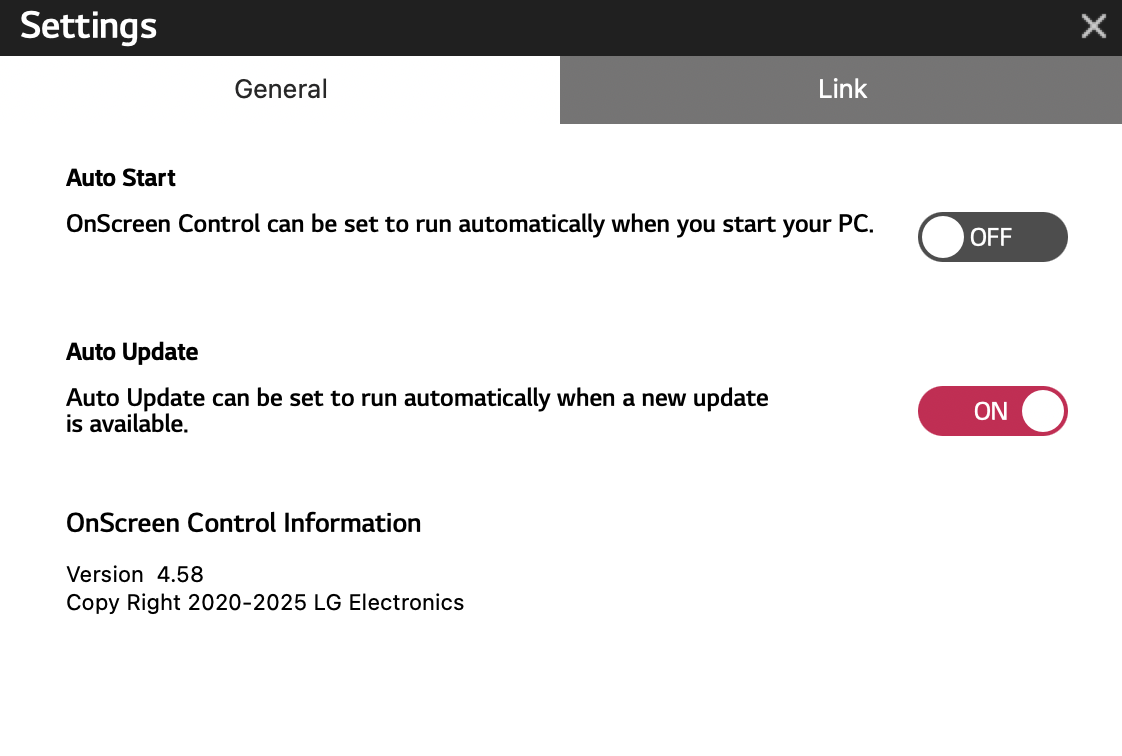
I use the same OnScreenControl version: 4.58, on MacOS Big Sur
Screen Shot 2021-05-17 at 10 09 59

<!-- gh-comment-id:842114865 --> @Max-Resilient commented on GitHub (May 17, 2021): > I'm using mac, catalina. The first time I open OnScreen, it ask me to upgrade the firmware. After this upgrade I can use DP 1.4, with full support. Last week I returned it because is too big for my desk, sorry I can't send you any data :( > > ![image](https://user-images.githubusercontent.com/2077168/118373559-df019e80-b5b7-11eb-9932-53608e4ab5ed.png) > Before upgrading it, the display preferences shows a resolution controller, not this scale selector. > > ![image](https://user-images.githubusercontent.com/2077168/118373511-95b14f00-b5b7-11eb-9a5e-b8aa50bd42fc.png) > This is the OnScreen version, hope it can help you. Btw. what Mac are you using. I read that it depends on the GPU too if you can use DisplayPort 1.4 or 1.2. I have the 2017 13" Macbook Pro (soon to be replaced with the upcoming 14", since the iGPU is too slow to drive this screen anyway. If you have a dedicated GPU (15" & 16" MBPs) then it will work with DisplayPort 1.4, else only with 1.2. I have not had a test this theory, I read it somewhere else, but the writer also didn't have both Macs to test it it. What's also strange is that you have more resolution options to choose from: <img width="658" alt="Screen Shot 2021-05-17 at 10 07 43" src="https://user-images.githubusercontent.com/64356730/118453776-e62fc600-b6f7-11eb-8259-f87c79eff51b.png"> I use the same OnScreenControl version: 4.58, on MacOS Big Sur <img width="561" alt="Screen Shot 2021-05-17 at 10 09 59" src="https://user-images.githubusercontent.com/64356730/118453998-268f4400-b6f8-11eb-82a4-17546ab5739f.png">
Author
Owner

@waydabber commented on GitHub (Aug 21, 2021):

Since this appears to be a display issue and there is nothing to solve on MonitorControl's end, I'll close this issue. Feel free to open a new Issue if there is any new development or request! Thank you!

<!-- gh-comment-id:903140036 --> @waydabber commented on GitHub (Aug 21, 2021): Since this appears to be a display issue and there is nothing to solve on MonitorControl's end, I'll close this issue. Feel free to open a new Issue if there is any new development or request! Thank you!
Sign in to join this conversation.
No milestone
No project
No assignees
1 participant
Notifications
Due date
The due date is invalid or out of range. Please use the format "yyyy-mm-dd".

No due date set.

Dependencies

No dependencies set.

Reference: github-starred/MonitorControl#173
No description provided.