mirror of
https://github.com/MonitorControl/MonitorControl.git
synced 2026-10-23 08:07:35 -06:00
[GH-ISSUE #208] Dell U2720Q - Brightness doesn't work when Color Space is set to DCI-P3 #157
Labels
No labels
Status: Abandoned
arm64
beta
beta
bug
done
duplicate
enhancement
feedback needed from reporter
in progress
information
invalid
investigating
known Issue
monitor Issue
pull-request
translation
unable to reproduce
unreleased
x86
No milestone
No project
No assignees
1 participant

Notifications
Due date
No due date set.
Dependencies
No dependencies set
Reference
github-starred/MonitorControl#157
Loading…
Reference in a new issue
No description provided.
Delete branch "%!s()"
Deleting a branch is permanent. Although the deleted branch may continue to exist for a short time before it actually gets removed, it CANNOT be undone in most cases. Continue?
Originally created by @aklekotka on GitHub (Apr 22, 2020).
Original GitHub issue: https://github.com/MonitorControl/MonitorControl/issues/208
Hey,
I have a Dell U2720Q, the brightness control works fine when the monitor color space is set to sRGB. When I change the settings to the wider color gamut - DCI-P3 - I can't control the brightness from my keyboard.
Any ideas?
Thanks!
@yixinh commented on GitHub (Apr 25, 2020):
same problem
@larouxn commented on GitHub (May 13, 2020):
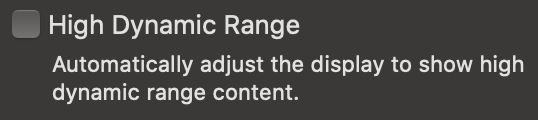
Potentially related, same monitor, can't change brightness with "High Dynamic Range" checked.
@ypresto commented on GitHub (Jun 11, 2020):
A twitter user in Japan says it does work with P3 or HDR (U2720QM). I finally bought this monitor 😉 so I'll test it after shipped.
@ypresto commented on GitHub (Jun 13, 2020):
I tested some configuration with my new monitor, and found Display P3 is working.
@aklekotka and @yixinh perhaps set color preset to Display P3 in OSD. U2720QM blocks brightness change when
Colors -> Preset Modes -> Color Space -> Display P3is set in OSD (setting sRGB is also the same). It seems it is by design:Fortunately, Display P3 gamut is working fine with other Preset Modes (Standard, Movie, or Custom Color etc.).
You also does not need to change Display profile in macOS (Use "DELL U2720QM" (or U2720Q)).UPDATE: Just you should change Display profile in macOS.You can test it with here:
https://webkit.org/blog-files/color-gamut/
Webkit logo should be shown in red background if your monitor supports P3.
I'm not color management specialist so I have no idea why that "Color Space" Preset Mode is for (maybe to test how a photo looks in sRGB color space?), but it just working without it.
@ypresto commented on GitHub (Jun 13, 2020):
Also NOTE: when settingDisplay -> Smart HDRin OSD to other thanOff, this monitor uses sRGB gamut. Unfortunately HDR and P3 gamut is mutually exclusive because Smart HDR is required for "High Dynamic Range" toggle to be shown in macOS's display preferences.macOS version: 10.15.5(19F101)UPDATE: This was totally wrong 😂.
@aklekotka commented on GitHub (Jun 13, 2020):
@ypresto thanks for your input. Yes, I meant setting both - the
Display P3Display profile in macOS ANDColor -> Preset Modes -> Color Space -> DCI-P3in OSD, because I thought that's the correct combination used for the color calibration in the factory.When you set the
Color SpacetosRGBthe reds are washed out (for example compare the red used in the Chrome logo)I haven't noticed the sentence about the default brightness set to 48cd/m2 in the manual. Thanks for pasting it here. Probably that's the reason why MonitorControl doesn't work, unfortunately.
While I agree with your first sentence here - I can see the webkit logo, when I set the macOS profile to
Display P3. But I don't think I follow your last sentence. You're saying that I don't need to theDisplay P3macOS profile, but the default "DELL U2720Q" doesn't support DCI-P3 in my case (the webkit logo is not visible).I have the HDR feature disabled.
@ypresto commented on GitHub (Jun 14, 2020):
@aklekotka You're right, I looked again and certainly macOS display profile should be set to
Display P3.(Maybe U2720 profile was not applied on click but why 😂)
@ypresto commented on GitHub (Jun 14, 2020):
Also tested HDR again, and P3 is working with
Smart HDR -> DisplayHDRin OSD. Maybe you should restart Preferences.app if P3 profile is not applied on click.@ypresto commented on GitHub (Jun 14, 2020):
Conclusion:
MonitorControl is
Smart HDRin OSD is selectedPreset Modes -> Color Spaceis selected (by monitor design)High Dynamic Rangecheck in macOS (only shown withSmart HDRenabled in OSD) is enabled (bug or OS design?)(P3 gamut is working regardless of HDR is enabled or not.)
@elitvynov commented on GitHub (Jun 14, 2020):
Hey guys. I bought Dell U2720 and as I see, brightness is working for me, but sound volume is not. Could you please check if you connect Speakers / Headphones to the Audio Out of monitor, do you able to control it volume with MonitorControl?
I connect MacBook Pro 2016 with USB-C (Display Port 2.0).
Thank you
P.S.: I also tried ddcctl but with no luck - brightness is working but sound volume is not
@aklekotka commented on GitHub (Jun 14, 2020):
Closing this issue, as I agree with @ypresto's summary above and there's probably not much that can be done regarding
DCI-P3.Also, please keep in mind that
DCI-P3andDisplay P3are two different color spaces - https://en.wikipedia.org/wiki/DCI-P3#Display_P3. Apple usesDisplay P3by default for their screens.If you want to achieve similar colors to your MBP's bulit-in P3 display, set your monitor to
Color -> Preset Modes -> Standardand your macOS display profile toDisplay P3(explanation:https://www.reddit.com/r/Monitors/comments/f4avo3/dell_u2720q_review/foi0cpl/?context=10000). MonitorControl works fine with these settings.
Thanks everyone :)
--
@elitvynov

Yes, the volume control also works fine via usb-c with MBP 15" 2019 and via micro displayport with MBP 13" 2015. If you have a touch bar in your MBP, the volume control buttons will be greyed-out, but they will still work if you tap them.UPDATE: I was wrong - the volume control OSD shows up correctly (screen below), but in fact the headphones volume doesn't change.