[GH-ISSUE #180] Volume icons in TouchBar grayed out even though they are interactable #135

Closed
opened 2026-05-05 05:14:08 -06:00 by gitea-mirror · 8 comments
Owner

Originally created by @Vxider on GitHub (Feb 25, 2020).
Original GitHub issue: https://github.com/MonitorControl/MonitorControl/issues/180

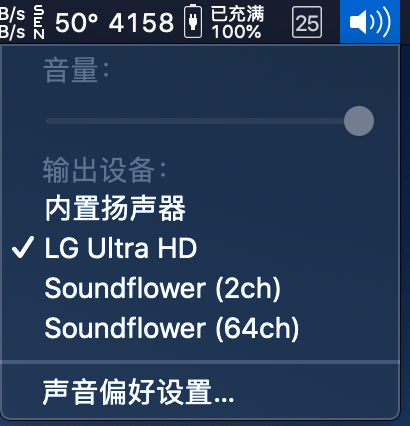
When I set the audio output to monitor, the sound icon in touchbar grayed out. So I have never realized that MonitorControl can control the monitor volume until I accidentally clicked the gray volume button. It would be better if the color of the volume button can be changed.
截屏2020-02-2511 41 57
触控栏快照2020-02-2511 39 01

Originally created by @Vxider on GitHub (Feb 25, 2020). Original GitHub issue: https://github.com/MonitorControl/MonitorControl/issues/180 When I set the audio output to monitor, the sound icon in touchbar grayed out. So I have never realized that MonitorControl can control the monitor volume until I accidentally clicked the gray volume button. It would be better if the color of the volume button can be changed. <img width="205" alt="截屏2020-02-2511 41 57" src="https://user-images.githubusercontent.com/6134315/75213024-d743b780-57c3-11ea-90bf-5c1a3e5c8e20.png"> <img width="1085" alt="触控栏快照2020-02-2511 39 01" src="https://user-images.githubusercontent.com/6134315/75213027-d9a61180-57c3-11ea-8093-67f3ac497914.png">
Author
Owner

@JoniVR commented on GitHub (Feb 25, 2020):

I didn't even know that it still worked when you pressed it.. not sure if we can do much to control that. Worth a try though

<!-- gh-comment-id:591044647 --> @JoniVR commented on GitHub (Feb 25, 2020): I didn't even know that it still worked when you pressed it.. not sure if we can do much to control that. Worth a try though
Author
Owner

@kumowoon1025 commented on GitHub (Mar 20, 2020):

This is not the case for me, you mean you can control the volume with the macOS native volume slider even though it's greyed out? Which model do you have? Which OS?
Nonfunctional slider for both USB-C and DisplayPort (eGPU) connections.

<!-- gh-comment-id:601594576 --> @kumowoon1025 commented on GitHub (Mar 20, 2020): This is not the case for me, you mean you can control the volume with the macOS native volume slider even though it's greyed out? Which model do you have? Which OS? ![Nonfunctional slider for both USB-C and DisplayPort (eGPU) connections.](https://media.kumowoon1025.com/images/lg-volume-unavailable.png)
Author
Owner

@Vxider commented on GitHub (Mar 20, 2020):

I means even the volumn adjust buttons on touch bar is gray, it still works.

<!-- gh-comment-id:601611350 --> @Vxider commented on GitHub (Mar 20, 2020): I means even the volumn adjust buttons on **touch bar** is gray, it still works.
Author
Owner

@kumowoon1025 commented on GitHub (Mar 20, 2020):

Ah, sorry I misunderstood. That is strange indeed. To expand on that:

  • Compact Control Strip
    Volume controls are greyed out, but mute still works. Neither slider is functional, despite brightness slider not being grey.
    • As @Vxider said, the volume adjust buttons are greyed out when control strip is in its compact form, but the mute button still works.
    • The volume slider won't respond. Same goes for the brightness slider, even though that isn't greyed out.
  • Expanded Control Strip
    Looks like everything is functional, but only the buttons work, not the sliders
    • Nothing is greyed out
    • All the incremental adjustment buttons work. (Tap for volume up down/Tap for brightness up down)
    • The volume slider pops open, and it kinda seems like its working, but in fact does nothing except for playing the volume adjustment feedback bop if you have it enabled.
      Doesn't affect volume level setting at all. Makes the bop sound when you adjust it if sound isn't muted though. Super confusing.
    • The brightness slider doesn't work here either.

IMHO this isn't really a bug in the app, and it's hard to say it's a bug in (mac|bridge)OS either. With that being said, the main enhancement in the Catalina beta is making up your own ports for XPC to/from/between extensions, so maybe it will become fixable in the future?

<!-- gh-comment-id:601658907 --> @kumowoon1025 commented on GitHub (Mar 20, 2020): Ah, sorry I misunderstood. That is strange indeed. To expand on that: - Compact Control Strip ![Volume controls are greyed out, but mute still works. Neither slider is functional, despite brightness slider not being grey.](https://media.kumowoon1025.com/images/touchbar2-controlstrip-compact.png) - As @Vxider said, the volume adjust buttons are greyed out when control strip is in its compact form, but the mute button still works. - The volume slider won't respond. Same goes for the brightness slider, even though *that* isn't greyed out. - Expanded Control Strip ![Looks like everything is functional, but only the buttons work, not the sliders](https://media.kumowoon1025.com/images/touchbar2-expanded-fn.png) - Nothing is greyed out - All the incremental adjustment buttons work. (Tap for volume up down/Tap for brightness up down) - The volume slider pops open, and it *kinda* seems like its working, but in fact does nothing except for playing the volume adjustment feedback bop if you have it enabled. ![Doesn't affect volume level setting at all. Makes the bop sound when you adjust it if sound isn't muted though. Super confusing.](https://media.kumowoon1025.com/images/touchbar2-expanded-slider.png) - The brightness slider doesn't work here either. IMHO this isn't really a bug in the app, and it's hard to say it's a bug in (mac|bridge)OS either. With that being said, the main enhancement in the Catalina beta is making up your own ports for XPC to/from/between extensions, so maybe it will become fixable in the future?
Author
Owner

@Vxider commented on GitHub (Mar 20, 2020):

@kumowoon1025 Sorry for misunderstood, I'm not native english speaker😂. Have you set the default output to monitor? On my computer, if I set the output device to external monitor(LG Ultra HD), the volume buttons (up, down and mute) are greyed whether control strip is compact. But it works if the external monitor is focused.

I think it's not a bug for the app. macOS cannot control the monitor volume, so the icons are greyed out. It's more like a feature request.

Whether the icon is grayed out does not affect the use of the volume button, but many people may ignore this feature. I only discovered it by accident after using this app for several months.

<!-- gh-comment-id:601751042 --> @Vxider commented on GitHub (Mar 20, 2020): @kumowoon1025 Sorry for misunderstood, I'm not native english speaker😂. Have you set the default output to monitor? On my computer, if I set the output device to external monitor(LG Ultra HD), the volume buttons (up, down and mute) are greyed whether control strip is compact. But it works if the external monitor is focused. I think it's not a bug for the app. macOS cannot control the monitor volume, so the icons are greyed out. It's more like a feature request. Whether the icon is grayed out does not affect the use of the volume button, but many people may ignore this feature. I only discovered it by accident after using this app for several months.
Author
Owner

@JoniVR commented on GitHub (Aug 14, 2020):

Closing in favour of #274

<!-- gh-comment-id:674304764 --> @JoniVR commented on GitHub (Aug 14, 2020): Closing in favour of #274
Author
Owner

@yernii commented on GitHub (Aug 20, 2020):

Same issue! did you solve it?

<!-- gh-comment-id:676986998 --> @yernii commented on GitHub (Aug 20, 2020): Same issue! did you solve it?
Author
Owner

@cerireyhan commented on GitHub (Nov 20, 2021):

This issue still exists on LG 34WN780 monitor with latest version.

<!-- gh-comment-id:974659830 --> @cerireyhan commented on GitHub (Nov 20, 2021): This issue still exists on LG 34WN780 monitor with latest version.
Sign in to join this conversation.
No milestone
No project
No assignees
1 participant
Notifications
Due date
The due date is invalid or out of range. Please use the format "yyyy-mm-dd".

No due date set.

Dependencies

No dependencies set.

Reference: github-starred/MonitorControl#135
No description provided.